XML

When you send XML data via HTTP, it makes sense to use JSP to handle incoming and outgoing XML documents for example RSS documents. As an XML document is merely a bunch of text, creating one through a JSP is no more difficult than creating an HTML document.

Sending XML from a JSP:

You can send XML content using JSPs the same way you send HTML. The only difference is that you must set the content type of your page to text/xml. To set the content type, use the <%@page%> tag, like this:

<%@ page contentType="text/xml" %>

Following is a simple example to send XML content to the browser:

<%@ page contentType="text/xml" %>

<books>
   <book>
      <name>Padam History</name>
      <author>ZARA</author>
      <price>100</price>
   </book>
</books>

Try to access above XML using different browsers to see the document tree presentation of the above XML.

Processing XML in JSP:

Before you proceed with XML processing using JSP, you would need to copy following two XML and XPath related libraries into your <Tomcat Installation Directory>\lib:

Let us put following content in books.xml file:

<books>
<book>
  <name>Padam History</name>
  <author>ZARA</author>
  <price>100</price>
</book>
<book>
  <name>Great Mistry</name>
  <author>NUHA</author>
  <price>2000</price>
</book>
</books>

Now try the following main.jsp, keeping in the same directory:

<%@ taglib prefix="c" uri="http://java.sun.com/jsp/jstl/core" %>
<%@ taglib prefix="x" uri="http://java.sun.com/jsp/jstl/xml" %>
 
<html>
<head>
  <title>JSTL x:parse Tags</title>
</head>
<body>
<h3>Books Info:</h3>
<c:import var="bookInfo" url="http://localhost:8080/books.xml"/>
 
<x:parse xml="${bookInfo}" var="output"/>
<b>The title of the first book is</b>: 
<x:out select="$output/books/book[1]/name" />
<br>
<b>The price of the second book</b>: 
<x:out select="$output/books/book[2]/price" />
 
</body>
</html>

Now try to access above JSP using http://localhost:8080/main.jsp, this would produce following result:

Books Info:

The title of the first book is:Padam History

The price of the second book: 2000

Formatting XML with JSP:

Consider the following XSLT stylesheet style.xsl:

<?xml version="1.0"?>
<xsl:stylesheet xmlns:xsl=
"http://www.w3.org/1999/XSL/Transform" version="1.0">
 
<xsl:output method="html" indent="yes"/>
 
<xsl:template match="/">
  <html>
  <body>
   <xsl:apply-templates/>
  </body>
  </html>
</xsl:template>
 
<xsl:template match="books">
  <table border="1" width="100%">
    <xsl:for-each select="book">
      <tr>
        <td>
          <i><xsl:value-of select="name"/></i>
        </td>
        <td>
          <xsl:value-of select="author"/>
        </td>
        <td>
          <xsl:value-of select="price"/>
        </td>
      </tr>
    </xsl:for-each>
  </table>
</xsl:template>
</xsl:stylesheet>

Now consider the following JSP file:

<%@ taglib prefix="c" uri="http://java.sun.com/jsp/jstl/core" %>
<%@ taglib prefix="x" uri="http://java.sun.com/jsp/jstl/xml" %>
 
<html>
<head>
  <title>JSTL x:transform Tags</title>
</head>
<body>
<h3>Books Info:</h3>
<c:set var="xmltext">
  <books>
    <book>
      <name>Padam History</name>
      <author>ZARA</author>
      <price>100</price>
    </book>
    <book>
      <name>Great Mistry</name>
      <author>NUHA</author>
      <price>2000</price>
    </book>
  </books>
</c:set>
 
<c:import url="http://localhost:8080/style.xsl" var="xslt"/>
<x:transform xml="${xmltext}" xslt="${xslt}"/>
 
</body>
</html>

This would produce following result:

Books Info:

Padam History ZARA 100
Great Mistry NUHA 2000

For more detail on XML processing using JSTL, you can check JSP Standard Tag Library

SESSION TRACKING

HTTP is a “stateless” protocol which means each time a client retrieves a Web page, the client opens a separate connection to the Web server and the server automatically does not keep any record of previous client request.

Still there are following three ways to maintain session between web client and web server:

Cookies:

A webserver can assign a unique session ID as a cookie to each web client and for subsequent requests from the client they can be recognized using the received cookie.

This may not be an effective way because many time browser does not support a cookie, so I would not recommend to use this procedure to maintain the sessions.

Hidden Form Fields:

A web server can send a hidden HTML form field along with a unique session ID as follows:

<input type="hidden" name="sessionid" value="12345">

This entry means that, when the form is submitted, the specified name and value are automatically included in the GET or POST data. Each time when web browser sends request back, then session_id value can be used to keep the track of different web browsers.

This could be an effective way of keeping track of the session but clicking on a regular (<A HREF…>) hypertext link does not result in a form submission, so hidden form fields also cannot support general session tracking.

URL Rewriting:

You can append some extra data on the end of each URL that identifies the session, and the server can associate that session identifier with data it has stored about that session.

For example, with http://tutorialspoint.com/file.htm;sessionid=12345, the session identifier is attached as sessionid=12345 which can be accessed at the web server to identify the client.

URL rewriting is a better way to maintain sessions and works for the browsers when they don’t support cookies but here drawback is that you would have generate every URL dynamically to assign a session ID though page is simple static HTML page.

The session Object:

Apart from the above mentioned three ways, JSP makes use of servlet provided HttpSession Interface which provides a way to identify a user across more than one page request or visit to a Web site and to store information about that user.

By default, JSPs have session tracking enabled and a new HttpSession object is instantiated for each new client automatically. Disabling session tracking requires explicitly turning it off by setting the page directive session attribute to false as follows:

<%@ page session="false" %>

The JSP engine exposes the HttpSession object to the JSP author through the implicit session object. Since session object is already provided to the JSP programmer, the programmer can immediately begin storing and retrieving data from the object without any initialization or getSession().

Here is a summary of important methods available through session object:

S.N. Method & Description
1 public Object getAttribute(String name)
This method returns the object bound with the specified name in this session, or null if no object is bound under the name.
2 public Enumeration getAttributeNames()
This method returns an Enumeration of String objects containing the names of all the objects bound to this session.
3 public long getCreationTime()
This method returns the time when this session was created, measured in milliseconds since midnight January 1, 1970 GMT.
4 public String getId()
This method returns a string containing the unique identifier assigned to this session.
5 public long getLastAccessedTime()
This method returns the last time the client sent a request associated with this session, as the number of milliseconds since midnight January 1, 1970 GMT.
6 public int getMaxInactiveInterval()
This method returns the maximum time interval, in seconds, that the servlet container will keep this session open between client accesses.
7 public void invalidate()
This method invalidates this session and unbinds any objects bound to it.
8 public boolean isNew(
This method returns true if the client does not yet know about the session or if the client chooses not to join the session.
9 public void removeAttribute(String name)
This method removes the object bound with the specified name from this session.
10 public void setAttribute(String name, Object value)
This method binds an object to this session, using the name specified.
11 public void setMaxInactiveInterval(int interval)
This method specifies the time, in seconds, between client requests before the servlet container will invalidate this session.

Session Tracking Example:

This example describes how to use the HttpSession object to find out the creation time and the last-accessed time for a session. We would associate a new session with the request if one does not already exist.

<%@ page import="java.io.*,java.util.*" %>
<%
   // Get session creation time.
   Date createTime = new Date(session.getCreationTime());
   // Get last access time of this web page.
   Date lastAccessTime = new Date(session.getLastAccessedTime());

   String title = "Welcome Back to my website";
   Integer visitCount = new Integer(0);
   String visitCountKey = new String("visitCount");
   String userIDKey = new String("userID");
   String userID = new String("ABCD");

   // Check if this is new comer on your web page.
   if (session.isNew()){
      title = "Welcome to my website";
      session.setAttribute(userIDKey, userID);
      session.setAttribute(visitCountKey,  visitCount);
   } 
   visitCount = (Integer)session.getAttribute(visitCountKey);
   visitCount = visitCount + 1;
   userID = (String)session.getAttribute(userIDKey);
   session.setAttribute(visitCountKey,  visitCount);
%>
<html>
<head>
<title>Session Tracking</title>
</head>
<body>
<center>
<h1>Session Tracking</h1>
</center>
<table border="1" align="center"> 
<tr bgcolor="#949494">
   <th>Session info</th>
   <th>Value</th>
</tr> 
<tr>
   <td>id</td>
   <td><% out.print( session.getId()); %></td>
</tr> 
<tr>
   <td>Creation Time</td>
   <td><% out.print(createTime); %></td>
</tr> 
<tr>
   <td>Time of Last Access</td>
   <td><% out.print(lastAccessTime); %></td>
</tr> 
<tr>
   <td>User ID</td>
   <td><% out.print(userID); %></td>
</tr> 
<tr>
   <td>Number of visits</td>
   <td><% out.print(visitCount); %></td>
</tr> 
</table> 
</body>
</html>

Now put above code in main.jsp and try to accesshttp://localhost:8080/main.jsp. It would display the following result when you would run for the first time:

Welcome to my website

Session Infomation

Session info value
id 0AE3EC93FF44E3C525B4351B77ABB2D5
Creation Time Tue Jun 08 17:26:40 GMT+04:00 2010
Time of Last Access Tue Jun 08 17:26:40 GMT+04:00 2010
User ID ABCD
Number of visits 0

Now try to run the same JSP for second time, it would display following result.

Welcome Back to my website

Session Infomation

info type value
id 0AE3EC93FF44E3C525B4351B77ABB2D5
Creation Time Tue Jun 08 17:26:40 GMT+04:00 2010
Time of Last Access Tue Jun 08 17:26:40 GMT+04:00 2010
User ID ABCD
Number of visits 1

Deleting Session Data:

When you are done with a user’s session data, you have several options:

  • Remove a particular attribute: You can call public void removeAttribute(String name) method to delete the value associated with a particular key.
  • Delete the whole session: You can call public void invalidate()method to discard an entire session.
  • Setting Session timeout: You can call public void setMaxInactiveInterval(int interval) method to set the timeout for a session individually.
  • Log the user out: The servers that support servlets 2.4, you can calllogout to log the client out of the Web server and invalidate all sessions belonging to all the users.
  • web.xml Configuration: If you are using Tomcat, apart from the above mentioned methods, you can configure session time out in web.xml file as follows.
  <session-config>
    <session-timeout>15</session-timeout>
  </session-config>

The timeout is expressed as minutes, and overrides the default timeout which is 30 minutes in Tomcat.

The getMaxInactiveInterval( ) method in a servlet returns the timeout period for that session in seconds. So if your session is configured in web.xml for 15 minutes, getMaxInactiveInterval( ) returns 900.

FILTER

Servlet and JSP Filters are Java classes that can be used in Servlet and JSP Programming for the following purposes:

  • To intercept requests from a client before they access a resource at back end.
  • To manipulate responses from server before they are sent back to the client.

There are various types of filters suggested by the specifications:

  • Authentication Filters.
  • Data compression Filters
  • Encryption Filters .
  • Filters that trigger resource access events.
  • Image Conversion Filters .
  • Logging and Auditing Filters.
  • MIME-TYPE Chain Filters.
  • Tokenizing Filters .
  • XSL/T Filters That Transform XML Content.

Filters are deployed in the deployment descriptor file web.xml and then map to either servlet or JSP names or URL patterns in your application’s deployment descriptor. The deployment descriptor file web.xml can be found in <Tomcat-installation-directory>\conf directory.

When the JSP container starts up your web application, it creates an instance of each filter that you have declared in the deployment descriptor. The filters execute in the order that they are declared in the deployment descriptor.

Servlet Filter Methods:

A filter is simply a Java class that implements the javax.servlet.Filter interface. The javax.servlet.Filter interface defines three methods:

S.N. Method & Description
1 public void doFilter (ServletRequest, ServletResponse, FilterChain)

This method is called by the container each time a request/response pair is passed through the chain due to a client request for a resource at the end of the chain.

2 public void init(FilterConfig filterConfig)

This method is called by the web container to indicate to a filter that it is being placed into service.

3 public void destroy()

This method is called by the web container to indicate to a filter that it is being taken out of service.

JSP Filter Example:

Following is the JSP Filter Example that would print the clients IP address and current date time each time it would access any JSP file. This example would give you basic understanding of JSP Filter, but you can write more sophisticated filter applications using the same concept:

// Import required java libraries
import java.io.*;
import javax.servlet.*;
import javax.servlet.http.*;
import java.util.*;
 
// Implements Filter class
public class LogFilter implements Filter  {
   public void  init(FilterConfig config) 
                         throws ServletException{
      // Get init parameter 
      String testParam = config.getInitParameter("test-param"); 
 
      //Print the init parameter 
      System.out.println("Test Param: " + testParam); 
   }
   public void  doFilter(ServletRequest request, 
                 ServletResponse response,
                 FilterChain chain) 
                 throws java.io.IOException, ServletException {
 
      // Get the IP address of client machine.   
      String ipAddress = request.getRemoteAddr();
 
      // Log the IP address and current timestamp.
      System.out.println("IP "+ ipAddress + ", Time "
                                       + new Date().toString());
 
      // Pass request back down the filter chain
      chain.doFilter(request,response);
   }
   public void destroy( ){
      /* Called before the Filter instance is removed 
      from service by the web container*/
   }
}

Compile LogFilter.java in usual way and put your LogFilter.class class file in <Tomcat-installation-directory>/webapps/ROOT/WEB-INF/classes.

JSP Filter Mapping in Web.xml:

Filters are defined and then mapped to a URL or JSP file name, in much the same way as Servlet is defined and then mapped to a URL pattern in web.xml file. Create the following entry for filter tag in the deployment descriptor fileweb.xml

<filter>
   <filter-name>LogFilter</filter-name>
   <filter-class>LogFilter</filter-class>
   <init-param>
	  <param-name>test-param</param-name>
	  <param-value>Initialization Paramter</param-value>
   </init-param>
</filter>
<filter-mapping>
   <filter-name>LogFilter</filter-name>
   <url-pattern>/*</url-pattern>
</filter-mapping>

The above filter would apply to all the servlets and JSP because we specified /*in our configuration. You can specify a particular servlet or JSP path if you want to apply filter on few servlets or JSP only.

Now try to call any servlet or JSP in usual way and you would see generated log in you web server log. You can use Log4J logger to log above log in a separate file.

Using Multiple Filters:

Your web application may define several different filters with a specific purpose. Consider, you define two filters AuthenFilter and LogFilter. Rest of the process would remain as explained above except you need to create a different mapping as mentioned below:

<filter>
   <filter-name>LogFilter</filter-name>
   <filter-class>LogFilter</filter-class>
   <init-param>
	  <param-name>test-param</param-name>
	  <param-value>Initialization Paramter</param-value>
   </init-param>
</filter>
 
<filter>
   <filter-name>AuthenFilter</filter-name>
   <filter-class>AuthenFilter</filter-class>
   <init-param>
	  <param-name>test-param</param-name>
	  <param-value>Initialization Paramter</param-value>
   </init-param>
</filter>
 
<filter-mapping>
   <filter-name>LogFilter</filter-name>
   <url-pattern>/*</url-pattern>
</filter-mapping>
 
<filter-mapping>
   <filter-name>AuthenFilter</filter-name>
   <url-pattern>/*</url-pattern>
</filter-mapping>

Filters Application Order:

The order of filter-mapping elements in web.xml determines the order in which the web container applies the filter to the servlet or JSP. To reverse the order of the filter, you just need to reverse the filter-mapping elements in the web.xml file.

For example, above example would apply LogFilter first and then it would apply AuthenFilter to any servlet or JSP but the following example would reverse the order:

<filter-mapping>
   <filter-name>AuthenFilter</filter-name>
   <url-pattern>/*</url-pattern>
</filter-mapping>
 
<filter-mapping>
   <filter-name>LogFilter</filter-name>
   <url-pattern>/*</url-pattern>
</filter-mapping>

Cookies are text files stored on the client computer and they are kept for various information tracking purpose. JSP transparently supports HTTP cookies using underlying servlet technology.

There are three steps involved in identifying returning users:

  • Server script sends a set of cookies to the browser. For example name, age, or identification number etc.
  • Browser stores this information on local machine for future use.
  • When next time browser sends any request to web server then it sends those cookies information to the server and server uses that information to identify the user or may be for some other purpose as well.

This chapter will teach you how to set or reset cookies, how to access them and how to delete them using JSP programs.

The Anatomy of a Cookie:

Cookies are usually set in an HTTP header (although JavaScript can also set a cookie directly on a browser). A JSP that sets a cookie might send headers that look something like this:

HTTP/1.1 200 OK
Date: Fri, 04 Feb 2000 21:03:38 GMT
Server: Apache/1.3.9 (UNIX) PHP/4.0b3
Set-Cookie: name=xyz; expires=Friday, 04-Feb-07 22:03:38 GMT; 
                 path=/; domain=tutorialspoint.com
Connection: close
Content-Type: text/html

As you can see, the Set-Cookie header contains a name value pair, a GMT date, a path and a domain. The name and value will be URL encoded. The expires field is an instruction to the browser to “forget” the cookie after the given time and date.

If the browser is configured to store cookies, it will then keep this information until the expiry date. If the user points the browser at any page that matches the path and domain of the cookie, it will resend the cookie to the server. The browser’s headers might look something like this:

GET / HTTP/1.0
Connection: Keep-Alive
User-Agent: Mozilla/4.6 (X11; I; Linux 2.2.6-15apmac ppc)
Host: zink.demon.co.uk:1126
Accept: image/gif, */*
Accept-Encoding: gzip
Accept-Language: en
Accept-Charset: iso-8859-1,*,utf-8
Cookie: name=xyz

A JSP script will then have access to the cookies through the request methodrequest.getCookies() which returns an array of Cookie objects.

Servlet Cookies Methods:

Following is the list of useful methods associated with Cookie object which you can use while manipulating cookies in JSP:

S.N. Method & Description
1 public void setDomain(String pattern)

This method sets the domain to which cookie applies, for example tutorialspoint.com.

2 public String getDomain()

This method gets the domain to which cookie applies, for example tutorialspoint.com.

3 public void setMaxAge(int expiry)

This method sets how much time (in seconds) should elapse before the cookie expires. If you don’t set this, the cookie will last only for the current session.

4 public int getMaxAge()

This method returns the maximum age of the cookie, specified in seconds, By default, -1 indicating the cookie will persist until browser shutdown.

5 public String getName()

This method returns the name of the cookie. The name cannot be changed after creation.

6 public void setValue(String newValue)

This method sets the value associated with the cookie.

7 public String getValue()

This method gets the value associated with the cookie.

8 public void setPath(String uri)

This method sets the path to which this cookie applies. If you don’t specify a path, the cookie is returned for all URLs in the same directory as the current page as well as all subdirectories.

9 public String getPath()

This method gets the path to which this cookie applies.

10 public void setSecure(boolean flag)

This method sets the boolean value indicating whether the cookie should only be sent over encrypted (i.e. SSL) connections.

11 public void setComment(String purpose)

This method specifies a comment that describes a cookie’s purpose. The comment is useful if the browser presents the cookie to the user.

12 public String getComment()

This method returns the comment describing the purpose of this cookie, or null if the cookie has no comment.

Setting Cookies with JSP:

Setting cookies with JSP involves three steps:

(1) Creating a Cookie object: You call the Cookie constructor with a cookie name and a cookie value, both of which are strings.

Cookie cookie = new Cookie("key","value");

Keep in mind, neither the name nor the value should contain white space or any of the following characters:

[ ] ( ) = , " / ? @ : ;

(2) Setting the maximum age: You use setMaxAge to specify how long (in seconds) the cookie should be valid. Following would set up a cookie for 24 hours.

cookie.setMaxAge(60*60*24);

(3) Sending the Cookie into the HTTP response headers: You useresponse.addCookie to add cookies in the HTTP response header as follows:

response.addCookie(cookie);

Example:

Let us modify our Form Example to set the cookies for first and last name.

<%
   // Create cookies for first and last names.      
   Cookie firstName = new Cookie("first_name",
 			  request.getParameter("first_name"));
   Cookie lastName = new Cookie("last_name",
			  request.getParameter("last_name"));

   // Set expiry date after 24 Hrs for both the cookies.
   firstName.setMaxAge(60*60*24); 
   lastName.setMaxAge(60*60*24); 

   // Add both the cookies in the response header.
   response.addCookie( firstName );
   response.addCookie( lastName );
%>
<html>
<head>
<title>Setting Cookies</title>
</head>
<body>
<center>
<h1>Setting Cookies</h1>
</center>
<ul>
<li><p><b>First Name:</b>
   <%= request.getParameter("first_name")%>
</p></li>
<li><p><b>Last  Name:</b>
   <%= request.getParameter("last_name")%>
</p></li>
</ul>
</body>
</html>

Let us put above code in main.jsp file and use it in the following HTML page:

 
<html>
<body>
<form action="main.jsp" method="GET">
First Name: <input type="text" name="first_name">
<br />
Last Name: <input type="text" name="last_name" />
<input type="submit" value="Submit" />
</form>
</body>
</html>

Keep above HTML content in a file hello.jsp and put hello.jsp and main.jsp in <Tomcat-installation-directory>/webapps/ROOT directory. When you would access http://localhost:8080/hello.jsp, here is the actual output of the above form.

First Name:
Last Name: Try to enter First Name and Last Name and then click submit button. This would display first name and last name on your screen and same time it would set two cookies firstName and lastName which would be passed back to the server when next time you would press Submit button.

Next section would explain you how you would access these cookies back in your web application.

Reading Cookies with JSP:

To read cookies, you need to create an array of javax.servlet.http.Cookieobjects by calling the getCookies( ) method of HttpServletRequest. Then cycle through the array, and use getName() and getValue() methods to access each cookie and associated value.

Example:

Let us read cookies which we have set in previous example:

<html>
<head>
<title>Reading Cookies</title>
</head>
<body>
<center>
<h1>Reading Cookies</h1>
</center>
<%
   Cookie cookie = null;
   Cookie[] cookies = null;
   // Get an array of Cookies associated with this domain
   cookies = request.getCookies();
   if( cookies != null ){
      out.println("<h2> Found Cookies Name and Value</h2>");
      for (int i = 0; i < cookies.length; i++){
         cookie = cookies[i];
         out.print("Name : " + cookie.getName( ) + ",  ");
         out.print("Value: " + cookie.getValue( )+" <br/>");
      }
  }else{
      out.println("<h2>No cookies founds</h2>");
  }
%>
</body>
</html>

Now let us put above code in main.jsp file and try to access it. If you would have set first_name cookie as “John” and last_name cookie as “Player” then running http://localhost:8080/main.jsp would display the following result:

Found Cookies Name and Value

Name : first_name, Value: John

Name : last_name, Value: Player

Delete Cookies with JSP:

To delete cookies is very simple. If you want to delete a cookie then you simply need to follow up following three steps:

  • Read an already existing cookie and store it in Cookie object.
  • Set cookie age as zero using setMaxAge() method to delete an existing cookie.
  • Add this cookie back into response header.

Example:

Following example would delete and existing cookie named “first_name” and when you would run main.jsp JSP next time it would return null value for first_name.

<html>
<head>
<title>Reading Cookies</title>
</head>
<body>
<center>
<h1>Reading Cookies</h1>
</center>
<%
   Cookie cookie = null;
   Cookie[] cookies = null;
   // Get an array of Cookies associated with this domain
   cookies = request.getCookies();
   if( cookies != null ){
      out.println("<h2> Found Cookies Name and Value</h2>");
      for (int i = 0; i < cookies.length; i++){
         cookie = cookies[i];
         if((cookie.getName( )).compareTo("first_name") == 0 ){
            cookie.setMaxAge(0);
            response.addCookie(cookie);
            out.print("Deleted cookie: " + 
            cookie.getName( ) + "<br/>");
         }
         out.print("Name : " + cookie.getName( ) + ",  ");
         out.print("Value: " + cookie.getValue( )+" <br/>");
      }
  }else{
      out.println(
      "<h2>No cookies founds</h2>");
  }
%>
</body>
</html>

Now let us put above code in main.jsp file and try to access it. It would display the following result:

Cookies Name and Value

Deleted cookie : first_name

Name : first_name, Value: John

Name : last_name, Value: Player

Now try to run http://localhost:8080/main.jsp once again and it should display only one cookie as follows:

Found Cookies Name and Value

Name : last_name,  Value: Player

REQUEST-RESPONSE(JSP)

When a browser requests for a web page, it sends lot of information to the web server which can not be read directly because this information travel as a part of header of HTTP request. You can check HTTP Protocol for more information on this.

Following is the important header information which comes from browser side and you would use very frequently in web programming:

Header Description
Accept This header specifies the MIME types that the browser or other clients can handle. Values of image/png orimage/jpeg are the two most common possibilities.
Accept-Charset This header specifies the character sets the browser can use to display the information. For example ISO-8859-1.
Accept-Encoding This header specifies the types of encodings that the browser knows how to handle. Values of gzip orcompress are the two most common possibilities.
Accept-Language This header specifies the client’s preferred languages in case the servlet can produce results in more than one language. For example en, en-us, ru, etc.
Authorization This header is used by clients to identify themselves when accessing password-protected Web pages.
Connection This header indicates whether the client can handle persistent HTTP connections. Persistent connections permit the client or other browser to retrieve multiple files with a single request. A value of Keep-Alive means that persistent connections should be used
Content-Length This header is applicable only to POST requests and gives the size of the POST data in bytes.
Cookie This header returns cookies to servers that previously sent them to the browser.
Host This header specifies the host and port as given in the original URL.
If-Modified-Since This header indicates that the client wants the page only if it has been changed after the specified date. The server sends a code, 304 which means Not Modifiedheader if no newer result is available.
If-Unmodified-Since This header is the reverse of If-Modified-Since; it specifies that the operation should succeed only if the document is older than the specified date.
Referer This header indicates the URL of the referring Web page. For example, if you are at Web page 1 and click on a link to Web page 2, the URL of Web page 1 is included in the Referer header when the browser requests Web page 2.
User-Agent This header identifies the browser or other client making the request and can be used to return different content to different types of browsers.

The HttpServletRequest Object:

The request object is an instance of a javax.servlet.http.HttpServletRequest object. Each time a client requests a page the JSP engine creates a new object to represent that request.

The request object provides methods to get HTTP header information including form data, cookies, HTTP methods etc.

There are following important methods which can be used to read HTTP header in your JSP program. These method are available with HttpServletRequestobject which represents client request to webserver.

S.N. Method & Description
1 Cookie[] getCookies()

Returns an array containing all of the Cookie objects the client sent with this request.

2 Enumeration getAttributeNames()

Returns an Enumeration containing the names of the attributes available to this request.

3 Enumeration getHeaderNames()

Returns an enumeration of all the header names this request contains.

4 Enumeration getParameterNames()

Returns an Enumeration of String objects containing the names of the parameters contained in this request.

5 HttpSession getSession()

Returns the current session associated with this request, or if the request does not have a session, creates one.

6 HttpSession getSession(boolean create)

Returns the current HttpSession associated with this request or, if if there is no current session and create is true, returns a new session.

7 Locale getLocale()

Returns the preferred Locale that the client will accept content in, based on the Accept-Language header

8 Object getAttribute(String name)

Returns the value of the named attribute as an Object, or null if no attribute of the given name exists.

9 ServletInputStream getInputStream()

Retrieves the body of the request as binary data using a ServletInputStream.

10 String getAuthType()

Returns the name of the authentication scheme used to protect the servlet, for example, “BASIC” or “SSL,” or null if the JSP was not protected

11 String getCharacterEncoding()

Returns the name of the character encoding used in the body of this request.

12 String getContentType()

Returns the MIME type of the body of the request, or null if the type is not known.

13 String getContextPath()

Returns the portion of the request URI that indicates the context of the request.

14 String getHeader(String name)

Returns the value of the specified request header as a String.

15 String getMethod()

Returns the name of the HTTP method with which this request was made, for example, GET, POST, or PUT.

16 String getParameter(String name)

Returns the value of a request parameter as a String, or null if the parameter does not exist.

17 String getPathInfo()

Returns any extra path information associated with the URL the client sent when it made this request.

18 String getProtocol()

Returns the name and version of the protocol the request.

19 String getQueryString()

Returns the query string that is contained in the request URL after the path.

20 String getRemoteAddr()

Returns the Internet Protocol (IP) address of the client that sent the request.

21 String getRemoteHost()

Returns the fully qualified name of the client that sent the request.

22 String getRemoteUser()

Returns the login of the user making this request, if the user has been authenticated, or null if the user has not been authenticated.

23 String getRequestURI()

Returns the part of this request’s URL from the protocol name up to the query string in the first line of the HTTP request.

24 String getRequestedSessionId()

Returns the session ID specified by the client.

25 String getServletPath()

Returns the part of this request’s URL that calls the JSP.

26 String[] getParameterValues(String name)

Returns an array of String objects containing all of the values the given request parameter has, or null if the parameter does not exist.

27 boolean isSecure()

Returns a boolean indicating whether this request was made using a secure channel, such as HTTPS.

28 int getContentLength()

Returns the length, in bytes, of the request body and made available by the input stream, or -1 if the length is not known.

29 int getIntHeader(String name)

Returns the value of the specified request header as an int.

30 int getServerPort()

Returns the port number on which this request was received.

HTTP Header Request Example:

Following is the example which uses getHeaderNames() method of HttpServletRequest to read the HTTP header infromation. This method returns an Enumeration that contains the header information associated with the current HTTP request.

Once we have an Enumeration, we can loop down the Enumeration in the standard manner, using hasMoreElements() method to determine when to stop and using nextElement() method to get each parameter name.

<%@ page import="java.io.*,java.util.*" %>
<html>
<head>
<title>HTTP Header Request Example</title>
</head>
<body>
<center>
<h2>HTTP Header Request Example</h2>
<table width="100%" border="1" align="center">
<tr bgcolor="#949494">
<th>Header Name</th><th>Header Value(s)</th>
</tr>
<%
   Enumeration headerNames = request.getHeaderNames();
   while(headerNames.hasMoreElements()) {
      String paramName = (String)headerNames.nextElement();
      out.print("<tr><td>" + paramName + "</td>\n");
      String paramValue = request.getHeader(paramName);
      out.println("<td> " + paramValue + "</td></tr>\n");
   }
%>
</table>
</center>
</body>
</html>

Now put the above code in main.jsp and try to access it. This would produce result something as follows:

HTTP Header Request Example

Header Name Header Value(s)
accept */*
accept-language en-us
user-agent Mozilla/4.0 (compatible; MSIE 7.0; Windows NT 5.1; Trident/4.0; InfoPath.2; MS-RTC LM 8)
accept-encoding gzip, deflate
host localhost:8080
connection Keep-Alive
cache-control no-cache

To become more comfortable with other methods you can try few more above listed methods in the same fashion.

When a Web server responds to a HTTP request to the browser, the response typically consists of a status line, some response headers, a blank line, and the document. A typical response looks like this:

HTTP/1.1 200 OK
Content-Type: text/html
Header2: ...
...
HeaderN: ...
  (Blank Line)
<!doctype ...>
<html>
<head>...</head>
<body>
...
</body>
</html>

The status line consists of the HTTP version (HTTP/1.1 in the example), a status code (200 in the example), and a very short message corresponding to the status code (OK in the example).

Following is a summary of the most useful HTTP 1.1 response headers which go back to the browser from web server side and you would use them very frequently in web programming:

Header Description
Allow This header specifies the request methods (GET, POST, etc.) that the server supports.
Cache-Control This header specifies the circumstances in which the response document can safely be cached. It can have values public, private or no-cache etc. Public means document is cacheable, Private means document is for a single user and can only be stored in private (nonshared) caches and no-cache means document should never be cached.
Connection This header instructs the browser whether to use persistent in HTTP connections or not. A value of closeinstructs the browser not to use persistent HTTP connections and keep-alive means using persistent connections.
Content-Disposition This header lets you request that the browser ask the user to save the response to disk in a file of the given name.
Content-Encoding This header specifies the way in which the page was encoded during transmission.
Content-Language This header signifies the language in which the document is written. For example en, en-us, ru, etc.
Content-Length This header indicates the number of bytes in the response. This information is needed only if the browser is using a persistent (keep-alive) HTTP connection.
Content-Type This header gives the MIME (Multipurpose Internet Mail Extension) type of the response document.
Expires This header specifies the time at which the content should be considered out-of-date and thus no longer be cached.
Last-Modified This header indicates when the document was last changed. The client can then cache the document and supply a date by an If-Modified-Since request header in later requests.
Location This header should be included with all responses that have a status code in the 300s. This notifies the browser of the document address. The browser automatically reconnects to this location and retrieves the new document.
Refresh This header specifies how soon the browser should ask for an updated page. You can specify time in number of seconds after which a page would be refreshed.
Retry-After This header can be used in conjunction with a 503 (Service Unavailable) response to tell the client how soon it can repeat its request.
Set-Cookie This header specifies a cookie associated with the page.

The HttpServletResponse Object:

The response object is an instance of a javax.servlet.http.HttpServletResponse object. Just as the server creates the request object, it also creates an object to represent the response to the client.

The response object also defines the interfaces that deal with creating new HTTP headers. Through this object the JSP programmer can add new cookies or date stamps, HTTP status codes etc.

There are following methods which can be used to set HTTP response header in your servlet program. These method are available with HttpServletResponseobject which represents server response.

S.N. Method & Description
1 String encodeRedirectURL(String url)

Encodes the specified URL for use in the sendRedirect method or, if encoding is not needed, returns the URL unchanged.

2 String encodeURL(String url)

Encodes the specified URL by including the session ID in it, or, if encoding is not needed, returns the URL unchanged.

3 boolean containsHeader(String name)

Returns a boolean indicating whether the named response header has already been set.

4 boolean isCommitted()

Returns a boolean indicating if the response has been committed.

5 void addCookie(Cookie cookie)

Adds the specified cookie to the response.

6 void addDateHeader(String name, long date)

Adds a response header with the given name and date-value.

7 void addHeader(String name, String value)

Adds a response header with the given name and value.

8 void addIntHeader(String name, int value)

Adds a response header with the given name and integer value.

9 void flushBuffer()

Forces any content in the buffer to be written to the client.

10 void reset()

Clears any data that exists in the buffer as well as the status code and headers.

11 void resetBuffer()

Clears the content of the underlying buffer in the response without clearing headers or status code.

12 void sendError(int sc)

Sends an error response to the client using the specified status code and clearing the buffer.

13 void sendError(int sc, String msg)

Sends an error response to the client using the specified status.

14 void sendRedirect(String location)

Sends a temporary redirect response to the client using the specified redirect location URL.

15 void setBufferSize(int size)

Sets the preferred buffer size for the body of the response.

16 void setCharacterEncoding(String charset)

Sets the character encoding (MIME charset) of the response being sent to the client, for example, to UTF-8.

17 void setContentLength(int len)

Sets the length of the content body in the response In HTTP servlets, this method sets the HTTP Content-Length header.

18 void setContentType(String type)

Sets the content type of the response being sent to the client, if the response has not been committed yet.

19 void setDateHeader(String name, long date)

Sets a response header with the given name and date-value.

20 void setHeader(String name, String value)

Sets a response header with the given name and value.

21 void setIntHeader(String name, int value)

Sets a response header with the given name and integer value.

22 void setLocale(Locale loc)

Sets the locale of the response, if the response has not been committed yet.

23 void setStatus(int sc)

Sets the status code for this response.

HTTP Header Response Example:

Following example would use setIntHeader() method to set Refresh header to simulate a digital clock:

<%@ page import="java.io.*,java.util.*" %>
<html>
<head>
<title>Auto Refresh Header Example</title>
</head>
<body>
<center>
<h2>Auto Refresh Header Example</h2>
<%
   // Set refresh, autoload time as 5 seconds
   response.setIntHeader("Refresh", 5);
   // Get current time
   Calendar calendar = new GregorianCalendar();
   String am_pm;
   int hour = calendar.get(Calendar.HOUR);
   int minute = calendar.get(Calendar.MINUTE);
   int second = calendar.get(Calendar.SECOND);
   if(calendar.get(Calendar.AM_PM) == 0)
      am_pm = "AM";
   else
      am_pm = "PM";
   String CT = hour+":"+ minute +":"+ second +" "+ am_pm;
   out.println("Current Time is: " + CT + "\n");
%>
</center>
</body>
</html>

Now put the above code in main.jsp and try to access it. This would display current system time after every 5 seconds as follows. Just run the JSP and wait to see the result:

Auto Refresh Header Example

Current Time is: 9:44:50 PMTo become more comfortable with other methods you can try few more above listed methods in the same fashion.

JSP SYNTAX

This tutorial will give basic idea on simple syntax (ie. elements) involved with JSP development:

The Scriptlet:

A scriptlet can contain any number of JAVA language statements, variable or method declarations, or expressions that are valid in the page scripting language.

Following is the syntax of Scriptlet:

<% code fragment %>

You can write XML equivalent of the above syntax as follows:

<jsp:scriptlet>
   code fragment
</jsp:scriptlet>

Any text, HTML tags, or JSP elements you write must be outside the scriptlet. Following is the simple and first example for JSP:

<html>
<head><title>Hello World</title></head>
<body>
Hello World!<br/>
<%
out.println("Your IP address is " + request.getRemoteAddr());
%>
</body>
</html>

NOTE: Assuming that Apache Tomcat is installed in C:\apache-tomcat-7.0.2 and your environment is setup as per environment setup tutorial.

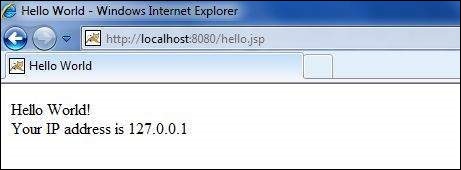
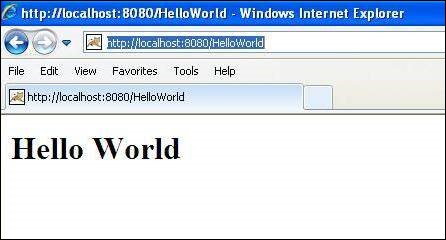
Let us keep above code in JSP file hello.jsp and put this file in C:\apache-tomcat-7.0.2\webapps\ROOT directory and try to browse it by giving URL http://localhost:8080/hello.jsp. This would generate following result:

Hello World

JSP Declarations:

A declaration declares one or more variables or methods that you can use in Java code later in the JSP file. You must declare the variable or method before you use it in the JSP file.

Following is the syntax of JSP Declarations:

<%! declaration; [ declaration; ]+ ... %>

You can write XML equivalent of the above syntax as follows:

<jsp:declaration>
   code fragment
</jsp:declaration>

Following is the simple example for JSP Declarations:

<%! int i = 0; %> 
<%! int a, b, c; %> 
<%! Circle a = new Circle(2.0); %> 

JSP Expression:

A JSP expression element contains a scripting language expression that is evaluated, converted to a String, and inserted where the expression appears in the JSP file.

Because the value of an expression is converted to a String, you can use an expression within a line of text, whether or not it is tagged with HTML, in a JSP file.

The expression element can contain any expression that is valid according to the Java Language Specification but you cannot use a semicolon to end an expression.

Following is the syntax of JSP Expression:

<%= expression %>

You can write XML equivalent of the above syntax as follows:

<jsp:expression>
   expression
</jsp:expression>

Following is the simple example for JSP Expression:

<html> 
<head><title>A Comment Test</title></head> 
<body>
<p>
   Today's date: <%= (new java.util.Date()).toLocaleString()%>
</p>
</body> 
</html>

This would generate following result:

Today’s date: 11-Sep-2010 21:24:25

JSP Comments:

JSP comment marks text or statements that the JSP container should ignore. A JSP comment is useful when you want to hide or “comment out” part of your JSP page.

Following is the syntax of JSP comments:

<%-- This is JSP comment --%>

Following is the simple example for JSP Comments:

<html> 
<head><title>A Comment Test</title></head> 
<body> 
<h2>A Test of Comments</h2> 
<%-- This comment will not be visible in the page source --%> 
</body> 
</html>

This would generate following result:

A Test of Comments

There are a small number of special constructs you can use in various cases to insert comments or characters that would otherwise be treated specially. Here’s a summary:

Syntax Purpose
<%– comment –%> A JSP comment. Ignored by the JSP engine.
<!– comment –> An HTML comment. Ignored by the browser.
<\% Represents static <% literal.
%\> Represents static %> literal.
\’ A single quote in an attribute that uses single quotes.
\” A double quote in an attribute that uses double quotes.

JSP Directives:

A JSP directive affects the overall structure of the servlet class. It usually has the following form:

<%@ directive attribute="value" %>

There are three types of directive tag:

Directive Description
<%@ page … %> Defines page-dependent attributes, such as scripting language, error page, and buffering requirements.
<%@ include … %> Includes a file during the translation phase.
<%@ taglib … %> Declares a tag library, containing custom actions, used in the page

We would explain JSP directive in separate chapter JSP – Directives

JSP Actions:

JSP actions use constructs in XML syntax to control the behavior of the servlet engine. You can dynamically insert a file, reuse JavaBeans components, forward the user to another page, or generate HTML for the Java plugin.

There is only one syntax for the Action element, as it conforms to the XML standard:

<jsp:action_name attribute="value" />

Action elements are basically predefined functions and there are following JSP actions available:

Syntax Purpose
jsp:include Includes a file at the time the page is requested
jsp:useBean Finds or instantiates a JavaBean
jsp:setProperty Sets the property of a JavaBean
jsp:getProperty Inserts the property of a JavaBean into the output
jsp:forward Forwards the requester to a new page
jsp:plugin Generates browser-specific code that makes an OBJECT or EMBED tag for the Java plugin
jsp:element Defines XML elements dynamically.
jsp:attribute Defines dynamically defined XML element’s attribute.
jsp:body Defines dynamically defined XML element’s body.
jsp:text Use to write template text in JSP pages and documents.

We would explain JSP actions in separate chapter JSP – Actions

JSP Implicit Objects:

JSP supports nine automatically defined variables, which are also called implicit objects. These variables are:

Objects Description
request This is the HttpServletRequest object associated with the request.
response This is the HttpServletResponse object associated with the response to the client.
out This is the PrintWriter object used to send output to the client.
session This is the HttpSession object associated with the request.
application This is the ServletContext object associated with application context.
config This is the ServletConfig object associated with the page.
pageContext This encapsulates use of server-specific features like higher performance JspWriters.
page This is simply a synonym for this, and is used to call the methods defined by the translated servlet class.
Exception The Exception object allows the exception data to be accessed by designated JSP.

We would explain JSP Implicit Objects in separate chapter JSP – Implicit Objects.

Control-Flow Statements:

JSP provides full power of Java to be embedded in your web application. You can use all the APIs and building blocks of Java in your JSP programming including decision making statements, loops etc.

Decision-Making Statements:

The if…else block starts out like an ordinary Scriptlet, but the Scriptlet is closed at each line with HTML text included between Scriptlet tags.

<%! int day = 3; %> 
<html> 
<head><title>IF...ELSE Example</title></head> 
<body>
<% if (day == 1 | day == 7) { %>
      <p> Today is weekend</p>
<% } else { %>
      <p> Today is not weekend</p>
<% } %>
</body> 
</html>

This would produce following result:

Today is not weekend

Now look at the following switch…case block which has been written a bit differentlty using out.println() and inside Scriptletas:

<%! int day = 3; %> 
<html> 
<head><title>SWITCH...CASE Example</title></head> 
<body>
<% 
switch(day) {
case 0:
   out.println("It\'s Sunday.");
   break;
case 1:
   out.println("It\'s Monday.");
   break;
case 2:
   out.println("It\'s Tuesday.");
   break;
case 3:
   out.println("It\'s Wednesday.");
   break;
case 4:
   out.println("It\'s Thursday.");
   break;
case 5:
   out.println("It\'s Friday.");
   break;
default:
   out.println("It's Saturday.");
}
%>
</body> 
</html>

This would produce following result:

It’s Wednesday.

Loop Statements:

You can also use three basic types of looping blocks in Java: for, while,and do…while blocks in your JSP programming.

Let us look at the following for loop example:

<%! int fontSize; %> 
<html> 
<head><title>FOR LOOP Example</title></head> 
<body>
<%for ( fontSize = 1; fontSize <= 3; fontSize++){ %>
   <font color="green" size="<%= fontSize %>">
    JSP Tutorial
   </font><br />
<%}%>
</body> 
</html>

This would produce following result:

   
    JSP Tutorial
   
    
    JSP Tutorial
   
    
    JSP Tutorial
   

Above example can be written using while loop as follows:

<%! int fontSize; %> 
<html> 
<head><title>WHILE LOOP Example</title></head> 
<body>
<%while ( fontSize <= 3){ %>
   <font color="green" size="<%= fontSize %>">
    JSP Tutorial
   </font><br />
<%fontSize++;%>
<%}%>
</body> 
</html>

This would also produce following result:

   
    JSP Tutorial
   
    
    JSP Tutorial
   
    
    JSP Tutorial
   

JSP Operators:

JSP supports all the logical and arithmetic operators supported by Java. Following table give a list of all the operators with the highest precedence appear at the top of the table, those with the lowest appear at the bottom.

Within an expression, higher precedence operators will be evaluated first.

Category Operator Associativity
Postfix () [] . (dot operator) Left to right
Unary ++ – – ! ~ Right to left
Multiplicative * / % Left to right
Additive + – Left to right
Shift >> >>> << Left to right
Relational > >= < <= Left to right
Equality == != Left to right
Bitwise AND & Left to right
Bitwise XOR ^ Left to right
Bitwise OR | Left to right
Logical AND && Left to right
Logical OR || Left to right
Conditional ?: Right to left
Assignment = += -= *= /= %= >>= <<= &= ^= |= Right to left
Comma , Left to right

JSP Literals:

The JSP expression language defines the following literals:

  • Boolean: true and false
  • Integer: as in Java
  • Floating point: as in Java
  • String: with single and double quotes; ” is escaped as \”, ‘ is escaped as \’, and \ is escaped as \\.
  • Null: null

JSP directives provide directions and instructions to the container, telling it how to handle certain aspects of JSP processing.

A JSP directive affects the overall structure of the servlet class. It usually has the following form:

<%@ directive attribute="value" %>

Directives can have a number of attributes which you can list down as key-value pairs and separated by commas.

The blanks between the @ symbol and the directive name, and between the last attribute and the closing %>, are optional.

There are three types of directive tag:

Directive Description
<%@ page … %> Defines page-dependent attributes, such as scripting language, error page, and buffering requirements.
<%@ include … %> Includes a file during the translation phase.
<%@ taglib … %> Declares a tag library, containing custom actions, used in the page

The page Directive:

The page directive is used to provide instructions to the container that pertain to the current JSP page. You may code page directives anywhere in your JSP page. By convention, page directives are coded at the top of the JSP page.

Following is the basic syntax of page directive:

<%@ page attribute="value" %>

You can write XML equivalent of the above syntax as follows:

<jsp:directive.page attribute="value" />

Attributes:

Following is the list of attributes associated with page directive:

Attribute Purpose
buffer Specifies a buffering model for the output stream.
autoFlush Controls the behavior of the servlet output buffer.
contentType Defines the character encoding scheme.
errorPage Defines the URL of another JSP that reports on Java unchecked runtime exceptions.
isErrorPage Indicates if this JSP page is a URL specified by another JSP page’s errorPage attribute.
extends Specifies a superclass that the generated servlet must extend
import Specifies a list of packages or classes for use in the JSP as the Java import statement does for Java classes.
info Defines a string that can be accessed with the servlet’s getServletInfo() method.
isThreadSafe Defines the threading model for the generated servlet.
language Defines the programming language used in the JSP page.
session Specifies whether or not the JSP page participates in HTTP sessions
isELIgnored Specifies whether or not EL expression within the JSP page will be ignored.
isScriptingEnabled Determines if scripting elements are allowed for use.

Check more detail related to all the above attributes at Page Directive.

The include Directive:

The include directive is used to includes a file during the translation phase. This directive tells the container to merge the content of other external files with the current JSP during the translation phase. You may code include directives anywhere in your JSP page.

The general usage form of this directive is as follows:

<%@ include file="relative url" >

The filename in the include directive is actually a relative URL. If you just specify a filename with no associated path, the JSP compiler assumes that the file is in the same directory as your JSP.

You can write XML equivalent of the above syntax as follows:

<jsp:directive.include file="relative url" />

Check more detail related to include directive at Include Directive.

The taglib Directive:

The JavaServer Pages API allows you to define custom JSP tags that look like HTML or XML tags and a tag library is a set of user-defined tags that implement custom behavior.

The taglib directive declares that your JSP page uses a set of custom tags, identifies the location of the library, and provides a means for identifying the custom tags in your JSP page.

The taglib directive follows the following syntax:

<%@ taglib uri="uri" prefix="prefixOfTag" >

Where the uri attribute value resolves to a location the container understands and the prefix attribute informs a container what bits of markup are custom actions.

You can write XML equivalent of the above syntax as follows:

<jsp:directive.taglib uri="uri" prefix="prefixOfTag" />

JSP-JAVA SERVER PAGES

What is JavaServer Pages?

JavaServer Pages (JSP) is a technology for developing web pages that support dynamic content which helps developers insert java code in HTML pages by making use of special JSP tags, most of which start with <% and end with %>.

A JavaServer Pages component is a type of Java servlet that is designed to fulfill the role of a user interface for a Java web application. Web developers write JSPs as text files that combine HTML or XHTML code, XML elements, and embedded JSP actions and commands.

Using JSP, you can collect input from users through web page forms, present records from a database or another source, and create web pages dynamically.

JSP tags can be used for a variety of purposes, such as retrieving information from a database or registering user preferences, accessing JavaBeans components, passing control between pages and sharing information between requests, pages etc.

Why Use JSP?

JavaServer Pages often serve the same purpose as programs implemented using the Common Gateway Interface (CGI). But JSP offer several advantages in comparison with the CGI.

  • Performance is significantly better because JSP allows embedding Dynamic Elements in HTML Pages itself instead of having a separate CGI files.
  • JSP are always compiled before it’s processed by the server unlike CGI/Perl which requires the server to load an interpreter and the target script each time the page is requested.
  • JavaServer Pages are built on top of the Java Servlets API, so like Servlets, JSP also has access to all the powerful Enterprise Java APIs, including JDBC, JNDI, EJB, JAXP etc.
  • JSP pages can be used in combination with servlets that handle the business logic, the model supported by Java servlet template engines.

Finally, JSP is an integral part of Java EE, a complete platform for enterprise class applications. This means that JSP can play a part in the simplest applications to the most complex and demanding.

Advantages of JSP:

Following is the list of other advantages of using JSP over other technologies:

  • vs. Active Server Pages (ASP): The advantages of JSP are twofold. First, the dynamic part is written in Java, not Visual Basic or other MS specific language, so it is more powerful and easier to use. Second, it is portable to other operating systems and non-Microsoft Web servers.
  • vs. Pure Servlets: It is more convenient to write (and to modify!) regular HTML than to have plenty of println statements that generate the HTML.
  • vs. Server-Side Includes (SSI): SSI is really only intended for simple inclusions, not for “real” programs that use form data, make database connections, and the like.
  • vs. JavaScript: JavaScript can generate HTML dynamically on the client but can hardly interact with the web server to perform complex tasks like database access and image processing etc.
  • vs. Static HTML: Regular HTML, of course, cannot contain dynamic information.

A development environment is where you would develop your JSP programs, test them and finally run them.

This tutorial will guide you to setup your JSP development environment which involves following steps:

Setting up Java Development Kit

This step involves downloading an implementation of the Java Software Development Kit (SDK) and setting up PATH environment variable appropriately.

You can download SDK from Oracle’s Java site: Java SE Downloads.

Once you download your Java implementation, follow the given instructions to install and configure the setup. Finally set PATH and JAVA_HOME environment variables to refer to the directory that contains java and javac, typically java_install_dir/bin and java_install_dir respectively.

If you are running Windows and installed the SDK in C:\jdk1.5.0_20, you would put the following line in your C:\autoexec.bat file.

set PATH=C:\jdk1.5.0_20\bin;%PATH%
set JAVA_HOME=C:\jdk1.5.0_20

Alternatively, on Windows NT/2000/XP, you could also right-click on My Computer, select Properties, then Advanced, then Environment Variables. Then, you would update the PATH value and press the OK button.

On Unix (Solaris, Linux, etc.), if the SDK is installed in /usr/local/jdk1.5.0_20 and you use the C shell, you would put the following into your .cshrc file.

setenv PATH /usr/local/jdk1.5.0_20/bin:$PATH
setenv JAVA_HOME /usr/local/jdk1.5.0_20

Alternatively, if you use an Integrated Development Environment (IDE) like Borland JBuilder, Eclipse, IntelliJ IDEA, or Sun ONE Studio, compile and run a simple program to confirm that the IDE knows where you installed Java.

Setting up Web Server: Tomcat

A number of Web Servers that support JavaServer Pages and Servlets development are available in the market. Some web servers are freely downloadable and Tomcat is one of them.

Apache Tomcat is an open source software implementation of the JavaServer Pages and Servlet technologies and can act as a standalone server for testing JSP and Servlets and can be integrated with the Apache Web Server. Here are the steps to setup Tomcat on your machine:

  • Download latest version of Tomcat from http://tomcat.apache.org/.
  • Once you downloaded the installation, unpack the binary distribution into a convenient location. For example in C:\apache-tomcat-5.5.29 on windows, or /usr/local/apache-tomcat-5.5.29 on Linux/Unix and create CATALINA_HOME environment variable pointing to these locations.

Tomcat can be started by executing the following commands on windows machine:

 %CATALINA_HOME%\bin\startup.bat
 
 or
 
 C:\apache-tomcat-5.5.29\bin\startup.bat

Tomcat can be started by executing the following commands on Unix (Solaris, Linux, etc.) machine:

$CATALINA_HOME/bin/startup.sh
 
or
 
/usr/local/apache-tomcat-5.5.29/bin/startup.sh

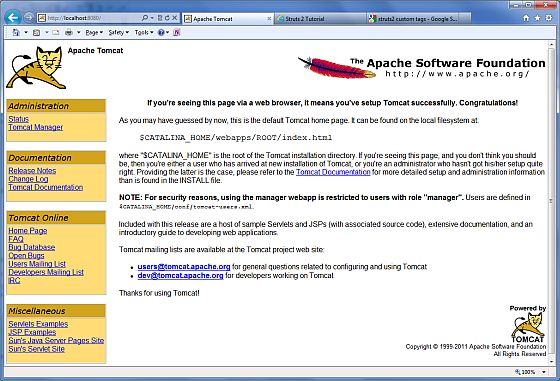
After a successful startup, the default web applications included with Tomcat will be available by visiting http://localhost:8080/. If everything is fine then it should display following result:

Tomcat Home pageFurther information about configuring and running Tomcat can be found in the documentation included here, as well as on the Tomcat web site: http://tomcat.apache.org

Tomcat can be stopped by executing the following commands on windows machine:

%CATALINA_HOME%\bin\shutdown
or

C:\apache-tomcat-5.5.29\bin\shutdown

Tomcat can be stopped by executing the following commands on Unix (Solaris, Linux, etc.) machine:

$CATALINA_HOME/bin/shutdown.sh

or

/usr/local/apache-tomcat-5.5.29/bin/shutdown.sh

Setting up CLASSPATH

Since servlets are not part of the Java Platform, Standard Edition, you must identify the servlet classes to the compiler.

If you are running Windows, you need to put the following lines in your C:\autoexec.bat file.

set CATALINA=C:\apache-tomcat-5.5.29
set CLASSPATH=%CATALINA%\common\lib\jsp-api.jar;%CLASSPATH%

Alternatively, on Windows NT/2000/XP, you could also right-click on My Computer, select Properties, then Advanced, then Environment Variables. Then, you would update the CLASSPATH value and press the OK button.

On Unix (Solaris, Linux, etc.), if you are using the C shell, you would put the following lines into your .cshrc file.

setenv CATALINA=/usr/local/apache-tomcat-5.5.29
setenv CLASSPATH $CATALINA/common/lib/jsp-api.jar:$CLASSPATH

NOTE: Assuming that your development directory is C:\JSPDev (Windows) or /usr/JSPDev (Unix) then you would need to add these directories as well in CLASSPATH in similar way as you have added above.

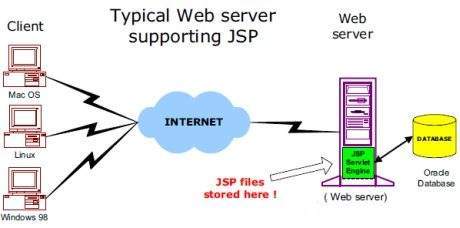
The web server needs a JSP engine ie. container to process JSP pages. The JSP container is responsible for intercepting requests for JSP pages. This tutorial makes use of Apache which has built-in JSP container to support JSP pages development.

A JSP container works with the Web server to provide the runtime environment and other services a JSP needs. It knows how to understand the special elements that are part of JSPs.

Following diagram shows the position of JSP container and JSP files in a Web Application.

JSP Architecture

JSP Processing:

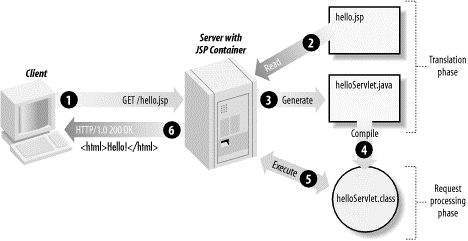
The following steps explain how the web server creates the web page using JSP:

  • As with a normal page, your browser sends an HTTP request to the web server.
  • The web server recognizes that the HTTP request is for a JSP page and forwards it to a JSP engine. This is done by using the URL or JSP page which ends with .jsp instead of .html.
  • The JSP engine loads the JSP page from disk and converts it into a servlet content. This conversion is very simple in which all template text is converted to println( ) statements and all JSP elements are converted to Java code that implements the corresponding dynamic behavior of the page.
  • The JSP engine compiles the servlet into an executable class and forwards the original request to a servlet engine.
  • A part of the web server called the servlet engine loads the Servlet class and executes it. During execution, the servlet produces an output in HTML format, which the servlet engine passes to the web server inside an HTTP response.
  • The web server forwards the HTTP response to your browser in terms of static HTML content.
  • Finally web browser handles the dynamically generated HTML page inside the HTTP response exactly as if it were a static page.

All the above mentioned steps can be shown below in the following diagram:

JSP ProcessingTypically, the JSP engine checks to see whether a servlet for a JSP file already exists and whether the modification date on the JSP is older than the servlet. If the JSP is older than its generated servlet, the JSP container assumes that the JSP hasn’t changed and that the generated servlet still matches the JSP’s contents. This makes the process more efficient than with other scripting languages (such as PHP) and therefore faster.

So in a way, a JSP page is really just another way to write a servlet without having to be a Java programming wiz. Except for the translation phase, a JSP page is handled exactly like a regular servlet

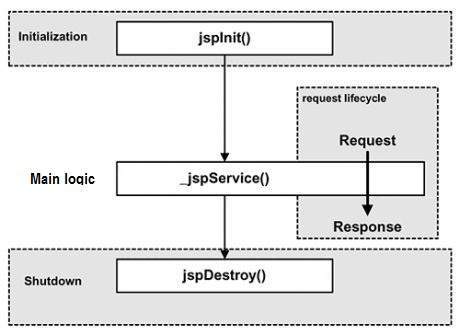
The key to understanding the low-level functionality of JSP is to understand the simple life cycle they follow.

A JSP life cycle can be defined as the entire process from its creation till the destruction which is similar to a servlet life cycle with an additional step which is required to compile a JSP into servlet.

The following are the paths followed by a JSP

  • Compilation
  • Initialization
  • Execution
  • Cleanup

The four major phases of JSP life cycle are very similar to Servlet Life Cycle and they are as follows:

JSP Life Cycle

JSP Compilation:

When a browser asks for a JSP, the JSP engine first checks to see whether it needs to compile the page. If the page has never been compiled, or if the JSP has been modified since it was last compiled, the JSP engine compiles the page.

The compilation process involves three steps:

  • Parsing the JSP.
  • Turning the JSP into a servlet.
  • Compiling the servlet.

JSP Initialization:

When a container loads a JSP it invokes the jspInit() method before servicing any requests. If you need to perform JSP-specific initialization, override the jspInit() method:

public void jspInit(){
  // Initialization code...
}

Typically initialization is performed only once and as with the servlet init method, you generally initialize database connections, open files, and create lookup tables in the jspInit method.

JSP Execution:

This phase of the JSP life cycle represents all interactions with requests until the JSP is destroyed.

Whenever a browser requests a JSP and the page has been loaded and initialized, the JSP engine invokes the _jspService() method in the JSP.

The _jspService() method takes an HttpServletRequest and anHttpServletResponse as its parameters as follows:

void _jspService(HttpServletRequest request, 
                 HttpServletResponse response)
{
   // Service handling code...
}

The _jspService() method of a JSP is invoked once per a request and is responsible for generating the response for that request and this method is also responsible for generating responses to all seven of the HTTP methods ie. GET, POST, DELETE etc.

JSP Cleanup:

The destruction phase of the JSP life cycle represents when a JSP is being removed from use by a container.

The jspDestroy() method is the JSP equivalent of the destroy method for servlets. Override jspDestroy when you need to perform any cleanup, such as releasing database connections or closing open files.

The jspDestroy() method has the following form:

public void jspDestroy()
{
   // Your cleanup code goes here.
}

PAGE REDIRECT

Page redirection is generally used when a document moves to a new location and we need to send the client to this new location or may be because of load balancing, or for simple randomization.

The simplest way of redirecting a request to another page is using methodsendRedirect() of response object. Following is the signature of this method:

public void HttpServletResponse.sendRedirect(String location)
throws IOException

This method sends back the response to the browser along with the status code and new page location. You can also use setStatus() and setHeader() methods together to achieve the same:

....
String site = "http://www.newpage.com" ;
response.setStatus(response.SC_MOVED_TEMPORARILY);
response.setHeader("Location", site); 
....

Example:

This example shows how a servlet performs page redirection to another location:

import java.io.*;
import java.sql.Date;
import java.util.*;
import javax.servlet.*;
import javax.servlet.http.*;

public class PageRedirect extends HttpServlet{
    
  public void doGet(HttpServletRequest request,
                    HttpServletResponse response)
            throws ServletException, IOException
  {
      // Set response content type
      response.setContentType("text/html");

      // New location to be redirected
      String site = new String("http://www.photofuntoos.com");

      response.setStatus(response.SC_MOVED_TEMPORARILY);
      response.setHeader("Location", site);    
    }
}

Now let us compile above servlet and create following entries in web.xml

....
 <servlet>
     <servlet-name>PageRedirect</servlet-name>
     <servlet-class>PageRedirect</servlet-class>
 </servlet>

 <servlet-mapping>
     <servlet-name>PageRedirect</servlet-name>
     <url-pattern>/PageRedirect</url-pattern>
 </servlet-mapping>
....

Now call this servlet using URL http://localhost:8080/PageRedirect. This would take you given URL http://www.photofuntoos.com.

Servlets – Database Access

This tutorial assumes you have understanding on how JDBC application works. Before starting with database access through a servlet, make sure you have proper JDBC environment setup along with a database.

For more detail on how to access database using JDBC and its environment setup you can go through our JDBC Tutorial.

To start with basic concept, let us create a simple table and create few records in that table as follows:

Create Table

To create the Employees table in TEST database, use the following steps:

Step 1:

Open a Command Prompt and change to the installation directory as follows:

C:\>
C:\>cd Program Files\MySQL\bin
C:\Program Files\MySQL\bin>

Step 2:

Login to database as follows

C:\Program Files\MySQL\bin>mysql -u root -p
Enter password: ********
mysql>

Step 3:

Create the table Employee in TEST database as follows:

mysql> use TEST;
mysql> create table Employees
    (
     id int not null,
     age int not null,
     first varchar (255),
     last varchar (255)
    );
Query OK, 0 rows affected (0.08 sec)
mysql>

Create Data Records

Finally you create few records in Employee table as follows:

mysql> INSERT INTO Employees VALUES (100, 18, 'Zara', 'Ali');
Query OK, 1 row affected (0.05 sec)
 
mysql> INSERT INTO Employees VALUES (101, 25, 'Mahnaz', 'Fatma');
Query OK, 1 row affected (0.00 sec)
 
mysql> INSERT INTO Employees VALUES (102, 30, 'Zaid', 'Khan');
Query OK, 1 row affected (0.00 sec)
 
mysql> INSERT INTO Employees VALUES (103, 28, 'Sumit', 'Mittal');
Query OK, 1 row affected (0.00 sec)
 
mysql>

Accessing a Database:

Here is an example which shows how to access TEST database using Servlet.

// Loading required libraries
import java.io.*;
import java.util.*;
import javax.servlet.*;
import javax.servlet.http.*;
import java.sql.*;
 
public class DatabaseAccess extends HttpServlet{
    
  public void doGet(HttpServletRequest request,
                    HttpServletResponse response)
            throws ServletException, IOException
  {
      // JDBC driver name and database URL
      static final String JDBC_DRIVER="com.mysql.jdbc.Driver";  
      static final String DB_URL="jdbc:mysql://localhost/TEST";

      //  Database credentials
      static final String USER = "root";
      static final String PASS = "password";

      // Set response content type
      response.setContentType("text/html");
      PrintWriter out = response.getWriter();
      String title = "Database Result";
      String docType =
        "<!doctype html public \"-//w3c//dtd html 4.0 " +
         "transitional//en\">\n";
         out.println(docType +
         "<html>\n" +
         "<head><title>" + title + "</title></head>\n" +
         "<body bgcolor=\"#f0f0f0\">\n" +
         "<h1 align=\"center\">" + title + "</h1>\n");
      try{
         // Register JDBC driver
         Class.forName("com.mysql.jdbc.Driver");

         // Open a connection
         Connection conn = DriverManager.getConnection(DB_URL, USER, PASS);

         // Execute SQL query
         Statement stmt = conn.createStatement();
         String sql;
         sql = "SELECT id, first, last, age FROM Employees";
         ResultSet rs = stmt.executeQuery(sql);

         // Extract data from result set
         while(rs.next()){
            //Retrieve by column name
            int id  = rs.getInt("id");
            int age = rs.getInt("age");
            String first = rs.getString("first");
            String last = rs.getString("last");

            //Display values
            out.println("ID: " + id + "<br>");
            out.println(", Age: " + age + "<br>");
            out.println(", First: " + first + "<br>");
            out.println(", Last: " + last + "<br>");
         }
         out.println("</body></html>");

         // Clean-up environment
         rs.close();
         stmt.close();
         conn.close();
      }catch(SQLException se){
         //Handle errors for JDBC
         se.printStackTrace();
      }catch(Exception e){
         //Handle errors for Class.forName
         e.printStackTrace();
      }finally{
         //finally block used to close resources
         try{
            if(stmt!=null)
               stmt.close();
         }catch(SQLException se2){
         }// nothing we can do
         try{
            if(conn!=null)
            conn.close();
         }catch(SQLException se){
            se.printStackTrace();
         }//end finally try
      } //end try
   }
}

Now let us compile above servlet and create following entries in web.xml

....
 <servlet>
     <servlet-name>DatabaseAccess</servlet-name>
     <servlet-class>DatabaseAccess</servlet-class>
 </servlet>
 
 <servlet-mapping>
     <servlet-name>DatabaseAccess</servlet-name>
     <url-pattern>/DatabaseAccess</url-pattern>
 </servlet-mapping>
....

Now call this servlet using URL http://localhost:8080/DatabaseAccess which would display following response:

Database Result

ID: 100, Age: 18, First: Zara, Last: Ali
ID: 101, Age: 25, First: Mahnaz, Last: Fatma
ID: 102, Age: 30, First: Zaid, Last: Khan
ID: 103, Age: 28, First: Sumit, Last: Mittal

To start developing with JDBC, you should setup your JDBC environment by following the steps shown below. We assume that you are working on a Windows platform.

Install Java

Install J2SE Development Kit 5.0 (JDK 5.0) from Java Official Site.

Make sure following environment variables are set as described below −

  • JAVA_HOME: This environment variable should point to the directory where you installed the JDK, e.g. C:\Program Files\Java\jdk1.5.0.
  • CLASSPATH: This environment variable should have appropriate paths set, e.g. C:\Program Files\Java\jdk1.5.0_20\jre\lib.
  • PATH: This environment variable should point to appropriate JRE bin, e.g. C:\Program Files\Java\jre1.5.0_20\bin.

It is possible you have these variable set already, but just to make sure here’s how to check.

  • Go to the control panel and double-click on System. If you are a Windows XP user, it is possible you have to open Performance and Maintenance before you will see the System icon.
  • Go to the Advanced tab and click on the Environment Variables.
  • Now check if all the above mentioned variables are set properly.

You automatically get both JDBC packages java.sql and javax.sql, when you install J2SE Development Kit 5.0 (JDK 5.0).

Install Database

The most important thing you will need, of course is an actual running database with a table that you can query and modify.

Install a database that is most suitable for you. You can have plenty of choices and most common are −

  • MySQL DB: MySQL is an open source database. You can download it from MySQL Official Site. We recommend downloading the full Windows installation.In addition, download and install MySQL Administrator as well asMySQL Query Browser. These are GUI based tools that will make your development much easier.

    Finally, download and unzip MySQL Connector/J (the MySQL JDBC driver) in a convenient directory. For the purpose of this tutorial we will assume that you have installed the driver at C:\Program Files\MySQL\mysql-connector-java-5.1.8.

    Accordingly, set CLASSPATH variable to C:\Program Files\MySQL\mysql-connector-java-5.1.8\mysql-connector-java-5.1.8-bin.jar. Your driver version may vary based on your installation.

  • PostgreSQL DB: PostgreSQL is an open source database. You can download it from PostgreSQL Official Site.The Postgres installation contains a GUI based administrative tool called pgAdmin III. JDBC drivers are also included as part of the installation.
  • Oracle DB: Oracle DB is a commercial database sold by Oracle . We assume that you have the necessary distribution media to install it.Oracle installation includes a GUI based administrative tool called Enterprise Manager. JDBC drivers are also included as a part of the installation.

Install Database Drivers

The latest JDK includes a JDBC-ODBC Bridge driver that makes most Open Database Connectivity (ODBC) drivers available to programmers using the JDBC API.

Now a days, most of the Database vendors are supplying appropriate JDBC drivers along with Database installation. So, you should not worry about this part.

Set Database Credential

For this tutorial we are going to use MySQL database. When you install any of the above database, its administrator ID is set to root and gives provision to set a password of your choice.

Using root ID and password you can either create another user ID and password, or you can use root ID and password for your JDBC application.

There are various database operations like database creation and deletion, which would need administrator ID and password.

For rest of the JDBC tutorial, we would use MySQL Database with username as ID and password as password.

If you do not have sufficient privilege to create new users, then you can ask your Database Administrator (DBA) to create a user ID and password for you.

Create Database

To create the EMP database, use the following steps −

Step 1

Open a Command Prompt and change to the installation directory as follows −

C:\>
C:\>cd Program Files\MySQL\bin
C:\Program Files\MySQL\bin>

Note: The path to mysqld.exe may vary depending on the install location of MySQL on your system. You can also check documentation on how to start and stop your database server.

Step 2

Start the database server by executing the following command, if it is already not running.

C:\Program Files\MySQL\bin>mysqld
C:\Program Files\MySQL\bin>

Step 3

Create the EMP database by executing the following command −

C:\Program Files\MySQL\bin> mysqladmin create EMP -u root -p
Enter password: ********
C:\Program Files\MySQL\bin>

Create Table

To create the Employees table in EMP database, use the following steps −

Step 1

Open a Command Prompt and change to the installation directory as follows −

C:\>
C:\>cd Program Files\MySQL\bin
C:\Program Files\MySQL\bin>

Step 2

Login to the database as follows −

C:\Program Files\MySQL\bin>mysql -u root -p
Enter password: ********
mysql>

Step 3

Create the table Employee as follows −

mysql> use EMP;
mysql> create table Employees
    -> (
    -> id int not null,
    -> age int not null,
    -> first varchar (255),
    -> last varchar (255)
    -> );
Query OK, 0 rows affected (0.08 sec)
mysql>

Create Data Records

Finally you create few records in Employee table as follows −

mysql> INSERT INTO Employees VALUES (100, 18, 'Zara', 'Ali');
Query OK, 1 row affected (0.05 sec)

mysql> INSERT INTO Employees VALUES (101, 25, 'Mahnaz', 'Fatma');
Query OK, 1 row affected (0.00 sec)

mysql> INSERT INTO Employees VALUES (102, 30, 'Zaid', 'Khan');
Query OK, 1 row affected (0.00 sec)

mysql> INSERT INTO Employees VALUES (103, 28, 'Sumit', 'Mittal');
Query OK, 1 row affected (0.00 sec)

mysql>

JDBC drivers implement the defined interfaces in the JDBC API, for interacting with your database server.

For example, using JDBC drivers enable you to open database connections and to interact with it by sending SQL or database commands then receiving results with Java.

The Java.sql package that ships with JDK, contains various classes with their behaviours defined and their actual implementaions are done in third-party drivers. Third party vendors implements the java.sql.Driver interface in their database driver.

JDBC Drivers Types

JDBC driver implementations vary because of the wide variety of operating systems and hardware platforms in which Java operates. Sun has divided the implementation types into four categories, Types 1, 2, 3, and 4, which is explained below −

Type 1: JDBC-ODBC Bridge Driver

In a Type 1 driver, a JDBC bridge is used to access ODBC drivers installed on each client machine. Using ODBC, requires configuring on your system a Data Source Name (DSN) that represents the target database.

When Java first came out, this was a useful driver because most databases only supported ODBC access but now this type of driver is recommended only for experimental use or when no other alternative is available.
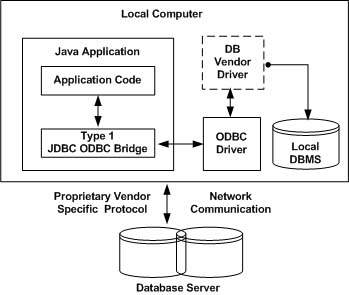
DBMS Driver type 1The JDBC-ODBC Bridge that comes with JDK 1.2 is a good example of this kind of driver.

Type 2: JDBC-Native API

In a Type 2 driver, JDBC API calls are converted into native C/C++ API calls, which are unique to the database. These drivers are typically provided by the database vendors and used in the same manner as the JDBC-ODBC Bridge. The vendor-specific driver must be installed on each client machine.

If we change the Database, we have to change the native API, as it is specific to a database and they are mostly obsolete now, but you may realize some speed increase with a Type 2 driver, because it eliminates ODBC’s overhead.
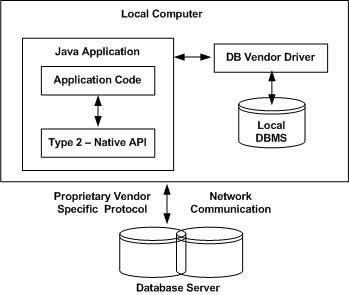
DBMS Driver type 2The Oracle Call Interface (OCI) driver is an example of a Type 2 driver.

Type 3: JDBC-Net pure Java

In a Type 3 driver, a three-tier approach is used to access databases. The JDBC clients use standard network sockets to communicate with a middleware application server. The socket information is then translated by the middleware application server into the call format required by the DBMS, and forwarded to the database server.

This kind of driver is extremely flexible, since it requires no code installed on the client and a single driver can actually provide access to multiple databases.
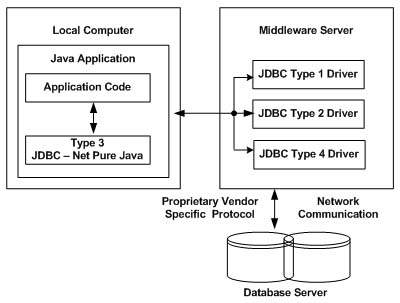
DBMS Driver type 3You can think of the application server as a JDBC “proxy,” meaning that it makes calls for the client application. As a result, you need some knowledge of the application server’s configuration in order to effectively use this driver type.

Your application server might use a Type 1, 2, or 4 driver to communicate with the database, understanding the nuances will prove helpful.

Type 4: 100% Pure Java

In a Type 4 driver, a pure Java-based driver communicates directly with the vendor’s database through socket connection. This is the highest performance driver available for the database and is usually provided by the vendor itself.

This kind of driver is extremely flexible, you don’t need to install special software on the client or server. Further, these drivers can be downloaded dynamically.
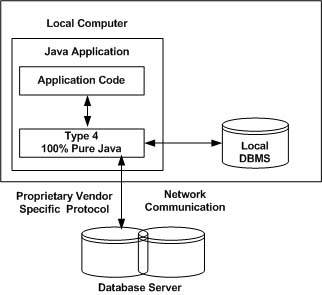
DBMS Driver type 4MySQL’s Connector/J driver is a Type 4 driver. Because of the proprietary nature of their network protocols, database vendors usually supply type 4 drivers.

Which Driver should be Used?

If you are accessing one type of database, such as Oracle, Sybase, or IBM, the preferred driver type is 4.

If your Java application is accessing multiple types of databases at the same time, type 3 is the preferred driver.

Type 2 drivers are useful in situations, where a type 3 or type 4 driver is not available yet for your database.

The type 1 driver is not considered a deployment-level driver, and is typically used for development and testing purposes only.

After you’ve installed the appropriate driver, it is time to establish a database connection using JDBC.

The programming involved to establish a JDBC connection is fairly simple. Here are these simple four steps −

  • Import JDBC Packages: Add import statements to your Java program to import required classes in your Java code.
  • Register JDBC Driver: This step causes the JVM to load the desired driver implementation into memory so it can fulfill your JDBC requests.
  • Database URL Formulation: This is to create a properly formatted address that points to the database to which you wish to connect.
  • Create Connection Object: Finally, code a call to the DriverManagerobject’s getConnection( ) method to establish actual database connection.

Import JDBC Packages

The Import statements tell the Java compiler where to find the classes you reference in your code and are placed at the very beginning of your source code.

To use the standard JDBC package, which allows you to select, insert, update, and delete data in SQL tables, add the following imports to your source code −

import java.sql.* ;  // for standard JDBC programs
import java.math.* ; // for BigDecimal and BigInteger support

Register JDBC Driver

You must register the driver in your program before you use it. Registering the driver is the process by which the Oracle driver’s class file is loaded into the memory, so it can be utilized as an implementation of the JDBC interfaces.

You need to do this registration only once in your program. You can register a driver in one of two ways.

Approach I – Class.forName()

The most common approach to register a driver is to use Java’sClass.forName() method, to dynamically load the driver’s class file into memory, which automatically registers it. This method is preferable because it allows you to make the driver registration configurable and portable.

The following example uses Class.forName( ) to register the Oracle driver −

try {
   Class.forName("oracle.jdbc.driver.OracleDriver");
}
catch(ClassNotFoundException ex) {
   System.out.println("Error: unable to load driver class!");
   System.exit(1);
}

You can use getInstance() method to work around noncompliant JVMs, but then you’ll have to code for two extra Exceptions as follows −

try {
   Class.forName("oracle.jdbc.driver.OracleDriver").newInstance();
}
catch(ClassNotFoundException ex) {
   System.out.println("Error: unable to load driver class!");
   System.exit(1);
catch(IllegalAccessException ex) {
   System.out.println("Error: access problem while loading!");
   System.exit(2);
catch(InstantiationException ex) {
   System.out.println("Error: unable to instantiate driver!");
   System.exit(3);
}

Approach II – DriverManager.registerDriver()

The second approach you can use to register a driver, is to use the staticDriverManager.registerDriver() method.

You should use the registerDriver() method if you are using a non-JDK compliant JVM, such as the one provided by Microsoft.

The following example uses registerDriver() to register the Oracle driver −

try {
   Driver myDriver = new oracle.jdbc.driver.OracleDriver();
   DriverManager.registerDriver( myDriver );
}
catch(ClassNotFoundException ex) {
   System.out.println("Error: unable to load driver class!");
   System.exit(1);
}

Database URL Formulation

After you’ve loaded the driver, you can establish a connection using theDriverManager.getConnection() method. For easy reference, let me list the three overloaded DriverManager.getConnection() methods −

  • getConnection(String url)
  • getConnection(String url, Properties prop)
  • getConnection(String url, String user, String password)

Here each form requires a database URL. A database URL is an address that points to your database.

Formulating a database URL is where most of the problems associated with establishing a connection occurs.

Following table lists down the popular JDBC driver names and database URL.

RDBMS JDBC driver name URL format
MySQL com.mysql.jdbc.Driver jdbc:mysql://hostname/ databaseName
ORACLE oracle.jdbc.driver.OracleDriver jdbc:oracle:thin:@hostname:port Number:databaseName
DB2 COM.ibm.db2.jdbc.net.DB2Driver jdbc:db2:hostname:port Number/databaseName
Sybase com.sybase.jdbc.SybDriver jdbc:sybase:Tds:hostname: port Number/databaseName

All the highlighted part in URL format is static and you need to change only the remaining part as per your database setup.

Create Connection Object

We have listed down three forms of DriverManager.getConnection() method to create a connection object.

Using a Database URL with a username and password

The most commonly used form of getConnection() requires you to pass a database URL, a username, and a password:

Assuming you are using Oracle’s thin driver, you’ll specify a host:port:databaseName value for the database portion of the URL.

If you have a host at TCP/IP address 192.0.0.1 with a host name of amrood, and your Oracle listener is configured to listen on port 1521, and your database name is EMP, then complete database URL would be −

jdbc:oracle:thin:@amrood:1521:EMP

Now you have to call getConnection() method with appropriate username and password to get a Connection object as follows −

String URL = "jdbc:oracle:thin:@amrood:1521:EMP";
String USER = "username";
String PASS = "password"
Connection conn = DriverManager.getConnection(URL, USER, PASS);

Using Only a Database URL

A second form of the DriverManager.getConnection( ) method requires only a database URL −

DriverManager.getConnection(String url);

However, in this case, the database URL includes the username and password and has the following general form −

jdbc:oracle:driver:username/password@database

So, the above connection can be created as follows −

String URL = "jdbc:oracle:thin:username/password@amrood:1521:EMP";
Connection conn = DriverManager.getConnection(URL);

Using a Database URL and a Properties Object

A third form of the DriverManager.getConnection( ) method requires a database URL and a Properties object −

DriverManager.getConnection(String url, Properties info);

A Properties object holds a set of keyword-value pairs. It is used to pass driver properties to the driver during a call to the getConnection() method.

To make the same connection made by the previous examples, use the following code −

import java.util.*;

String URL = "jdbc:oracle:thin:@amrood:1521:EMP";
Properties info = new Properties( );
info.put( "user", "username" );
info.put( "password", "password" );

Connection conn = DriverManager.getConnection(URL, info);

Closing JDBC Connections

At the end of your JDBC program, it is required explicitly to close all the connections to the database to end each database session. However, if you forget, Java’s garbage collector will close the connection when it cleans up stale objects.

Relying on the garbage collection, especially in database programming, is a very poor programming practice. You should make a habit of always closing the connection with the close() method associated with connection object.

To ensure that a connection is closed, you could provide a ‘finally’ block in your code. A finally block always executes, regardless of an exception occurs or not.

To close the above opened connection, you should call close() method as follows −

conn.close();

Explicitly closing a connection conserves DBMS resources, which will make your database administrator happy.

SERVLET SESSIONS

HTTP is a “stateless” protocol which means each time a client retrieves a Web page, the client opens a separate connection to the Web server and the server automatically does not keep any record of previous client request.

Still there are following three ways to maintain session between web client and web server:

Cookies:

A webserver can assign a unique session ID as a cookie to each web client and for subsequent requests from the client they can be recognized using the recieved cookie.

This may not be an effective way because many time browser does not support a cookie, so I would not recommend to use this procedure to maintain the sessions.

Hidden Form Fields:

A web server can send a hidden HTML form field along with a unique session ID as follows:

<input type="hidden" name="sessionid" value="12345">

This entry means that, when the form is submitted, the specified name and value are automatically included in the GET or POST data. Each time when web browser sends request back, then session_id value can be used to keep the track of different web browsers.

This could be an effective way of keeping track of the session but clicking on a regular (<A HREF…>) hypertext link does not result in a form submission, so hidden form fields also cannot support general session tracking.

URL Rewriting:

You can append some extra data on the end of each URL that identifies the session, and the server can associate that session identifier with data it has stored about that session.

For example, with http://tutorialspoint.com/file.htm;sessionid=12345, the session identifier is attached as sessionid=12345 which can be accessed at the web server to identify the client.

URL rewriting is a better way to maintain sessions and works for the browsers when they don’t support cookies but here drawback is that you would have generate every URL dynamically to assign a session ID though page is simple static HTML page.

The HttpSession Object:

Apart from the above mentioned three ways, servlet provides HttpSession Interface which provides a way to identify a user across more than one page request or visit to a Web site and to store information about that user.

The servlet container uses this interface to create a session between an HTTP client and an HTTP server. The session persists for a specified time period, across more than one connection or page request from the user.

You would get HttpSession object by calling the public method getSession() of HttpServletRequest, as below:

HttpSession session = request.getSession();

You need to call request.getSession() before you send any document content to the client. Here is a summary of the important methods available through HttpSession object:

S.N. Method & Description
1 public Object getAttribute(String name)

This method returns the object bound with the specified name in this session, or null if no object is bound under the name.

2 public Enumeration getAttributeNames()

This method returns an Enumeration of String objects containing the names of all the objects bound to this session.

3 public long getCreationTime()

This method returns the time when this session was created, measured in milliseconds since midnight January 1, 1970 GMT.

4 public String getId()

This method returns a string containing the unique identifier assigned to this session.

5 public long getLastAccessedTime()

This method returns the last time the client sent a request associated with this session, as the number of milliseconds since midnight January 1, 1970 GMT.

6 public int getMaxInactiveInterval()

This method returns the maximum time interval, in seconds, that the servlet container will keep this session open between client accesses.

7 public void invalidate()

This method invalidates this session and unbinds any objects bound to it.

8 public boolean isNew(

This method returns true if the client does not yet know about the session or if the client chooses not to join the session.

9 public void removeAttribute(String name)

This method removes the object bound with the specified name from this session.

10 public void setAttribute(String name, Object value)

This method binds an object to this session, using the name specified.

11 public void setMaxInactiveInterval(int interval)

This method specifies the time, in seconds, between client requests before the servlet container will invalidate this session.

Session Tracking Example:

This example describes how to use the HttpSession object to find out the creation time and the last-accessed time for a session. We would associate a new session with the request if one does not already exist.

// Import required java libraries
import java.io.*;
import javax.servlet.*;
import javax.servlet.http.*;
import java.util.*;
 
// Extend HttpServlet class
public class SessionTrack extends HttpServlet {
 
  public void doGet(HttpServletRequest request,
                    HttpServletResponse response)
            throws ServletException, IOException
  {
      // Create a session object if it is already not  created.
      HttpSession session = request.getSession(true);
      // Get session creation time.
      Date createTime = new Date(session.getCreationTime());
      // Get last access time of this web page.
      Date lastAccessTime = 
                        new Date(session.getLastAccessedTime());

      String title = "Welcome Back to my website";
      Integer visitCount = new Integer(0);
      String visitCountKey = new String("visitCount");
      String userIDKey = new String("userID");
      String userID = new String("ABCD");

      // Check if this is new comer on your web page.
      if (session.isNew()){
         title = "Welcome to my website";
         session.setAttribute(userIDKey, userID);
      } else {
         visitCount = (Integer)session.getAttribute(visitCountKey);
         visitCount = visitCount + 1;
         userID = (String)session.getAttribute(userIDKey);
      }
      session.setAttribute(visitCountKey,  visitCount);

      // Set response content type
      response.setContentType("text/html");
      PrintWriter out = response.getWriter();

      String docType =
      "<!doctype html public \"-//w3c//dtd html 4.0 " +
      "transitional//en\">\n";
      out.println(docType +
                "<html>\n" +
                "<head><title>" + title + "</title></head>\n" +
                "<body bgcolor=\"#f0f0f0\">\n" +
                "<h1 align=\"center\">" + title + "</h1>\n" +
                 "<h2 align=\"center\">Session Infomation</h2>\n" +
                "<table border=\"1\" align=\"center\">\n" +
                "<tr bgcolor=\"#949494\">\n" +
                "  <th>Session info</th><th>value</th></tr>\n" +
                "<tr>\n" +
                "  <td>id</td>\n" +
                "  <td>" + session.getId() + "</td></tr>\n" +
                "<tr>\n" +
                "  <td>Creation Time</td>\n" +
                "  <td>" + createTime + 
                "  </td></tr>\n" +
                "<tr>\n" +
                "  <td>Time of Last Access</td>\n" +
                "  <td>" + lastAccessTime + 
                "  </td></tr>\n" +
                "<tr>\n" +
                "  <td>User ID</td>\n" +
                "  <td>" + userID + 
                "  </td></tr>\n" +
                "<tr>\n" +
                "  <td>Number of visits</td>\n" +
                "  <td>" + visitCount + "</td></tr>\n" +
                "</table>\n" +
                "</body></html>");
  }
}

Compile above servlet SessionTrack and create appropriate entry in web.xml file. Now running http://localhost:8080/SessionTrack would display the following result when you would run for the first time:

Welcome to my website

Session Infomation

Session info value
id 0AE3EC93FF44E3C525B4351B77ABB2D5
Creation Time Tue Jun 08 17:26:40 GMT+04:00 2010
Time of Last Access Tue Jun 08 17:26:40 GMT+04:00 2010
User ID ABCD
Number of visits 0

Now try to run the same servlet for second time, it would display following result.

Welcome Back to my website

Session Infomation

info type value
id 0AE3EC93FF44E3C525B4351B77ABB2D5
Creation Time Tue Jun 08 17:26:40 GMT+04:00 2010
Time of Last Access Tue Jun 08 17:26:40 GMT+04:00 2010
User ID ABCD
Number of visits 1

Deleting Session Data:

When you are done with a user’s session data, you have several options:

  • Remove a particular attribute: You can call public void removeAttribute(String name) method to delete the value associated with a particular key.
  • Delete the whole session: You can call public void invalidate()method to discard an entire session.
  • Setting Session timeout: You can call public void setMaxInactiveInterval(int interval) method to set the timeout for a session individually.
  • Log the user out: The servers that support servlets 2.4, you can calllogout to log the client out of the Web server and invalidate all sessions belonging to all the users.
  • web.xml Configuration: If you are using Tomcat, apart from the above mentioned methods, you can configure session time out in web.xml file as follows.
  <session-config>
    <session-timeout>15</session-timeout>
  </session-config>

The timeout is expressed as minutes, and overrides the default timeout which is 30 minutes in Tomcat.

The getMaxInactiveInterval( ) method in a servlet returns the timeout period for that session in seconds. So if your session is configured in web.xml for 15 minutes, getMaxInactiveInterval( ) returns 900.

ECXEPTIONS

When a servlet throws an exception, the web container searches the configurations in web.xml that use the exception-type element for a match with the thrown exception type.

You would have to use the error-page element in web.xml to specify the invocation of servlets in response to certain exceptions or HTTP status codes.

web.xml Configuration:

Consider, you have an ErrorHandler servlet which would be called whenever there is any defined exception or error. Following would be the entry created in web.xml.

<!-- servlet definition -->
<servlet>
        <servlet-name>ErrorHandler</servlet-name>
        <servlet-class>ErrorHandler</servlet-class>
</servlet>
<!-- servlet mappings -->
<servlet-mapping>
        <servlet-name>ErrorHandler</servlet-name>
        <url-pattern>/ErrorHandler</url-pattern>
</servlet-mapping>

<!-- error-code related error pages -->
<error-page>
    <error-code>404</error-code>
    <location>/ErrorHandler</location>
</error-page>
<error-page>
    <error-code>403</error-code>
    <location>/ErrorHandler</location>
</error-page>

<!-- exception-type related error pages -->
<error-page>
    <exception-type>
          javax.servlet.ServletException
    </exception-type >
    <location>/ErrorHandler</location>
</error-page>

<error-page>
    <exception-type>java.io.IOException</exception-type >
    <location>/ErrorHandler</location>
</error-page>

If you want to have a generic Error Handler for all the exceptions then you should define following error-page instead of defining separate error-page elements for every exception:

<error-page>
    <exception-type>java.lang.Throwable</exception-type >
    <location>/ErrorHandler</location>
</error-page>

Following are the points to be noted about above web.xml for Exception Handling:

  • The servlet ErrorHandler is defined in usual way as any other servlet and configured in web.xml.
  • If there is any error with status code either 404 ( Not Found) or 403 ( Forbidden ), then ErrorHandler servlet would be called.
  • If the web application throws either ServletException or IOException, then the web container invokes the /ErrorHandler servlet.
  • You can define different Error Handlers to handle different type of errors or exceptions. Above example is very much generic and hope it serve the purpose to explain you the basic concept.

Request Attributes – Errors/Exceptions:

Following is the list of request attributes that an error-handling servlet can access to analyse the nature of error/exception.

S.N. Attribute & Description
1 javax.servlet.error.status_code

This attribute give status code which can be stored and analysed after storing in a java.lang.Integer data type.

2 javax.servlet.error.exception_type

This attribute gives information about exception type which can be stored and analysed after storing in a java.lang.Class data type.

3 javax.servlet.error.message

This attribute gives information exact error message which can be stored and analysed after storing in a java.lang.String data type.

4 javax.servlet.error.request_uri

This attribute gives information about URL calling the servlet and it can be stored and analysed after storing in a java.lang.String data type.

5 javax.servlet.error.exception

This attribute gives information the exception raised which can be stored and analysed after storing in a java.lang.Throwable data type.

6 javax.servlet.error.servlet_name

This attribute gives servlet name which can be stored and analysed after storing in a java.lang.String data type.

Error Handler Servlet Example:

Following is the Servlet Example that would be used as Error Handler in case of any error or exception occurs with your any of the servlet defined.

This example would give you basic understanding of Exception Handling in Servlet, but you can write more sophisticated filter applications using the same concept:

// Import required java libraries
import java.io.*;
import javax.servlet.*;
import javax.servlet.http.*;
import java.util.*;

// Extend HttpServlet class
public class ErrorHandler extends HttpServlet {
 
  // Method to handle GET method request.
  public void doGet(HttpServletRequest request,
                    HttpServletResponse response)
            throws ServletException, IOException
  {
      // Analyze the servlet exception       
      Throwable throwable = (Throwable)
      request.getAttribute("javax.servlet.error.exception");
      Integer statusCode = (Integer)
      request.getAttribute("javax.servlet.error.status_code");
      String servletName = (String)
      request.getAttribute("javax.servlet.error.servlet_name");
      if (servletName == null){
         servletName = "Unknown";
      }
      String requestUri = (String)
      request.getAttribute("javax.servlet.error.request_uri");
      if (requestUri == null){
         requestUri = "Unknown";
      }

      // Set response content type
      response.setContentType("text/html");
 
      PrintWriter out = response.getWriter();
	  String title = "Error/Exception Information";
      String docType =
      "<!doctype html public \"-//w3c//dtd html 4.0 " +
      "transitional//en\">\n";
      out.println(docType +
        "<html>\n" +
        "<head><title>" + title + "</title></head>\n" +
        "<body bgcolor=\"#f0f0f0\">\n");

      if (throwable == null && statusCode == null){
         out.println("<h2>Error information is missing</h2>");
         out.println("Please return to the <a href=\"" + 
           response.encodeURL("http://localhost:8080/") + 
           "\">Home Page</a>.");
      }else if (statusCode != null){
         out.println("The status code : " + statusCode);
      }else{
         out.println("<h2>Error information</h2>");
         out.println("Servlet Name : " + servletName + 
                             "</br></br>");
         out.println("Exception Type : " + 
                             throwable.getClass( ).getName( ) + 
                             "</br></br>");
         out.println("The request URI: " + requestUri + 
                             "<br><br>");
         out.println("The exception message: " + 
                                 throwable.getMessage( ));
      }
      out.println("</body>");
      out.println("</html>");
  }
  // Method to handle POST method request.
  public void doPost(HttpServletRequest request,
                     HttpServletResponse response)
      throws ServletException, IOException {
     doGet(request, response);
  }
}

Compile ErrorHandler.java in usual way and put your class file in <Tomcat-installation-directory>/webapps/ROOT/WEB-INF/classes.

Let us add the following configuration in web.xml to handle exceptions:

<servlet>
        <servlet-name>ErrorHandler</servlet-name>
        <servlet-class>ErrorHandler</servlet-class>
</servlet>
<!-- servlet mappings -->
<servlet-mapping>
        <servlet-name>ErrorHandler</servlet-name>
        <url-pattern>/ErrorHandler</url-pattern>
</servlet-mapping>
<error-page>
    <error-code>404</error-code>
    <location>/ErrorHandler</location>
</error-page>
<error-page>
    <exception-type>java.lang.Throwable</exception-type >
    <location>/ErrorHandler</location>
</error-page>

Now try to use a servlet which raise any exception or type a wrong URL, this would trigger Web Container to call ErrorHandler servlet and display an appropriate message as programmed. For example, if you type a wrong URL then it would display the following result:

The status code : 404

Above code may not work with some web browsers. So try with Mozilla and Safari and it should work.

Servlet Filters

Servlet Filters are Java classes that can be used in Servlet Programming for the following purposes:

  • To intercept requests from a client before they access a resource at back end.
  • To manipulate responses from server before they are sent back to the client.

There are are various types of filters suggested by the specifications:

  • Authentication Filters.
  • Data compression Filters.
  • Encryption Filters.
  • Filters that trigger resource access events.
  • Image Conversion Filters.
  • Logging and Auditing Filters.
  • MIME-TYPE Chain Filters.
  • Tokenizing Filters .
  • XSL/T Filters That Transform XML Content.

Filters are deployed in the deployment descriptor file web.xml and then map to either servlet names or URL patterns in your application’s deployment descriptor.

When the web container starts up your web application, it creates an instance of each filter that you have declared in the deployment descriptor. The filters execute in the order that they are declared in the deployment descriptor.

Servlet Filter Methods:

A filter is simply a Java class that implements the javax.servlet.Filter interface. The javax.servlet.Filter interface defines three methods:

S.N. Method & Description
1 public void doFilter (ServletRequest, ServletResponse, FilterChain)

This method is called by the container each time a request/response pair is passed through the chain due to a client request for a resource at the end of the chain.

2 public void init(FilterConfig filterConfig)

This method is called by the web container to indicate to a filter that it is being placed into service.

3 public void destroy()

This method is called by the web container to indicate to a filter that it is being taken out of service.

Servlet Filter Example:

Following is the Servlet Filter Example that would print the clients IP address and current date time. This example would give you basic understanding of Servlet Filter, but you can write more sophisticated filter applications using the same concept:

// Import required java libraries
import java.io.*;
import javax.servlet.*;
import javax.servlet.http.*;
import java.util.*;

// Implements Filter class
public class LogFilter implements Filter  {
   public void  init(FilterConfig config) 
                         throws ServletException{
      // Get init parameter 
      String testParam = config.getInitParameter("test-param"); 

      //Print the init parameter 
      System.out.println("Test Param: " + testParam); 
   }
   public void  doFilter(ServletRequest request, 
                 ServletResponse response,
                 FilterChain chain) 
                 throws java.io.IOException, ServletException {

      // Get the IP address of client machine.   
      String ipAddress = request.getRemoteAddr();

      // Log the IP address and current timestamp.
      System.out.println("IP "+ ipAddress + ", Time "
                                       + new Date().toString());

      // Pass request back down the filter chain
      chain.doFilter(request,response);
   }
   public void destroy( ){
      /* Called before the Filter instance is removed 
      from service by the web container*/
   }
}

Compile LogFilter.java in usual way and put your class file in <Tomcat-installation-directory>/webapps/ROOT/WEB-INF/classes.

Servlet Filter Mapping in Web.xml:

Filters are defined and then mapped to a URL or Servlet, in much the same way as Servlet is defined and then mapped to a URL pattern. Create the following entry for filter tag in the deployment descriptor file web.xml

<filter>
   <filter-name>LogFilter</filter-name>
   <filter-class>LogFilter</filter-class>
   <init-param>
	  <param-name>test-param</param-name>
	  <param-value>Initialization Paramter</param-value>
   </init-param>
</filter>
<filter-mapping>
   <filter-name>LogFilter</filter-name>
   <url-pattern>/*</url-pattern>
</filter-mapping>

The above filter would apply to all the servlets because we specified /* in our configuration. You can specify a particular servlet path if you want to apply filter on few servlets only.

Now try to call any servlet in usual way and you would see generated log in your web server log. You can use Log4J logger to log above log in a separate file.

Using Multiple Filters:

Your web application may define several different filters with a specific purpose. Consider, you define two filters AuthenFilter and LogFilter. Rest of the process would remain as explained above except you need to create a different mapping as mentioned below:

<filter>
   <filter-name>LogFilter</filter-name>
   <filter-class>LogFilter</filter-class>
   <init-param>
	  <param-name>test-param</param-name>
	  <param-value>Initialization Paramter</param-value>
   </init-param>
</filter>

<filter>
   <filter-name>AuthenFilter</filter-name>
   <filter-class>AuthenFilter</filter-class>
   <init-param>
	  <param-name>test-param</param-name>
	  <param-value>Initialization Paramter</param-value>
   </init-param>
</filter>

<filter-mapping>
   <filter-name>LogFilter</filter-name>
   <url-pattern>/*</url-pattern>
</filter-mapping>

<filter-mapping>
   <filter-name>AuthenFilter</filter-name>
   <url-pattern>/*</url-pattern>
</filter-mapping>

Filters Application Order:

The order of filter-mapping elements in web.xml determines the order in which the web container applies the filter to the servlet. To reverse the order of the filter, you just need to reverse the filter-mapping elements in the web.xml file.

For example, above example would apply LogFilter first and then it would apply AuthenFilter to any servlet but the following example would reverse the order:

<filter-mapping>
   <filter-name>AuthenFilter</filter-name>
   <url-pattern>/*</url-pattern>
</filter-mapping>

<filter-mapping>
   <filter-name>LogFilter</filter-name>
   <url-pattern>/*</url-pattern>
</filter-mapping>

HTTP CODES

The format of the HTTP request and HTTP response messages are similar and will have following structure:

  • An initial status line + CRLF ( Carriage Return + Line Feed ie. New Line )
  • Zero or more header lines + CRLF
  • A blank line ie. a CRLF
  • An optioanl message body like file, query data or query output.

For example, a server response header looks as follows:

HTTP/1.1 200 OK
Content-Type: text/html
Header2: ...
...
HeaderN: ...
  (Blank Line)
<!doctype ...>
<html>
<head>...</head>
<body>
...
</body>
</html>

The status line consists of the HTTP version (HTTP/1.1 in the example), a status code (200 in the example), and a very short message corresponding to the status code (OK in the example).

Following is a list of HTTP status codes and associated messages that might be returned from the Web Server:

Code: Message: Description:
100 Continue Only a part of the request has been received by the server, but as long as it has not been rejected, the client should continue with the request
101 Switching Protocols The server switches protocol.
200 OK The request is OK
201 Created The request is complete, and a new resource is created
202 Accepted The request is accepted for processing, but the processing is not complete.
203 Non-authoritative Information
204 No Content
205 Reset Content
206 Partial Content
300 Multiple Choices A link list. The user can select a link and go to that location. Maximum five addresses
301 Moved Permanently The requested page has moved to a new url
302 Found The requested page has moved temporarily to a new url
303 See Other The requested page can be found under a different url
304 Not Modified
305 Use Proxy
306 Unused This code was used in a previous version. It is no longer used, but the code is reserved.
307 Temporary Redirect The requested page has moved temporarily to a new url.
400 Bad Request The server did not understand the request
401 Unauthorized The requested page needs a username and a password
402 Payment Required You can not use this code yet
403 Forbidden Access is forbidden to the requested page
404 Not Found The server can not find the requested page.
405 Method Not Allowed The method specified in the request is not allowed.
406 Not Acceptable The server can only generate a response that is not accepted by the client.
407 Proxy Authentication Required You must authenticate with a proxy server before this request can be served.
408 Request Timeout The request took longer than the server was prepared to wait.
409 Conflict The request could not be completed because of a conflict.
410 Gone The requested page is no longer available.
411 Length Required The “Content-Length” is not defined. The server will not accept the request without it.
412 Precondition Failed The precondition given in the request evaluated to false by the server.
413 Request Entity Too Large The server will not accept the request, because the request entity is too large.
414 Request-url Too Long The server will not accept the request, because the url is too long. Occurs when you convert a “post” request to a “get” request with a long query information.
415 Unsupported Media Type The server will not accept the request, because the media type is not supported.
417 Expectation Failed
500 Internal Server Error The request was not completed. The server met an unexpected condition
501 Not Implemented The request was not completed. The server did not support the functionality required.
502 Bad Gateway The request was not completed. The server received an invalid response from the upstream server
503 Service Unavailable The request was not completed. The server is temporarily overloading or down.
504 Gateway Timeout The gateway has timed out.
505 HTTP Version Not Supported The server does not support the “http protocol” version.

Methods to Set HTTP Status Code:

There are following methods which can be used to set HTTP Status Code in your servlet program. These methods are available with HttpServletResponse object.

S.N. Method & Description
1 public void setStatus ( int statusCode )

This method sets an arbitrary status code. The setStatus method takes an int (the status code) as an argument. If your response includes a special status code and a document, be sure to call setStatus before actually returning any of the content with thePrintWriter.

2 public void sendRedirect(String url)

This method generates a 302 response along with a Location header giving the URL of the new document.

3 public void sendError(int code, String message)

This method sends a status code (usually 404) along with a short message that is automatically formatted inside an HTML document and sent to the client.

HTTP Status Code Example:

Following is the example which would send 407 error code to the client browser and browser would show you “Need authentication!!!” message.

// Import required java libraries
import java.io.*;
import javax.servlet.*;
import javax.servlet.http.*;
import java.util.*;

// Extend HttpServlet class
public class showError extends HttpServlet {
 
  // Method to handle GET method request.
  public void doGet(HttpServletRequest request,
                    HttpServletResponse response)
            throws ServletException, IOException
  {
      // Set error code and reason.
      response.sendError(407, "Need authentication!!!" );
  }
  // Method to handle POST method request.
  public void doPost(HttpServletRequest request,
                     HttpServletResponse response)
      throws ServletException, IOException {
     doGet(request, response);
  }
}

Now calling the above servlet would display following result:

HTTP Status 407 – Need authentication!!!

type Status report

messageNeed authentication!!!

descriptionThe client must first authenticate itself with the proxy (Need authentication!!!).

Apache Tomcat/5.5.29

httpstatuses.com is an easy to reference database of HTTP Status Codes with their definitions and helpful code references all in one place. Visit an individual status code via httpstatuses.com/code or browse the list below.

REQUEST-RESPONSE

When a browser requests for a web page, it sends lot of information to the web server which can not be read directly because this information travel as a part of header of HTTP request. You can check HTTP Protocol for more information on this.

Following is the important header information which comes from browser side and you would use very frequently in web programming:

Header Description
Accept This header specifies the MIME types that the browser or other clients can handle. Values of image/png orimage/jpeg are the two most common possibilities.
Accept-Charset This header specifies the character sets the browser can use to display the information. For example ISO-8859-1.
Accept-Encoding This header specifies the types of encodings that the browser knows how to handle. Values of gzip orcompress are the two most common possibilities.
Accept-Language This header specifies the client’s preferred languages in case the servlet can produce results in more than one language. For example en, en-us, ru, etc.
Authorization This header is used by clients to identify themselves when accessing password-protected Web pages.
Connection This header indicates whether the client can handle persistent HTTP connections. Persistent connections permit the client or other browser to retrieve multiple files with a single request. A value of Keep-Alive means that persistent connections should be used
Content-Length This header is applicable only to POST requests and gives the size of the POST data in bytes.
Cookie This header returns cookies to servers that previously sent them to the browser.
Host This header specifies the host and port as given in the original URL.
If-Modified-Since This header indicates that the client wants the page only if it has been changed after the specified date. The server sends a code, 304 which means Not Modifiedheader if no newer result is available.
If-Unmodified-Since This header is the reverse of If-Modified-Since; it specifies that the operation should succeed only if the document is older than the specified date.
Referer This header indicates the URL of the referring Web page. For example, if you are at Web page 1 and click on a link to Web page 2, the URL of Web page 1 is included in the Referer header when the browser requests Web page 2.
User-Agent This header identifies the browser or other client making the request and can be used to return different content to different types of browsers.

Methods to read HTTP Header:

There are following methods which can be used to read HTTP header in your servlet program. These methods are available with HttpServletRequest object.

S.N. Method & Description
1 Cookie[] getCookies()

Returns an array containing all of the Cookie objects the client sent with this request.

2 Enumeration getAttributeNames()

Returns an Enumeration containing the names of the attributes available to this request.

3 Enumeration getHeaderNames()

Returns an enumeration of all the header names this request contains.

4 Enumeration getParameterNames()

Returns an Enumeration of String objects containing the names of the parameters contained in this request.

5 HttpSession getSession()

Returns the current session associated with this request, or if the request does not have a session, creates one.

6 HttpSession getSession(boolean create)

Returns the current HttpSession associated with this request or, if if there is no current session and create is true, returns a new session.

7 Locale getLocale()

Returns the preferred Locale that the client will accept content in, based on the Accept-Language header.

8 Object getAttribute(String name)

Returns the value of the named attribute as an Object, or null if no attribute of the given name exists.

9 ServletInputStream getInputStream()

Retrieves the body of the request as binary data using a ServletInputStream.

10 String getAuthType()

Returns the name of the authentication scheme used to protect the servlet, for example, “BASIC” or “SSL,” or null if the JSP was not protected.

11 String getCharacterEncoding()

Returns the name of the character encoding used in the body of this request.

12 String getContentType()

Returns the MIME type of the body of the request, or null if the type is not known.

13 String getContextPath()

Returns the portion of the request URI that indicates the context of the request.

14 String getHeader(String name)

Returns the value of the specified request header as a String.

15 String getMethod()

Returns the name of the HTTP method with which this request was made, for example, GET, POST, or PUT.

16 String getParameter(String name)

Returns the value of a request parameter as a String, or null if the parameter does not exist.

17 String getPathInfo()

Returns any extra path information associated with the URL the client sent when it made this request.

18 String getProtocol()

Returns the name and version of the protocol the request.

19 String getQueryString()

Returns the query string that is contained in the request URL after the path.

20 String getRemoteAddr()

Returns the Internet Protocol (IP) address of the client that sent the request.

21 String getRemoteHost()

Returns the fully qualified name of the client that sent the request.

22 String getRemoteUser()

Returns the login of the user making this request, if the user has been authenticated, or null if the user has not been authenticated.

23 String getRequestURI()

Returns the part of this request’s URL from the protocol name up to the query string in the first line of the HTTP request.

24 String getRequestedSessionId()

Returns the session ID specified by the client.

25 String getServletPath()

Returns the part of this request’s URL that calls the JSP.

26 String[] getParameterValues(String name)

Returns an array of String objects containing all of the values the given request parameter has, or null if the parameter does not exist.

27 boolean isSecure()

Returns a boolean indicating whether this request was made using a secure channel, such as HTTPS.

28 int getContentLength()

Returns the length, in bytes, of the request body and made available by the input stream, or -1 if the length is not known.

29 int getIntHeader(String name)

Returns the value of the specified request header as an int.

30 int getServerPort()

Returns the port number on which this request was received.

HTTP Header Request Example:

Following is the example which uses getHeaderNames() method of HttpServletRequest to read the HTTP header infromation. This method returns an Enumeration that contains the header information associated with the current HTTP request.

Once we have an Enumeration, we can loop down the Enumeration in the standard manner, using hasMoreElements() method to determine when to stop and using nextElement() method to get each parameter name.

// Import required java libraries
import java.io.*;
import javax.servlet.*;
import javax.servlet.http.*;
import java.util.*;
 
// Extend HttpServlet class
public class DisplayHeader extends HttpServlet {
 
  // Method to handle GET method request.
  public void doGet(HttpServletRequest request,
                    HttpServletResponse response)
            throws ServletException, IOException
  {
      // Set response content type
      response.setContentType("text/html");
 
      PrintWriter out = response.getWriter();
	  String title = "HTTP Header Request Example";
      String docType =
      "<!doctype html public \"-//w3c//dtd html 4.0 " +
      "transitional//en\">\n";
      out.println(docType +
        "<html>\n" +
        "<head><title>" + title + "</title></head>\n"+
        "<body bgcolor=\"#f0f0f0\">\n" +
        "<h1 align=\"center\">" + title + "</h1>\n" +
        "<table width=\"100%\" border=\"1\" align=\"center\">\n" +
        "<tr bgcolor=\"#949494\">\n" +
        "<th>Header Name</th><th>Header Value(s)</th>\n"+
        "</tr>\n");
 
      Enumeration headerNames = request.getHeaderNames();
      
      while(headerNames.hasMoreElements()) {
         String paramName = (String)headerNames.nextElement();
         out.print("<tr><td>" + paramName + "</td>\n");
         String paramValue = request.getHeader(paramName);
         out.println("<td> " + paramValue + "</td></tr>\n");
      }
      out.println("</table>\n</body></html>");
  }
  // Method to handle POST method request.
  public void doPost(HttpServletRequest request,
                     HttpServletResponse response)
      throws ServletException, IOException {
     doGet(request, response);
  }
}

Now calling the above servlet would generate following result:

HTTP Header Request Example

Header Name Header Value(s)
accept */*
accept-language en-us
user-agent Mozilla/4.0 (compatible; MSIE 7.0; Windows NT 5.1; Trident/4.0; InfoPath.2; MS-RTC LM 8)
accept-encoding gzip, deflate
host localhost:8080
connection Keep-Alive
cache-control no-cache

As discussed in previous chapter, when a Web server responds to a HTTP request to the browser, the response typically consists of a status line, some response headers, a blank line, and the document. A typical response looks like this:

HTTP/1.1 200 OK
Content-Type: text/html
Header2: ...
...
HeaderN: ...
  (Blank Line)
<!doctype ...>
<html>
<head>...</head>
<body>
...
</body>
</html>

The status line consists of the HTTP version (HTTP/1.1 in the example), a status code (200 in the example), and a very short message corresponding to the status code (OK in the example).

Following is a summary of the most useful HTTP 1.1 response headers which go back to the browser from web server side and you would use them very frequently in web programming:

Header Description
Allow This header specifies the request methods (GET, POST, etc.) that the server supports.
Cache-Control This header specifies the circumstances in which the response document can safely be cached. It can have values public, private or no-cache etc. Public means document is cacheable, Private means document is for a single user and can only be stored in private (nonshared) caches and no-cache means document should never be cached.
Connection This header instructs the browser whether to use persistent in HTTP connections or not. A value of closeinstructs the browser not to use persistent HTTP connections and keep-alive means using persistent connections.
Content-Disposition This header lets you request that the browser ask the user to save the response to disk in a file of the given name.
Content-Encoding This header specifies the way in which the page was encoded during transmission.
Content-Language This header signifies the language in which the document is written. For example en, en-us, ru, etc.
Content-Length This header indicates the number of bytes in the response. This information is needed only if the browser is using a persistent (keep-alive) HTTP connection.
Content-Type This header gives the MIME (Multipurpose Internet Mail Extension) type of the response document.
Expires This header specifies the time at which the content should be considered out-of-date and thus no longer be cached.
Last-Modified This header indicates when the document was last changed. The client can then cache the document and supply a date by an If-Modified-Since request header in later requests.
Location This header should be included with all responses that have a status code in the 300s. This notifies the browser of the document address. The browser automatically reconnects to this location and retrieves the new document.
Refresh This header specifies how soon the browser should ask for an updated page. You can specify time in number of seconds after which a page would be refreshed.
Retry-After This header can be used in conjunction with a 503 (Service Unavailable) response to tell the client how soon it can repeat its request.
Set-Cookie This header specifies a cookie associated with the page.

Methods to Set HTTP Response Header:

There are following methods which can be used to set HTTP response header in your servlet program. These methods are available with HttpServletResponseobject.

S.N. Method & Description
1 String encodeRedirectURL(String url)Encodes the specified URL for use in the sendRedirect method or, if encoding is not needed, returns the URL unchanged.
2 String encodeURL(String url)Encodes the specified URL by including the session ID in it, or, if encoding is not needed, returns the URL unchanged.
3 boolean containsHeader(String name)Returns a boolean indicating whether the named response header has already been set.
4 boolean isCommitted()Returns a boolean indicating if the response has been committed.
5 void addCookie(Cookie cookie)Adds the specified cookie to the response.
6 void addDateHeader(String name, long date)Adds a response header with the given name and date-value.
7 void addHeader(String name, String value)Adds a response header with the given name and value.
8 void addIntHeader(String name, int value)Adds a response header with the given name and integer value.
9 void flushBuffer()Forces any content in the buffer to be written to the client.
10 void reset()Clears any data that exists in the buffer as well as the status code and headers.
11 void resetBuffer()Clears the content of the underlying buffer in the response without clearing headers or status code.
12 void sendError(int sc)Sends an error response to the client using the specified status code and clearing the buffer.
13 void sendError(int sc, String msg)Sends an error response to the client using the specified status.
14 void sendRedirect(String location)Sends a temporary redirect response to the client using the specified redirect location URL.
15 void setBufferSize(int size)Sets the preferred buffer size for the body of the response.
16 void setCharacterEncoding(String charset)Sets the character encoding (MIME charset) of the response being sent to the client, for example, to UTF-8.
17 void setContentLength(int len)Sets the length of the content body in the response In HTTP servlets, this method sets the HTTP Content-Length header.
18 void setContentType(String type)Sets the content type of the response being sent to the client, if the response has not been committed yet.
19 void setDateHeader(String name, long date)Sets a response header with the given name and date-value.
20 void setHeader(String name, String value)Sets a response header with the given name and value.
21 void setIntHeader(String name, int value)Sets a response header with the given name and integer value.
22 void setLocale(Locale loc)Sets the locale of the response, if the response has not been committed yet.
23 void setStatus(int sc)Sets the status code for this response.

HTTP Header Response Example:

You already have seen setContentType() method working in previous examples and following example would also use same method, additionally we would usesetIntHeader() method to set Refresh header.

// Import required java libraries
import java.io.*;
import javax.servlet.*;
import javax.servlet.http.*;
import java.util.*;
 
// Extend HttpServlet class
public class Refresh extends HttpServlet {
 
  // Method to handle GET method request.
  public void doGet(HttpServletRequest request,
                    HttpServletResponse response)
            throws ServletException, IOException
  {
      // Set refresh, autoload time as 5 seconds
      response.setIntHeader("Refresh", 5);
 
      // Set response content type
      response.setContentType("text/html");
 
      // Get current time
      Calendar calendar = new GregorianCalendar();
      String am_pm;
      int hour = calendar.get(Calendar.HOUR);
      int minute = calendar.get(Calendar.MINUTE);
      int second = calendar.get(Calendar.SECOND);
      if(calendar.get(Calendar.AM_PM) == 0)
        am_pm = "AM";
      else
        am_pm = "PM";
 
      String CT = hour+":"+ minute +":"+ second +" "+ am_pm;
    
      PrintWriter out = response.getWriter();
      String title = "Auto Refresh Header Setting";
      String docType =
      "<!doctype html public \"-//w3c//dtd html 4.0 " +
      "transitional//en\">\n";
      out.println(docType +
        "<html>\n" +
        "<head><title>" + title + "</title></head>\n"+
        "<body bgcolor=\"#f0f0f0\">\n" +
        "<h1 align=\"center\">" + title + "</h1>\n" +
        "<p>Current Time is: " + CT + "</p>\n");
  }
  // Method to handle POST method request.
  public void doPost(HttpServletRequest request,
                     HttpServletResponse response)
      throws ServletException, IOException {
     doGet(request, response);
  }
}

Now calling the above servlet would display current system time after every 5 seconds as follows. Just run the servlet and wait to see the result:

Auto Refresh Header Setting

Current Time is: 9:44:50 PM


SERVLETS(FORMS)

You must have come across many situations when you need to pass some information from your browser to web server and ultimately to your backend program. The browser uses two methods to pass this information to web server. These methods are GET Method and POST Method.

GET method:

The GET method sends the encoded user information appended to the page request. The page and the encoded information are separated by the ? character as follows:

http://www.test.com/hello?key1=value1&key2=value2

The GET method is the defualt method to pass information from browser to web server and it produces a long string that appears in your browser’s Location:box. Never use the GET method if you have password or other sensitive information to pass to the server. The GET method has size limtation: only 1024 characters can be in a request string.

This information is passed using QUERY_STRING header and will be accessible through QUERY_STRING environment variable and Servlet handles this type of requests using doGet() method.

POST method:

A generally more reliable method of passing information to a backend program is the POST method. This packages the information in exactly the same way as GET methods, but instead of sending it as a text string after a ? in the URL it sends it as a separate message. This message comes to the backend program in the form of the standard input which you can parse and use for your processing. Servlet handles this type of requests using doPost() method.

Reading Form Data using Servlet:

Servlets handles form data parsing automatically using the following methods depending on the situation:

  • getParameter(): You call request.getParameter() method to get the value of a form parameter.
  • getParameterValues(): Call this method if the parameter appears more than once and returns multiple values, for example checkbox.
  • getParameterNames(): Call this method if you want a complete list of all parameters in the current request.

GET Method Example Using URL:

Here is a simple URL which will pass two values to HelloForm program using GET method.

http://localhost:8080/HelloForm?first_name=ZARA&last_name=ALI

Below is HelloForm.java servlet program to handle input given by web browser. We are going to use getParameter() method which makes it very easy to access passed information:

// Import required java libraries
import java.io.*;
import javax.servlet.*;
import javax.servlet.http.*;

// Extend HttpServlet class
public class HelloForm extends HttpServlet {
 
  public void doGet(HttpServletRequest request,
                    HttpServletResponse response)
            throws ServletException, IOException
  {
      // Set response content type
      response.setContentType("text/html");

      PrintWriter out = response.getWriter();
	  String title = "Using GET Method to Read Form Data";
      String docType =
      "<!doctype html public \"-//w3c//dtd html 4.0 " +
      "transitional//en\">\n";
      out.println(docType +
                "<html>\n" +
                "<head><title>" + title + "</title></head>\n" +
                "<body bgcolor=\"#f0f0f0\">\n" +
                "<h1 align=\"center\">" + title + "</h1>\n" +
                "<ul>\n" +
                "  <li><b>First Name</b>: "
                + request.getParameter("first_name") + "\n" +
                "  <li><b>Last Name</b>: "
                + request.getParameter("last_name") + "\n" +
                "</ul>\n" +
                "</body></html>");
  }
}

Assuming your environment is setup properly, compile HelloForm.java as follows:

$ javac HelloForm.java

If everything goes fine, above compilation would produce HelloForm.class file. Next you would have to copy this class file in <Tomcat-installation-directory>/webapps/ROOT/WEB-INF/classes and create following entries inweb.xml file located in <Tomcat-installation-directory>/webapps/ROOT/WEB-INF/

    <servlet>
        <servlet-name>HelloForm</servlet-name>
        <servlet-class>HelloForm</servlet-class>
    </servlet>

    <servlet-mapping>
        <servlet-name>HelloForm</servlet-name>
        <url-pattern>/HelloForm</url-pattern>
    </servlet-mapping>

Now type http://localhost:8080/HelloForm?first_name=ZARA&last_name=ALIin your browser’s Location:box and make sure you already started tomcat server, before firing above command in the browser. This would generate following result:

Using GET Method to Read Form Data

  • First Name: ZARA
  • Last Name: ALI

GET Method Example Using Form:

Here is a simple example which passes two values using HTML FORM and submit button. We are going to use same Servlet HelloForm to handle this imput.

<html>
<body>
<form action="HelloForm" method="GET">
First Name: <input type="text" name="first_name">
<br />
Last Name: <input type="text" name="last_name" />
<input type="submit" value="Submit" />
</form>
</body>
</html>

Keep this HTML in a file Hello.htm and put it in <Tomcat-installation-directory>/webapps/ROOT directory. When you would accesshttp://localhost:8080/Hello.htm, here is the actual output of the above form.

First Name: Last Name: Try to enter First Name and Last Name and then click submit button to see the result on your local machine where tomcat is running. Based on the input provided, it will generate similar result as mentioned in the above example.

POST Method Example Using Form:

Let us do little modification in the above servlet, so that it can handle GET as well as POST methods. Below is HelloForm.java servlet program to handle input given by web browser using GET or POST methods.

// Import required java libraries
import java.io.*;
import javax.servlet.*;
import javax.servlet.http.*;

// Extend HttpServlet class
public class HelloForm extends HttpServlet {
 
  // Method to handle GET method request.
  public void doGet(HttpServletRequest request,
                    HttpServletResponse response)
            throws ServletException, IOException
  {
      // Set response content type
      response.setContentType("text/html");

      PrintWriter out = response.getWriter();
	  String title = "Using GET Method to Read Form Data";
      String docType =
      "<!doctype html public \"-//w3c//dtd html 4.0 " +
      "transitional//en\">\n";
      out.println(docType +
                "<html>\n" +
                "<head><title>" + title + "</title></head>\n" +
                "<body bgcolor=\"#f0f0f0\">\n" +
                "<h1 align=\"center\">" + title + "</h1>\n" +
                "<ul>\n" +
                "  <li><b>First Name</b>: "
                + request.getParameter("first_name") + "\n" +
                "  <li><b>Last Name</b>: "
                + request.getParameter("last_name") + "\n" +
                "</ul>\n" +
                "</body></html>");
  }
  // Method to handle POST method request.
  public void doPost(HttpServletRequest request,
                     HttpServletResponse response)
      throws ServletException, IOException {
     doGet(request, response);
  }
}

Now compile, deploy the above Servlet and test it using Hello.htm with the POST method as follows:

<html>
<body>
<form action="HelloForm" method="POST">
First Name: <input type="text" name="first_name">
<br />
Last Name: <input type="text" name="last_name" />
<input type="submit" value="Submit" />
</form>
</body>
</html>

Here is the actual output of the above form, Try to enter First and Last Name and then click submit button to see the result on your local machine where tomcat is running.

First Name: Last Name: Based on the input provided, it would generate similar result as mentioned in the above examples.

Passing Checkbox Data to Servlet Program

Checkboxes are used when more than one option is required to be selected.

Here is example HTML code, CheckBox.htm, for a form with two checkboxes

<html>
<body>
<form action="CheckBox" method="POST" target="_blank">
<input type="checkbox" name="maths" checked="checked" /> Maths
<input type="checkbox" name="physics"  /> Physics
<input type="checkbox" name="chemistry" checked="checked" /> 
                                                Chemistry
<input type="submit" value="Select Subject" />
</form>
</body>
</html>

The result of this code is the following form

Maths Physics Chemistry Below is CheckBox.java servlet program to handle input given by web browser for checkbox button.

// Import required java libraries
import java.io.*;
import javax.servlet.*;
import javax.servlet.http.*;

// Extend HttpServlet class
public class CheckBox extends HttpServlet {
 
  // Method to handle GET method request.
  public void doGet(HttpServletRequest request,
                    HttpServletResponse response)
            throws ServletException, IOException
  {
      // Set response content type
      response.setContentType("text/html");

      PrintWriter out = response.getWriter();
	  String title = "Reading Checkbox Data";
      String docType =
      "<!doctype html public \"-//w3c//dtd html 4.0 " +
      "transitional//en\">\n";
      out.println(docType +
                "<html>\n" +
                "<head><title>" + title + "</title></head>\n" +
                "<body bgcolor=\"#f0f0f0\">\n" +
                "<h1 align=\"center\">" + title + "</h1>\n" +
                "<ul>\n" +
                "  <li><b>Maths Flag : </b>: "
                + request.getParameter("maths") + "\n" +
                "  <li><b>Physics Flag: </b>: "
                + request.getParameter("physics") + "\n" +
                "  <li><b>Chemistry Flag: </b>: "
                + request.getParameter("chemistry") + "\n" +
                "</ul>\n" +
                "</body></html>");
  }
  // Method to handle POST method request.
  public void doPost(HttpServletRequest request,
                     HttpServletResponse response)
      throws ServletException, IOException {
     doGet(request, response);
  }
}

For the above example, it would display following result:

Reading Checkbox Data

  • Maths Flag : : on
  • Physics Flag: : null
  • Chemistry Flag: : on

Reading All Form Parameters:

Following is the generic example which uses getParameterNames() method of HttpServletRequest to read all the available form parameters. This method returns an Enumeration that contains the parameter names in an unspecified order.

Once we have an Enumeration, we can loop down the Enumeration in the standard manner, using hasMoreElements() method to determine when to stop and using nextElement() method to get each parameter name.

// Import required java libraries
import java.io.*;
import javax.servlet.*;
import javax.servlet.http.*;
import java.util.*;

// Extend HttpServlet class
public class ReadParams extends HttpServlet {
 
  // Method to handle GET method request.
  public void doGet(HttpServletRequest request,
                    HttpServletResponse response)
            throws ServletException, IOException
  {
      // Set response content type
      response.setContentType("text/html");

      PrintWriter out = response.getWriter();
	  String title = "Reading All Form Parameters";
      String docType =
      "<!doctype html public \"-//w3c//dtd html 4.0 " +
      "transitional//en\">\n";
      out.println(docType +
        "<html>\n" +
        "<head><title>" + title + "</title></head>\n" +
        "<body bgcolor=\"#f0f0f0\">\n" +
        "<h1 align=\"center\">" + title + "</h1>\n" +
        "<table width=\"100%\" border=\"1\" align=\"center\">\n" +
        "<tr bgcolor=\"#949494\">\n" +
        "<th>Param Name</th><th>Param Value(s)</th>\n"+
        "</tr>\n");

      Enumeration paramNames = request.getParameterNames();
      
      while(paramNames.hasMoreElements()) {
         String paramName = (String)paramNames.nextElement();
         out.print("<tr><td>" + paramName + "</td>\n<td>");
         String[] paramValues =
                request.getParameterValues(paramName);
         // Read single valued data
         if (paramValues.length == 1) {
           String paramValue = paramValues[0];
           if (paramValue.length() == 0)
             out.println("<i>No Value</i>");
           else
             out.println(paramValue);
         } else {
             // Read multiple valued data
             out.println("<ul>");
             for(int i=0; i < paramValues.length; i++) {
                out.println("<li>" + paramValues[i]);
             }
             out.println("</ul>");
         }
      }
      out.println("</tr>\n</table>\n</body></html>");
  }
  // Method to handle POST method request.
  public void doPost(HttpServletRequest request,
                     HttpServletResponse response)
      throws ServletException, IOException {
     doGet(request, response);
  }
}

Now, try above servlet with the following form:

<html>
<body>
<form action="ReadParams" method="POST" target="_blank">
<input type="checkbox" name="maths" checked="checked" /> Maths
<input type="checkbox" name="physics"  /> Physics
<input type="checkbox" name="chemistry" checked="checked" /> Chem
<input type="submit" value="Select Subject" />
</form>
</body>
</html>

Now calling servlet using above form would generate following result:

Reading All Form Parameters

Param Name Param Value(s)
maths on
chemistry on

You can try above servlet to read any other form’s data which is having other objects like text box, radio button or drop down box etc.

DEPLOYMENT EXAMPLE

Servlets are Java classes which service HTTP requests and implement thejavax.servlet.Servlet interface. Web application developers typically write servlets that extend javax.servlet.http.HttpServlet, an abstract class that implements the Servlet interface and is specially designed to handle HTTP requests.

Sample Code for Hello World:

Following is the sample source code structure of a servlet example to write Hello World:

// Import required java libraries
import java.io.*;
import javax.servlet.*;
import javax.servlet.http.*;

// Extend HttpServlet class
public class HelloWorld extends HttpServlet {
 
  private String message;

  public void init() throws ServletException
  {
      // Do required initialization
      message = "Hello World";
  }

  public void doGet(HttpServletRequest request,
                    HttpServletResponse response)
            throws ServletException, IOException
  {
      // Set response content type
      response.setContentType("text/html");

      // Actual logic goes here.
      PrintWriter out = response.getWriter();
      out.println("<h1>" + message + "</h1>");
  }
  
  public void destroy()
  {
      // do nothing.
  }
}

Compiling a Servlet:

Let us put above code if HelloWorld.java file and put this file in C:\ServletDevel (Windows) or /usr/ServletDevel (Unix) then you would need to add these directories as well in CLASSPATH.

Assuming your environment is setup properly, go in ServletDevel directory and compile HelloWorld.java as follows:

$ javac HelloWorld.java

If the servlet depends on any other libraries, you have to include those JAR files on your CLASSPATH as well. I have included only servlet-api.jar JAR file because I’m not using any other library in Hello World program.

This command line uses the built-in javac compiler that comes with the Sun Microsystems Java Software Development Kit (JDK). For this command to work properly, you have to include the location of the Java SDK that you are using in the PATH environment variable.

If everything goes fine, above compilation would produce HelloWorld.class file in the same directory. Next section would explain how a compiled servlet would be deployed in production.

Servlet Deployment:

By default, a servlet application is located at the path <Tomcat-installation-directory>/webapps/ROOT and the class file would reside in <Tomcat-installation-directory>/webapps/ROOT/WEB-INF/classes.

If you have a fully qualified class name of com.myorg.MyServlet, then this servlet class must be located in WEB-INF/classes/com/myorg/MyServlet.class.

For now, let us copy HelloWorld.class into <Tomcat-installation-directory>/webapps/ROOT/WEB-INF/classes and create following entries inweb.xml file located in <Tomcat-installation-directory>/webapps/ROOT/WEB-INF/

<servlet>
   <servlet-name>HelloWorld</servlet-name>
   <servlet-class>HelloWorld</servlet-class>
</servlet>

<servlet-mapping>
   <servlet-name>HelloWorld</servlet-name>
   <url-pattern>/HelloWorld</url-pattern>
</servlet-mapping>

Above entries to be created inside <web-app>…</web-app> tags available in web.xml file. There could be various entries in this table already available, but never mind.

You are almost done, now let us start tomcat server using <Tomcat-installation-directory>\bin\startup.bat (on windows) or <Tomcat-installation-directory>/bin/startup.sh (on Linux/Solaris etc.) and finally typehttp://localhost:8080/HelloWorld in browser’s address box. If everything goes fine, you would get following result:

Servlet Example

SERVLETS

Java Servlets are programs that run on a Web or Application server and act as a middle layer between a request coming from a Web browser or other HTTP client and databases or applications on the HTTP server.

Using Servlets, you can collect input from users through web page forms, present records from a database or another source, and create web pages dynamically.

Java Servlets often serve the same purpose as programs implemented using the Common Gateway Interface (CGI). But Servlets offer several advantages in comparison with the CGI.

  • Performance is significantly better.
  • Servlets execute within the address space of a Web server. It is not necessary to create a separate process to handle each client request.
  • Servlets are platform-independent because they are written in Java.
  • Java security manager on the server enforces a set of restrictions to protect the resources on a server machine. So servlets are trusted.
  • The full functionality of the Java class libraries is available to a servlet. It can communicate with applets, databases, or other software via the sockets and RMI mechanisms that you have seen already.

Servlets Architecture:

Following diagram shows the position of Servelts in a Web Application.

Servlets Architecture

Servlets Tasks:

Servlets perform the following major tasks:

  • Read the explicit data sent by the clients (browsers). This includes an HTML form on a Web page or it could also come from an applet or a custom HTTP client program.
  • Read the implicit HTTP request data sent by the clients (browsers). This includes cookies, media types and compression schemes the browser understands, and so forth.
  • Process the data and generate the results. This process may require talking to a database, executing an RMI or CORBA call, invoking a Web service, or computing the response directly.
  • Send the explicit data (i.e., the document) to the clients (browsers). This document can be sent in a variety of formats, including text (HTML or XML), binary (GIF images), Excel, etc.
  • Send the implicit HTTP response to the clients (browsers). This includes telling the browsers or other clients what type of document is being returned (e.g., HTML), setting cookies and caching parameters, and other such tasks.

Servlets Packages:

Java Servlets are Java classes run by a web server that has an interpreter that supports the Java Servlet specification.

Servlets can be created using the javax.servlet and javax.servlet.httppackages, which are a standard part of the Java’s enterprise edition, an expanded version of the Java class library that supports large-scale development projects.

These classes implement the Java Servlet and JSP specifications. At the time of writing this tutorial, the versions are Java Servlet 2.5 and JSP 2.1.

Java servlets have been created and compiled just like any other Java class. After you install the servlet packages and add them to your computer’s Classpath, you can compile servlets with the JDK’s Java compiler or any other current compiler.

A servlet life cycle can be defined as the entire process from its creation till the destruction. The following are the paths followed by a servlet

  • The servlet is initialized by calling the init () method.
  • The servlet calls service() method to process a client’s request.
  • The servlet is terminated by calling the destroy() method.
  • Finally, servlet is garbage collected by the garbage collector of the JVM.

Now let us discuss the life cycle methods in details.

The init() method :

The init method is designed to be called only once. It is called when the servlet is first created, and not called again for each user request. So, it is used for one-time initializations, just as with the init method of applets.

The servlet is normally created when a user first invokes a URL corresponding to the servlet, but you can also specify that the servlet be loaded when the server is first started.

When a user invokes a servlet, a single instance of each servlet gets created, with each user request resulting in a new thread that is handed off to doGet or doPost as appropriate. The init() method simply creates or loads some data that will be used throughout the life of the servlet.

The init method definition looks like this:

public void init() throws ServletException {
  // Initialization code...
}

The service() method :

The service() method is the main method to perform the actual task. The servlet container (i.e. web server) calls the service() method to handle requests coming from the client( browsers) and to write the formatted response back to the client.

Each time the server receives a request for a servlet, the server spawns a new thread and calls service. The service() method checks the HTTP request type (GET, POST, PUT, DELETE, etc.) and calls doGet, doPost, doPut, doDelete, etc. methods as appropriate.

Here is the signature of this method:

public void service(ServletRequest request, 
                    ServletResponse response) 
      throws ServletException, IOException{
}

The service () method is called by the container and service method invokes doGe, doPost, doPut, doDelete, etc. methods as appropriate. So you have nothing to do with service() method but you override either doGet() or doPost() depending on what type of request you receive from the client.

The doGet() and doPost() are most frequently used methods with in each service request. Here is the signature of these two methods.

The doGet() Method

A GET request results from a normal request for a URL or from an HTML form that has no METHOD specified and it should be handled by doGet() method.

public void doGet(HttpServletRequest request,
                  HttpServletResponse response)
    throws ServletException, IOException {
    // Servlet code
}

The doPost() Method

A POST request results from an HTML form that specifically lists POST as the METHOD and it should be handled by doPost() method.

public void doPost(HttpServletRequest request,
                   HttpServletResponse response)
    throws ServletException, IOException {
    // Servlet code
}

The destroy() method :

The destroy() method is called only once at the end of the life cycle of a servlet. This method gives your servlet a chance to close database connections, halt background threads, write cookie lists or hit counts to disk, and perform other such cleanup activities.

After the destroy() method is called, the servlet object is marked for garbage collection. The destroy method definition looks like this:

  public void destroy() {
    // Finalization code...
  }

Architecture Digram:

The following figure depicts a typical servlet life-cycle scenario.

  • First the HTTP requests coming to the server are delegated to the servlet container.
  • The servlet container loads the servlet before invoking the service() method.
  • Then the servlet container handles multiple requests by spawning multiple threads, each thread executing the service() method of a single instance of the servlet.

Servlet Life Cycle

NETWORKING

The term network programming refers to writing programs that execute across multiple devices (computers), in which the devices are all connected to each other using a network.

The java.net package of the J2SE APIs contains a collection of classes and interfaces that provide the low-level communication details, allowing you to write programs that focus on solving the problem at hand.

The java.net package provides support for the two common network protocols −

  • TCP − TCP stands for Transmission Control Protocol, which allows for reliable communication between two applications. TCP is typically used over the Internet Protocol, which is referred to as TCP/IP.
  • UDP − UDP stands for User Datagram Protocol, a connection-less protocol that allows for packets of data to be transmitted between applications.

This chapter gives a good understanding on the following two subjects −

  • Socket Programming − This is the most widely used concept in Networking and it has been explained in very detail.
  • URL Processing − This would be covered separately. Click here to learn about URL Processing in Java language.

Socket Programming

Sockets provide the communication mechanism between two computers using TCP. A client program creates a socket on its end of the communication and attempts to connect that socket to a server.

When the connection is made, the server creates a socket object on its end of the communication. The client and the server can now communicate by writing to and reading from the socket.

The java.net.Socket class represents a socket, and the java.net.ServerSocket class provides a mechanism for the server program to listen for clients and establish connections with them.

The following steps occur when establishing a TCP connection between two computers using sockets −

  • The server instantiates a ServerSocket object, denoting which port number communication is to occur on.
  • The server invokes the accept() method of the ServerSocket class. This method waits until a client connects to the server on the given port.
  • After the server is waiting, a client instantiates a Socket object, specifying the server name and the port number to connect to.
  • The constructor of the Socket class attempts to connect the client to the specified server and the port number. If communication is established, the client now has a Socket object capable of communicating with the server.
  • On the server side, the accept() method returns a reference to a new socket on the server that is connected to the client’s socket.

After the connections are established, communication can occur using I/O streams. Each socket has both an OutputStream and an InputStream. The client’s OutputStream is connected to the server’s InputStream, and the client’s InputStream is connected to the server’s OutputStream.

TCP is a two-way communication protocol, hence data can be sent across both streams at the same time. Following are the useful classes providing complete set of methods to implement sockets.

ServerSocket Class Methods

The java.net.ServerSocket class is used by server applications to obtain a port and listen for client requests.

The ServerSocket class has four constructors −

Sr.No. Method & Description
1 public ServerSocket(int port) throws IOException

Attempts to create a server socket bound to the specified port. An exception occurs if the port is already bound by another application.

2 public ServerSocket(int port, int backlog) throws IOException

Similar to the previous constructor, the backlog parameter specifies how many incoming clients to store in a wait queue.

3 public ServerSocket(int port, int backlog, InetAddress address) throws IOException

Similar to the previous constructor, the InetAddress parameter specifies the local IP address to bind to. The InetAddress is used for servers that may have multiple IP addresses, allowing the server to specify which of its IP addresses to accept client requests on.

4 public ServerSocket() throws IOException

Creates an unbound server socket. When using this constructor, use the bind() method when you are ready to bind the server socket.

If the ServerSocket constructor does not throw an exception, it means that your application has successfully bound to the specified port and is ready for client requests.

Following are some of the common methods of the ServerSocket class −

Sr.No. Method & Description
1 public int getLocalPort()

Returns the port that the server socket is listening on. This method is useful if you passed in 0 as the port number in a constructor and let the server find a port for you.

2 public Socket accept() throws IOException

Waits for an incoming client. This method blocks until either a client connects to the server on the specified port or the socket times out, assuming that the time-out value has been set using the setSoTimeout() method. Otherwise, this method blocks indefinitely.

3 public void setSoTimeout(int timeout)

Sets the time-out value for how long the server socket waits for a client during the accept().

4 public void bind(SocketAddress host, int backlog)

Binds the socket to the specified server and port in the SocketAddress object. Use this method if you have instantiated the ServerSocket using the no-argument constructor.

When the ServerSocket invokes accept(), the method does not return until a client connects. After a client does connect, the ServerSocket creates a new Socket on an unspecified port and returns a reference to this new Socket. A TCP connection now exists between the client and the server, and communication can begin.

Socket Class Methods

The java.net.Socket class represents the socket that both the client and the server use to communicate with each other. The client obtains a Socket object by instantiating one, whereas the server obtains a Socket object from the return value of the accept() method.

The Socket class has five constructors that a client uses to connect to a server −

Sr.No. Method & Description
1 public Socket(String host, int port) throws UnknownHostException, IOException.

This method attempts to connect to the specified server at the specified port. If this constructor does not throw an exception, the connection is successful and the client is connected to the server.

2 public Socket(InetAddress host, int port) throws IOException

This method is identical to the previous constructor, except that the host is denoted by an InetAddress object.

3 public Socket(String host, int port, InetAddress localAddress, int localPort) throws IOException.

Connects to the specified host and port, creating a socket on the local host at the specified address and port.

4 public Socket(InetAddress host, int port, InetAddress localAddress, int localPort) throws IOException.

This method is identical to the previous constructor, except that the host is denoted by an InetAddress object instead of a String.

5 public Socket()

Creates an unconnected socket. Use the connect() method to connect this socket to a server.

When the Socket constructor returns, it does not simply instantiate a Socket object but it actually attempts to connect to the specified server and port.

Some methods of interest in the Socket class are listed here. Notice that both the client and the server have a Socket object, so these methods can be invoked by both the client and the server.

Sr.No. Method & Description
1 public void connect(SocketAddress host, int timeout) throws IOException

This method connects the socket to the specified host. This method is needed only when you instantiate the Socket using the no-argument constructor.

2 public InetAddress getInetAddress()

This method returns the address of the other computer that this socket is connected to.

3 public int getPort()

Returns the port the socket is bound to on the remote machine.

4 public int getLocalPort()

Returns the port the socket is bound to on the local machine.

5 public SocketAddress getRemoteSocketAddress()

Returns the address of the remote socket.

6 public InputStream getInputStream() throws IOException

Returns the input stream of the socket. The input stream is connected to the output stream of the remote socket.

7 public OutputStream getOutputStream() throws IOException

Returns the output stream of the socket. The output stream is connected to the input stream of the remote socket.

8 public void close() throws IOException

Closes the socket, which makes this Socket object no longer capable of connecting again to any server.

InetAddress Class Methods

This class represents an Internet Protocol (IP) address. Here are following usefull methods which you would need while doing socket programming −

Sr.No. Method & Description
1 static InetAddress getByAddress(byte[] addr)

Returns an InetAddress object given the raw IP address.

2 static InetAddress getByAddress(String host, byte[] addr)

Creates an InetAddress based on the provided host name and IP address.

3 static InetAddress getByName(String host)

Determines the IP address of a host, given the host’s name.

4 String getHostAddress()

Returns the IP address string in textual presentation.

5 String getHostName()

Gets the host name for this IP address.

6 static InetAddress InetAddress getLocalHost()

Returns the local host.

7 String toString()

Converts this IP address to a String.

Socket Client Example

The following GreetingClient is a client program that connects to a server by using a socket and sends a greeting, and then waits for a response.

Example

// File Name GreetingClient.java
import java.net.*;
import java.io.*;

public class GreetingClient {

   public static void main(String [] args) {
      String serverName = args[0];
      int port = Integer.parseInt(args[1]);
      try {
         System.out.println("Connecting to " + serverName + " on port " + port);
         Socket client = new Socket(serverName, port);
         
         System.out.println("Just connected to " + client.getRemoteSocketAddress());
         OutputStream outToServer = client.getOutputStream();
         DataOutputStream out = new DataOutputStream(outToServer);
         
         out.writeUTF("Hello from " + client.getLocalSocketAddress());
         InputStream inFromServer = client.getInputStream();
         DataInputStream in = new DataInputStream(inFromServer);
         
         System.out.println("Server says " + in.readUTF());
         client.close();
      }catch(IOException e) {
         e.printStackTrace();
      }
   }
}

Socket Server Example

The following GreetingServer program is an example of a server application that uses the Socket class to listen for clients on a port number specified by a command-line argument −

Example

// File Name GreetingServer.java
import java.net.*;
import java.io.*;

public class GreetingServer extends Thread {
   private ServerSocket serverSocket;
   
   public GreetingServer(int port) throws IOException {
      serverSocket = new ServerSocket(port);
      serverSocket.setSoTimeout(10000);
   }

   public void run() {
      while(true) {
         try {
            System.out.println("Waiting for client on port " + 
               serverSocket.getLocalPort() + "...");
            Socket server = serverSocket.accept();
            
            System.out.println("Just connected to " + server.getRemoteSocketAddress());
            DataInputStream in = new DataInputStream(server.getInputStream());
            
            System.out.println(in.readUTF());
            DataOutputStream out = new DataOutputStream(server.getOutputStream());
            out.writeUTF("Thank you for connecting to " + server.getLocalSocketAddress()
               + "\nGoodbye!");
            server.close();
            
         }catch(SocketTimeoutException s) {
            System.out.println("Socket timed out!");
            break;
         }catch(IOException e) {
            e.printStackTrace();
            break;
         }
      }
   }
   
   public static void main(String [] args) {
      int port = Integer.parseInt(args[0]);
      try {
         Thread t = new GreetingServer(port);
         t.start();
      }catch(IOException e) {
         e.printStackTrace();
      }
   }
}

Compile the client and the server and then start the server as follows −

$ java GreetingServer 6066
Waiting for client on port 6066...

Check the client program as follows −

Output

$ java GreetingClient localhost 6066
Connecting to localhost on port 6066
Just connected to localhost/127.0.0.1:6066
Server says Thank you for connecting to /127.0.0.1:6066
Goodbye!

Applet Basics

An applet is a Java program that runs in a Web browser. An applet can be a fully functional Java application because it has the entire Java API at its disposal.

There are some important differences between an applet and a standalone Java application, including the following −

  • An applet is a Java class that extends the java.applet.Applet class.
  • A main() method is not invoked on an applet, and an applet class will not define main().
  • Applets are designed to be embedded within an HTML page.
  • When a user views an HTML page that contains an applet, the code for the applet is downloaded to the user’s machine.
  • A JVM is required to view an applet. The JVM can be either a plug-in of the Web browser or a separate runtime environment.
  • The JVM on the user’s machine creates an instance of the applet class and invokes various methods during the applet’s lifetime.
  • Applets have strict security rules that are enforced by the Web browser. The security of an applet is often referred to as sandbox security, comparing the applet to a child playing in a sandbox with various rules that must be followed.
  • Other classes that the applet needs can be downloaded in a single Java Archive (JAR) file.

Life Cycle of an Applet

Four methods in the Applet class gives you the framework on which you build any serious applet −

  • init − This method is intended for whatever initialization is needed for your applet. It is called after the param tags inside the applet tag have been processed.
  • start − This method is automatically called after the browser calls the init method. It is also called whenever the user returns to the page containing the applet after having gone off to other pages.
  • stop − This method is automatically called when the user moves off the page on which the applet sits. It can, therefore, be called repeatedly in the same applet.
  • destroy − This method is only called when the browser shuts down normally. Because applets are meant to live on an HTML page, you should not normally leave resources behind after a user leaves the page that contains the applet.
  • paint − Invoked immediately after the start() method, and also any time the applet needs to repaint itself in the browser. The paint() method is actually inherited from the java.awt.

A “Hello, World” Applet

Following is a simple applet named HelloWorldApplet.java −

import java.applet.*;
import java.awt.*;

public class HelloWorldApplet extends Applet {
   public void paint (Graphics g) {
      g.drawString ("Hello World", 25, 50);
   }
}

These import statements bring the classes into the scope of our applet class −

  • java.applet.Applet
  • java.awt.Graphics

Without those import statements, the Java compiler would not recognize the classes Applet and Graphics, which the applet class refers to.

The Applet Class

Every applet is an extension of the java.applet.Applet class. The base Applet class provides methods that a derived Applet class may call to obtain information and services from the browser context.

These include methods that do the following −

  • Get applet parameters
  • Get the network location of the HTML file that contains the applet
  • Get the network location of the applet class directory
  • Print a status message in the browser
  • Fetch an image
  • Fetch an audio clip
  • Play an audio clip
  • Resize the applet

Additionally, the Applet class provides an interface by which the viewer or browser obtains information about the applet and controls the applet’s execution. The viewer may −

  • Request information about the author, version, and copyright of the applet
  • Request a description of the parameters the applet recognizes
  • Initialize the applet
  • Destroy the applet
  • Start the applet’s execution
  • Stop the applet’s execution

The Applet class provides default implementations of each of these methods. Those implementations may be overridden as necessary.

The “Hello, World” applet is complete as it stands. The only method overridden is the paint method.

Invoking an Applet

An applet may be invoked by embedding directives in an HTML file and viewing the file through an applet viewer or Java-enabled browser.

The <applet> tag is the basis for embedding an applet in an HTML file. Following is an example that invokes the “Hello, World” applet −

<html>
   <title>The Hello, World Applet</title>
   <hr>
   <applet code = "HelloWorldApplet.class" width = "320" height = "120">
      If your browser was Java-enabled, a "Hello, World"
      message would appear here.
   </applet>
   <hr>
</html>

Note − You can refer to HTML Applet Tag to understand more about calling applet from HTML.

The code attribute of the <applet> tag is required. It specifies the Applet class to run. Width and height are also required to specify the initial size of the panel in which an applet runs. The applet directive must be closed with an </applet> tag.

If an applet takes parameters, values may be passed for the parameters by adding <param> tags between <applet> and </applet>. The browser ignores text and other tags between the applet tags.

Non-Java-enabled browsers do not process <applet> and </applet>. Therefore, anything that appears between the tags, not related to the applet, is visible in non-Java-enabled browsers.

The viewer or browser looks for the compiled Java code at the location of the document. To specify otherwise, use the codebase attribute of the <applet> tag as shown −

<applet codebase = "https://amrood.com/applets" code = "HelloWorldApplet.class"
   width = "320" height = "120">

If an applet resides in a package other than the default, the holding package must be specified in the code attribute using the period character (.) to separate package/class components. For example −

<applet  = "mypackage.subpackage.TestApplet.class" 
   width = "320" height = "120">

Getting Applet Parameters

The following example demonstrates how to make an applet respond to setup parameters specified in the document. This applet displays a checkerboard pattern of black and a second color.

The second color and the size of each square may be specified as parameters to the applet within the document.

CheckerApplet gets its parameters in the init() method. It may also get its parameters in the paint() method. However, getting the values and saving the settings once at the start of the applet, instead of at every refresh, is convenient and efficient.

The applet viewer or browser calls the init() method of each applet it runs. The viewer calls init() once, immediately after loading the applet. (Applet.init() is implemented to do nothing.) Override the default implementation to insert custom initialization code.

The Applet.getParameter() method fetches a parameter given the parameter’s name (the value of a parameter is always a string). If the value is numeric or other non-character data, the string must be parsed.

The following is a skeleton of CheckerApplet.java −

import java.applet.*;
import java.awt.*;

public class CheckerApplet extends Applet {
   int squareSize = 50;   // initialized to default size
   public void init() {}
   private void parseSquareSize (String param) {}
   private Color parseColor (String param) {}
   public void paint (Graphics g) {}
}

Here are CheckerApplet’s init() and private parseSquareSize() methods −

public void init () {
   String squareSizeParam = getParameter ("squareSize");
   parseSquareSize (squareSizeParam);
   
   String colorParam = getParameter ("color");
   Color fg = parseColor (colorParam);
   
   setBackground (Color.black);
   setForeground (fg);
}

private void parseSquareSize (String param) {
   if (param == null) return;
   try {
      squareSize = Integer.parseInt (param);
   }catch (Exception e) {
      // Let default value remain
   }
}

The applet calls parseSquareSize() to parse the squareSize parameter. parseSquareSize() calls the library method Integer.parseInt(), which parses a string and returns an integer. Integer.parseInt() throws an exception whenever its argument is invalid.

Therefore, parseSquareSize() catches exceptions, rather than allowing the applet to fail on bad input.

The applet calls parseColor() to parse the color parameter into a Color value. parseColor() does a series of string comparisons to match the parameter value to the name of a predefined color. You need to implement these methods to make this applet work.

Specifying Applet Parameters

The following is an example of an HTML file with a CheckerApplet embedded in it. The HTML file specifies both parameters to the applet by means of the <param> tag.

<html>
   <title>Checkerboard Applet</title>
   <hr>
   <applet code = "CheckerApplet.class" width = "480" height = "320">
      <param name = "color" value = "blue">
      <param name = "squaresize" value = "30">
   </applet>
   <hr>
</html>

Note − Parameter names are not case sensitive.

Application Conversion to Applets

It is easy to convert a graphical Java application (that is, an application that uses the AWT and that you can start with the Java program launcher) into an applet that you can embed in a web page.

Following are the specific steps for converting an application to an applet.

  • Make an HTML page with the appropriate tag to load the applet code.
  • Supply a subclass of the JApplet class. Make this class public. Otherwise, the applet cannot be loaded.
  • Eliminate the main method in the application. Do not construct a frame window for the application. Your application will be displayed inside the browser.
  • Move any initialization code from the frame window constructor to the init method of the applet. You don’t need to explicitly construct the applet object. The browser instantiates it for you and calls the init method.
  • Remove the call to setSize; for applets, sizing is done with the width and height parameters in the HTML file.
  • Remove the call to setDefaultCloseOperation. An applet cannot be closed; it terminates when the browser exits.
  • If the application calls setTitle, eliminate the call to the method. Applets cannot have title bars. (You can, of course, title the web page itself, using the HTML title tag.)
  • Don’t call setVisible(true). The applet is displayed automatically.

Event Handling

Applets inherit a group of event-handling methods from the Container class. The Container class defines several methods, such as processKeyEvent and processMouseEvent, for handling particular types of events, and then one catch-all method called processEvent.

In order to react to an event, an applet must override the appropriate event-specific method.

import java.awt.event.MouseListener;
import java.awt.event.MouseEvent;
import java.applet.Applet;
import java.awt.Graphics;

public class ExampleEventHandling extends Applet implements MouseListener {
   StringBuffer strBuffer;

   public void init() {
      addMouseListener(this);
      strBuffer = new StringBuffer();
      addItem("initializing the apple ");
   }

   public void start() {
      addItem("starting the applet ");
   }

   public void stop() {
      addItem("stopping the applet ");
   }

   public void destroy() {
      addItem("unloading the applet");
   }

   void addItem(String word) {
      System.out.println(word);
      strBuffer.append(word);
      repaint();
   }

   public void paint(Graphics g) {
      // Draw a Rectangle around the applet's display area.
      g.drawRect(0, 0, 
      getWidth() - 1,
      getHeight() - 1);

      // display the string inside the rectangle.
      g.drawString(strBuffer.toString(), 10, 20);
   }

   
   public void mouseEntered(MouseEvent event) {
   }
   public void mouseExited(MouseEvent event) {
   }
   public void mousePressed(MouseEvent event) {
   }
   public void mouseReleased(MouseEvent event) {
   }
   public void mouseClicked(MouseEvent event) {
      addItem("mouse clicked! ");
   }
}

Now, let us call this applet as follows −

<html>
   <title>Event Handling</title>
   <hr>
   <applet code = "ExampleEventHandling.class" 
      width = "300" height = "300">
   </applet>
   <hr>
</html>

Initially, the applet will display “initializing the applet. Starting the applet.” Then once you click inside the rectangle, “mouse clicked” will be displayed as well.

Displaying Images

An applet can display images of the format GIF, JPEG, BMP, and others. To display an image within the applet, you use the drawImage() method found in the java.awt.Graphics class.

Following is an example illustrating all the steps to show images −

import java.applet.*;
import java.awt.*;
import java.net.*;

public class ImageDemo extends Applet {
   private Image image;
   private AppletContext context;
   
   public void init() {
      context = this.getAppletContext();
      String imageURL = this.getParameter("image");
      if(imageURL == null) {
         imageURL = "java.jpg";
      }
      try {
         URL url = new URL(this.getDocumentBase(), imageURL);
         image = context.getImage(url);
      }catch(MalformedURLException e) {
         e.printStackTrace();
         // Display in browser status bar
         context.showStatus("Could not load image!");
      }
   }
   
   public void paint(Graphics g) {
      context.showStatus("Displaying image");
      g.drawImage(image, 0, 0, 200, 84, null);
      g.drawString("www.javalicense.com", 35, 100);
   }  
}

Now, let us call this applet as follows −

<html>
   <title>The ImageDemo applet</title>
   <hr>
   <applet code = "ImageDemo.class" width = "300" height = "200">
      <param name = "image" value = "java.jpg">
   </applet>
   <hr>
</html>

Playing Audio

An applet can play an audio file represented by the AudioClip interface in the java.applet package. The AudioClip interface has three methods, including −

  • public void play() − Plays the audio clip one time, from the beginning.
  • public void loop() − Causes the audio clip to replay continually.
  • public void stop() − Stops playing the audio clip.

To obtain an AudioClip object, you must invoke the getAudioClip() method of the Applet class. The getAudioClip() method returns immediately, whether or not the URL resolves to an actual audio file. The audio file is not downloaded until an attempt is made to play the audio clip.

Following is an example illustrating all the steps to play an audio −

import java.applet.*;
import java.awt.*;
import java.net.*;

public class AudioDemo extends Applet {
   private AudioClip clip;
   private AppletContext context;
   
   public void init() {
      context = this.getAppletContext();
      String audioURL = this.getParameter("audio");
      if(audioURL == null) {
         audioURL = "default.au";
      }
      try {
         URL url = new URL(this.getDocumentBase(), audioURL);
         clip = context.getAudioClip(url);
      }catch(MalformedURLException e) {
         e.printStackTrace();
         context.showStatus("Could not load audio file!");
      }
   }
   
   public void start() {
      if(clip != null) {
         clip.loop();
      }
   }
   
   public void stop() {
      if(clip != null) {
         clip.stop();
      }
   }
}

Now, let us call this applet as follows −

<html>
   <title>The ImageDemo applet</title>
   <hr>
   <applet code = "ImageDemo.class" width = "0" height = "0">
      <param name = "audio" value = "test.wav">
   </applet>
   <hr>
</html>

MULTITHREADING

Java is a multi-threaded programming language which means we can develop multi-threaded program using Java. A multi-threaded program contains two or more parts that can run concurrently and each part can handle a different task at the same time making optimal use of the available resources specially when your computer has multiple CPUs.

By definition, multitasking is when multiple processes share common processing resources such as a CPU. Multi-threading extends the idea of multitasking into applications where you can subdivide specific operations within a single application into individual threads. Each of the threads can run in parallel. The OS divides processing time not only among different applications, but also among each thread within an application.

Multi-threading enables you to write in a way where multiple activities can proceed concurrently in the same program.

Life Cycle of a Thread

A thread goes through various stages in its life cycle. For example, a thread is born, started, runs, and then dies. The following diagram shows the complete life cycle of a thread.

Java Thread

Following are the stages of the life cycle −

  • New − A new thread begins its life cycle in the new state. It remains in this state until the program starts the thread. It is also referred to as aborn thread.
  • Runnable − After a newly born thread is started, the thread becomes runnable. A thread in this state is considered to be executing its task.
  • Waiting − Sometimes, a thread transitions to the waiting state while the thread waits for another thread to perform a task. A thread transitions back to the runnable state only when another thread signals the waiting thread to continue executing.
  • Timed Waiting − A runnable thread can enter the timed waiting state for a specified interval of time. A thread in this state transitions back to the runnable state when that time interval expires or when the event it is waiting for occurs.
  • Terminated (Dead) − A runnable thread enters the terminated state when it completes its task or otherwise terminates.

Thread Priorities

Every Java thread has a priority that helps the operating system determine the order in which threads are scheduled.

Java thread priorities are in the range between MIN_PRIORITY (a constant of 1) and MAX_PRIORITY (a constant of 10). By default, every thread is given priority NORM_PRIORITY (a constant of 5).

Threads with higher priority are more important to a program and should be allocated processor time before lower-priority threads. However, thread priorities cannot guarantee the order in which threads execute and are very much platform dependent.

Create a Thread by Implementing a Runnable Interface

If your class is intended to be executed as a thread then you can achieve this by implementing a Runnable interface. You will need to follow three basic steps −

Step 1

As a first step, you need to implement a run() method provided by a Runnableinterface. This method provides an entry point for the thread and you will put your complete business logic inside this method. Following is a simple syntax of the run() method −

public void run( )

Step 2

As a second step, you will instantiate a Thread object using the following constructor −

Thread(Runnable threadObj, String threadName);

Where, threadObj is an instance of a class that implements the Runnableinterface and threadName is the name given to the new thread.

Step 3

Once a Thread object is created, you can start it by calling start() method, which executes a call to run( ) method. Following is a simple syntax of start() method −

void start();

Example

Here is an example that creates a new thread and starts running it −

class RunnableDemo implements Runnable {
   private Thread t;
   private String threadName;
   
   RunnableDemo( String name) {
      threadName = name;
      System.out.println("Creating " +  threadName );
   }
   
   public void run() {
      System.out.println("Running " +  threadName );
      try {
         for(int i = 4; i > 0; i--) {
            System.out.println("Thread: " + threadName + ", " + i);
            // Let the thread sleep for a while.
            Thread.sleep(50);
         }
      }catch (InterruptedException e) {
         System.out.println("Thread " +  threadName + " interrupted.");
      }
      System.out.println("Thread " +  threadName + " exiting.");
   }
   
   public void start () {
      System.out.println("Starting " +  threadName );
      if (t == null) {
         t = new Thread (this, threadName);
         t.start ();
      }
   }
}

public class TestThread {

   public static void main(String args[]) {
      RunnableDemo R1 = new RunnableDemo( "Thread-1");
      R1.start();
      
      RunnableDemo R2 = new RunnableDemo( "Thread-2");
      R2.start();
   }   
}

This will produce the following result −

Output

Creating Thread-1
Starting Thread-1
Creating Thread-2
Starting Thread-2
Running Thread-1
Thread: Thread-1, 4
Running Thread-2
Thread: Thread-2, 4
Thread: Thread-1, 3
Thread: Thread-2, 3
Thread: Thread-1, 2
Thread: Thread-2, 2
Thread: Thread-1, 1
Thread: Thread-2, 1
Thread Thread-1 exiting.
Thread Thread-2 exiting.

Create a Thread by Extending a Thread Class

The second way to create a thread is to create a new class that extendsThread class using the following two simple steps. This approach provides more flexibility in handling multiple threads created using available methods in Thread class.

Step 1

You will need to override run( ) method available in Thread class. This method provides an entry point for the thread and you will put your complete business logic inside this method. Following is a simple syntax of run() method −

public void run( )

Step 2

Once Thread object is created, you can start it by calling start() method, which executes a call to run( ) method. Following is a simple syntax of start() method −

void start( );

Example

Here is the preceding program rewritten to extend the Thread −

class ThreadDemo extends Thread {
   private Thread t;
   private String threadName;
   
   ThreadDemo( String name) {
      threadName = name;
      System.out.println("Creating " +  threadName );
   }
   
   public void run() {
      System.out.println("Running " +  threadName );
      try {
         for(int i = 4; i > 0; i--) {
            System.out.println("Thread: " + threadName + ", " + i);
            // Let the thread sleep for a while.
            Thread.sleep(50);
         }
      }catch (InterruptedException e) {
         System.out.println("Thread " +  threadName + " interrupted.");
      }
      System.out.println("Thread " +  threadName + " exiting.");
   }
   
   public void start () {
      System.out.println("Starting " +  threadName );
      if (t == null) {
         t = new Thread (this, threadName);
         t.start ();
      }
   }
}

public class TestThread {

   public static void main(String args[]) {
      ThreadDemo T1 = new ThreadDemo( "Thread-1");
      T1.start();
      
      ThreadDemo T2 = new ThreadDemo( "Thread-2");
      T2.start();
   }   
}

This will produce the following result −

Output

Creating Thread-1
Starting Thread-1
Creating Thread-2
Starting Thread-2
Running Thread-1
Thread: Thread-1, 4
Running Thread-2
Thread: Thread-2, 4
Thread: Thread-1, 3
Thread: Thread-2, 3
Thread: Thread-1, 2
Thread: Thread-2, 2
Thread: Thread-1, 1
Thread: Thread-2, 1
Thread Thread-1 exiting.
Thread Thread-2 exiting.

Thread Methods

Following is the list of important methods available in the Thread class.

Sr.No. Method & Description
1 public void start()

Starts the thread in a separate path of execution, then invokes the run() method on this Thread object.

2 public void run()

If this Thread object was instantiated using a separate Runnable target, the run() method is invoked on that Runnable object.

3 public final void setName(String name)

Changes the name of the Thread object. There is also a getName() method for retrieving the name.

4 public final void setPriority(int priority)

Sets the priority of this Thread object. The possible values are between 1 and 10.

5 public final void setDaemon(boolean on)

A parameter of true denotes this Thread as a daemon thread.

6 public final void join(long millisec)

The current thread invokes this method on a second thread, causing the current thread to block until the second thread terminates or the specified number of milliseconds passes.

7 public void interrupt()

Interrupts this thread, causing it to continue execution if it was blocked for any reason.

8 public final boolean isAlive()

Returns true if the thread is alive, which is any time after the thread has been started but before it runs to completion.

The previous methods are invoked on a particular Thread object. The following methods in the Thread class are static. Invoking one of the static methods performs the operation on the currently running thread.

Sr.No. Method & Description
1 public static void yield()

Causes the currently running thread to yield to any other threads of the same priority that are waiting to be scheduled.

2 public static void sleep(long millisec)

Causes the currently running thread to block for at least the specified number of milliseconds.

3 public static boolean holdsLock(Object x)

Returns true if the current thread holds the lock on the given Object.

4 public static Thread currentThread()

Returns a reference to the currently running thread, which is the thread that invokes this method.

5 public static void dumpStack()

Prints the stack trace for the currently running thread, which is useful when debugging a multithreaded application.

Example

The following ThreadClassDemo program demonstrates some of these methods of the Thread class. Consider a class DisplayMessage which implementsRunnable

// File Name : DisplayMessage.java
// Create a thread to implement Runnable

public class DisplayMessage implements Runnable {
   private String message;
   
   public DisplayMessage(String message) {
      this.message = message;
   }
   
   public void run() {
      while(true) {
         System.out.println(message);
      }
   }
}

Following is another class which extends the Thread class −

// File Name : GuessANumber.java
// Create a thread to extentd Thread

public class GuessANumber extends Thread {
   private int number;
   public GuessANumber(int number) {
      this.number = number;
   }
   
   public void run() {
      int counter = 0;
      int guess = 0;
      do {
         guess = (int) (Math.random() * 100 + 1);
         System.out.println(this.getName() + " guesses " + guess);
         counter++;
      } while(guess != number);
      System.out.println("** Correct!" + this.getName() + "in" + counter + "guesses.**");
   }
}

Following is the main program, which makes use of the above-defined classes −

// File Name : ThreadClassDemo.java
public class ThreadClassDemo {

   public static void main(String [] args) {
      Runnable hello = new DisplayMessage("Hello");
      Thread thread1 = new Thread(hello);
      thread1.setDaemon(true);
      thread1.setName("hello");
      System.out.println("Starting hello thread...");
      thread1.start();
      
      Runnable bye = new DisplayMessage("Goodbye");
      Thread thread2 = new Thread(bye);
      thread2.setPriority(Thread.MIN_PRIORITY);
      thread2.setDaemon(true);
      System.out.println("Starting goodbye thread...");
      thread2.start();

      System.out.println("Starting thread3...");
      Thread thread3 = new GuessANumber(27);
      thread3.start();
      try {
         thread3.join();
      }catch(InterruptedException e) {
         System.out.println("Thread interrupted.");
      }
      System.out.println("Starting thread4...");
      Thread thread4 = new GuessANumber(75);
      
      thread4.start();
      System.out.println("main() is ending...");
   }
}

This will produce the following result. You can try this example again and again and you will get a different result every time.

Output

Starting hello thread...
Starting goodbye thread...
Hello
Hello
Hello
Hello
Hello
Hello
Goodbye
Goodbye
Goodbye
Goodbye
Goodbye
.......

Major Java Multithreading Concepts

While doing Multithreading programming in Java, you would need to have the following concepts very handy −

INTERFACES

An interface is a reference type in Java. It is similar to class. It is a collection of abstract methods. A class implements an interface, thereby inheriting the abstract methods of the interface.

Along with abstract methods, an interface may also contain constants, default methods, static methods, and nested types. Method bodies exist only for default methods and static methods.

Writing an interface is similar to writing a class. But a class describes the attributes and behaviors of an object. And an interface contains behaviors that a class implements.

Unless the class that implements the interface is abstract, all the methods of the interface need to be defined in the class.

An interface is similar to a class in the following ways −

  • An interface can contain any number of methods.
  • An interface is written in a file with a .java extension, with the name of the interface matching the name of the file.
  • The byte code of an interface appears in a .class file.
  • Interfaces appear in packages, and their corresponding bytecode file must be in a directory structure that matches the package name.

However, an interface is different from a class in several ways, including −

  • You cannot instantiate an interface.
  • An interface does not contain any constructors.
  • All of the methods in an interface are abstract.
  • An interface cannot contain instance fields. The only fields that can appear in an interface must be declared both static and final.
  • An interface is not extended by a class; it is implemented by a class.
  • An interface can extend multiple interfaces.

Declaring Interfaces

The interface keyword is used to declare an interface. Here is a simple example to declare an interface −

Example

Following is an example of an interface −

/* File name : NameOfInterface.java */
import java.lang.*;
// Any number of import statements

public interface NameOfInterface {
   // Any number of final, static fields
   // Any number of abstract method declarations\
}

Interfaces have the following properties −

  • An interface is implicitly abstract. You do not need to use the abstractkeyword while declaring an interface.
  • Each method in an interface is also implicitly abstract, so the abstract keyword is not needed.
  • Methods in an interface are implicitly public.

Example

/* File name : Animal.java */
interface Animal {
   public void eat();
   public void travel();
}

Implementing Interfaces

When a class implements an interface, you can think of the class as signing a contract, agreeing to perform the specific behaviors of the interface. If a class does not perform all the behaviors of the interface, the class must declare itself as abstract.

A class uses the implements keyword to implement an interface. The implements keyword appears in the class declaration following the extends portion of the declaration.

Example

/* File name : MammalInt.java */
public class MammalInt implements Animal {

   public void eat() {
      System.out.println("Mammal eats");
   }

   public void travel() {
      System.out.println("Mammal travels");
   } 

   public int noOfLegs() {
      return 0;
   }

   public static void main(String args[]) {
      MammalInt m = new MammalInt();
      m.eat();
      m.travel();
   }
}

This will produce the following result −

Output

Mammal eats
Mammal travels

When overriding methods defined in interfaces, there are several rules to be followed −

  • Checked exceptions should not be declared on implementation methods other than the ones declared by the interface method or subclasses of those declared by the interface method.
  • The signature of the interface method and the same return type or subtype should be maintained when overriding the methods.
  • An implementation class itself can be abstract and if so, interface methods need not be implemented.

When implementation interfaces, there are several rules −

  • A class can implement more than one interface at a time.
  • A class can extend only one class, but implement many interfaces.
  • An interface can extend another interface, in a similar way as a class can extend another class.

Extending Interfaces

An interface can extend another interface in the same way that a class can extend another class. The extends keyword is used to extend an interface, and the child interface inherits the methods of the parent interface.

The following Sports interface is extended by Hockey and Football interfaces.

Example

// Filename: Sports.java
public interface Sports {
   public void setHomeTeam(String name);
   public void setVisitingTeam(String name);
}

// Filename: Football.java
public interface Football extends Sports {
   public void homeTeamScored(int points);
   public void visitingTeamScored(int points);
   public void endOfQuarter(int quarter);
}

// Filename: Hockey.java
public interface Hockey extends Sports {
   public void homeGoalScored();
   public void visitingGoalScored();
   public void endOfPeriod(int period);
   public void overtimePeriod(int ot);
}

The Hockey interface has four methods, but it inherits two from Sports; thus, a class that implements Hockey needs to implement all six methods. Similarly, a class that implements Football needs to define the three methods from Football and the two methods from Sports.

Extending Multiple Interfaces

A Java class can only extend one parent class. Multiple inheritance is not allowed. Interfaces are not classes, however, and an interface can extend more than one parent interface.

The extends keyword is used once, and the parent interfaces are declared in a comma-separated list.

For example, if the Hockey interface extended both Sports and Event, it would be declared as −

Example

public interface Hockey extends Sports, Event

Tagging Interfaces

The most common use of extending interfaces occurs when the parent interface does not contain any methods. For example, the MouseListener interface in the java.awt.event package extended java.util.EventListener, which is defined as −

Example

package java.util;
public interface EventListener
{}

An interface with no methods in it is referred to as a tagging interface. There are two basic design purposes of tagging interfaces −

Creates a common parent − As with the EventListener interface, which is extended by dozens of other interfaces in the Java API, you can use a tagging interface to create a common parent among a group of interfaces. For example, when an interface extends EventListener, the JVM knows that this particular interface is going to be used in an event delegation scenario.

Adds a data type to a class − This situation is where the term, tagging comes from. A class that implements a tagging interface does not need to define any methods (since the interface does not have any), but the class becomes an interface type through polymorphism.

ABSTRACTION

abstraction is the quality of dealing with ideas rather than events. For example, when you consider the case of e-mail, complex details such as what happens as soon as you send an e-mail, the protocol your e-mail server uses are hidden from the user. Therefore, to send an e-mail you just need to type the content, mention the address of the receiver, and click send.

Likewise in Object-oriented programming, abstraction is a process of hiding the implementation details from the user, only the functionality will be provided to the user. In other words, the user will have the information on what the object does instead of how it does it.

In Java, abstraction is achieved using Abstract classes and interfaces.

Abstract Class

A class which contains the abstract keyword in its declaration is known as abstract class.

  • Abstract classes may or may not contain abstract methods, i.e., methods without body ( public void get(); )
  • But, if a class has at least one abstract method, then the class must be declared abstract.
  • If a class is declared abstract, it cannot be instantiated.
  • To use an abstract class, you have to inherit it from another class, provide implementations to the abstract methods in it.
  • If you inherit an abstract class, you have to provide implementations to all the abstract methods in it.

Example

This section provides you an example of the abstract class. To create an abstract class, just use the abstract keyword before the class keyword, in the class declaration.

/* File name : Employee.java */
public abstract class Employee {
   private String name;
   private String address;
   private int number;

   public Employee(String name, String address, int number) {
      System.out.println("Constructing an Employee");
      this.name = name;
      this.address = address;
      this.number = number;
   }
   
   public double computePay() {
     System.out.println("Inside Employee computePay");
     return 0.0;
   }
   
   public void mailCheck() {
      System.out.println("Mailing a check to " + this.name + " " + this.address);
   }

   public String toString() {
      return name + " " + address + " " + number;
   }

   public String getName() {
      return name;
   }
 
   public String getAddress() {
      return address;
   }
   
   public void setAddress(String newAddress) {
      address = newAddress;
   }
 
   public int getNumber() {
      return number;
   }
}

You can observe that except abstract methods the Employee class is same as normal class in Java. The class is now abstract, but it still has three fields, seven methods, and one constructor.

Now you can try to instantiate the Employee class in the following way −

/* File name : AbstractDemo.java */
public class AbstractDemo {

   public static void main(String [] args) {
      /* Following is not allowed and would raise error */
      Employee e = new Employee("George W.", "Houston, TX", 43);
      System.out.println("\n Call mailCheck using Employee reference--");
      e.mailCheck();
   }
}

When you compile the above class, it gives you the following error −

Employee.java:46: Employee is abstract; cannot be instantiated
      Employee e = new Employee("George W.", "Houston, TX", 43);
                   ^
1 error

Inheriting the Abstract Class

We can inherit the properties of Employee class just like concrete class in the following way −

Example

/* File name : Salary.java */
public class Salary extends Employee {
   private double salary;   // Annual salary
   
   public Salary(String name, String address, int number, double salary) {
      super(name, address, number);
      setSalary(salary);
   }
   
   public void mailCheck() {
      System.out.println("Within mailCheck of Salary class ");
      System.out.println("Mailing check to " + getName() + " with salary " + salary);
   }
 
   public double getSalary() {
      return salary;
   }
   
   public void setSalary(double newSalary) {
      if(newSalary >= 0.0) {
         salary = newSalary;
      }
   }
   
   public double computePay() {
      System.out.println("Computing salary pay for " + getName());
      return salary/52;
   }
}

Here, you cannot instantiate the Employee class, but you can instantiate the Salary Class, and using this instance you can access all the three fields and seven methods of Employee class as shown below.

/* File name : AbstractDemo.java */
public class AbstractDemo {

   public static void main(String [] args) {
      Salary s = new Salary("Mohd Mohtashim", "Ambehta, UP", 3, 3600.00);
      Employee e = new Salary("John Adams", "Boston, MA", 2, 2400.00);
      System.out.println("Call mailCheck using Salary reference --");
      s.mailCheck();
      System.out.println("\n Call mailCheck using Employee reference--");
      e.mailCheck();
   }
}

This produces the following result −

Output

Constructing an Employee
Call mailCheck using Salary reference --
Within mailCheck of Salary class 
Mailing check to Mohd Mohtashim with salary 3600.0

 Call mailCheck using Employee reference--
Within mailCheck of Salary class 
Mailing check to John Adams with salary 2400.0

Abstract Methods

If you want a class to contain a particular method but you want the actual implementation of that method to be determined by child classes, you can declare the method in the parent class as an abstract.

  • abstract keyword is used to declare the method as abstract.
  • You have to place the abstract keyword before the method name in the method declaration.
  • An abstract method contains a method signature, but no method body.
  • Instead of curly braces, an abstract method will have a semoi colon (;) at the end.

Following is an example of the abstract method.

Example

public abstract class Employee {
   private String name;
   private String address;
   private int number;
   
   public abstract double computePay();
   // Remainder of class definition
}

Declaring a method as abstract has two consequences −

  • The class containing it must be declared as abstract.
  • Any class inheriting the current class must either override the abstract method or declare itself as abstract.

Note − Eventually, a descendant class has to implement the abstract method; otherwise, you would have a hierarchy of abstract classes that cannot be instantiated.

Suppose Salary class inherits the Employee class, then it should implement thecomputePay() method as shown below −

/* File name : Salary.java */
public class Salary extends Employee {
   private double salary;   // Annual salary
  
   public double computePay() {
      System.out.println("Computing salary pay for " + getName());
      return salary/52;
   }
   // Remainder of class definition
}

OVERRIDING

If a class inherits a method from its superclass, then there is a chance to override the method provided that it is not marked final.

The benefit of overriding is: ability to define a behavior that’s specific to the subclass type, which means a subclass can implement a parent class method based on its requirement.

In object-oriented terms, overriding means to override the functionality of an existing method.

Example

Let us look at an example.

class Animal {
   public void move() {
      System.out.println("Animals can move");
   }
}

class Dog extends Animal {
   public void move() {
      System.out.println("Dogs can walk and run");
   }
}

public class TestDog {

   public static void main(String args[]) {
      Animal a = new Animal();   // Animal reference and object
      Animal b = new Dog();   // Animal reference but Dog object

      a.move();   // runs the method in Animal class
      b.move();   // runs the method in Dog class
   }
}

This will produce the following result −

Output

Animals can move
Dogs can walk and run

In the above example, you can see that even though b is a type of Animal it runs the move method in the Dog class. The reason for this is: In compile time, the check is made on the reference type. However, in the runtime, JVM figures out the object type and would run the method that belongs to that particular object.

Therefore, in the above example, the program will compile properly since Animal class has the method move. Then, at the runtime, it runs the method specific for that object.

Consider the following example −

Example

class Animal {
   public void move() {
      System.out.println("Animals can move");
   }
}

class Dog extends Animal {
   public void move() {
      System.out.println("Dogs can walk and run");
   }
   public void bark() {
      System.out.println("Dogs can bark");
   }
}

public class TestDog {

   public static void main(String args[]) {
      Animal a = new Animal();   // Animal reference and object
      Animal b = new Dog();   // Animal reference but Dog object

      a.move();   // runs the method in Animal class
      b.move();   // runs the method in Dog class
      b.bark();
   }
}

This will produce the following result −

Output

TestDog.java:26: error: cannot find symbol
      b.bark();
       ^
  symbol:   method bark()
  location: variable b of type Animal
1 error

This program will throw a compile time error since b’s reference type Animal doesn’t have a method by the name of bark.

Rules for Method Overriding

  • The argument list should be exactly the same as that of the overridden method.
  • The return type should be the same or a subtype of the return type declared in the original overridden method in the superclass.
  • The access level cannot be more restrictive than the overridden method’s access level. For example: If the superclass method is declared public then the overridding method in the sub class cannot be either private or protected.
  • Instance methods can be overridden only if they are inherited by the subclass.
  • A method declared final cannot be overridden.
  • A method declared static cannot be overridden but can be re-declared.
  • If a method cannot be inherited, then it cannot be overridden.
  • A subclass within the same package as the instance’s superclass can override any superclass method that is not declared private or final.
  • A subclass in a different package can only override the non-final methods declared public or protected.
  • An overriding method can throw any uncheck exceptions, regardless of whether the overridden method throws exceptions or not. However, the overriding method should not throw checked exceptions that are new or broader than the ones declared by the overridden method. The overriding method can throw narrower or fewer exceptions than the overridden method.
  • Constructors cannot be overridden.

Using the super Keyword

When invoking a superclass version of an overridden method the superkeyword is used.

Example

class Animal {
   public void move() {
      System.out.println("Animals can move");
   }
}

class Dog extends Animal {
   public void move() {
      super.move();   // invokes the super class method
      System.out.println("Dogs can walk and run");
   }
}

public class TestDog {

   public static void main(String args[]) {
      Animal b = new Dog();   // Animal reference but Dog object
      b.move();   // runs the method in Dog class
   }
}

This will produce the following result −

Output

Animals can move
Dogs can walk and run

EXCEPTION

An exception (or exceptional event) is a problem that arises during the execution of a program. When an Exception occurs the normal flow of the program is disrupted and the program/Application terminates abnormally, which is not recommended, therefore, these exceptions are to be handled.

An exception can occur for many different reasons. Following are some scenarios where an exception occurs.

  • A user has entered an invalid data.
  • A file that needs to be opened cannot be found.
  • A network connection has been lost in the middle of communications or the JVM has run out of memory.

Some of these exceptions are caused by user error, others by programmer error, and others by physical resources that have failed in some manner.

Based on these, we have three categories of Exceptions. You need to understand them to know how exception handling works in Java.

  • Checked exceptions − A checked exception is an exception that occurs at the compile time, these are also called as compile time exceptions. These exceptions cannot simply be ignored at the time of compilation, the programmer should take care of (handle) these exceptions.

For example, if you use FileReader class in your program to read data from a file, if the file specified in its constructor doesn’t exist, then aFileNotFoundException occurs, and the compiler prompts the programmer to handle the exception.

Example

import java.io.File;
import java.io.FileReader;

public class FilenotFound_Demo {

   public static void main(String args[]) {		
      File file = new File("E://file.txt");
      FileReader fr = new FileReader(file); 
   }
}

If you try to compile the above program, you will get the following exceptions.

Output

C:\>javac FilenotFound_Demo.java
FilenotFound_Demo.java:8: error: unreported exception FileNotFoundException; must be caught or declared to be thrown
      FileReader fr = new FileReader(file);
                      ^
1 error

Note − Since the methods read() and close() of FileReader class throws IOException, you can observe that the compiler notifies to handle IOException, along with FileNotFoundException.

  • Unchecked exceptions − An unchecked exception is an exception that occurs at the time of execution. These are also called as Runtime Exceptions. These include programming bugs, such as logic errors or improper use of an API. Runtime exceptions are ignored at the time of compilation.

For example, if you have declared an array of size 5 in your program, and trying to call the 6th element of the array then anArrayIndexOutOfBoundsExceptionexception occurs.

Example

public class Unchecked_Demo {
   
   public static void main(String args[]) {
      int num[] = {1, 2, 3, 4};
      System.out.println(num[5]);
   }
}

If you compile and execute the above program, you will get the following exception.

Output

Exception in thread "main" java.lang.ArrayIndexOutOfBoundsException: 5
	at Exceptions.Unchecked_Demo.main(Unchecked_Demo.java:8)
  • Errors − These are not exceptions at all, but problems that arise beyond the control of the user or the programmer. Errors are typically ignored in your code because you can rarely do anything about an error. For example, if a stack overflow occurs, an error will arise. They are also ignored at the time of compilation.

Exception Hierarchy

All exception classes are subtypes of the java.lang.Exception class. The exception class is a subclass of the Throwable class. Other than the exception class there is another subclass called Error which is derived from the Throwable class.

Errors are abnormal conditions that happen in case of severe failures, these are not handled by the Java programs. Errors are generated to indicate errors generated by the runtime environment. Example: JVM is out of memory. Normally, programs cannot recover from errors.

The Exception class has two main subclasses: IOException class and RuntimeException Class.

Exceptions1

Following is a list of most common checked and unchecked Java’s Built-in Exceptions.

Exceptions Methods

Following is the list of important methods available in the Throwable class.

Sr.No. Method & Description
1 public String getMessage()

Returns a detailed message about the exception that has occurred. This message is initialized in the Throwable constructor.

2 public Throwable getCause()

Returns the cause of the exception as represented by a Throwable object.

3 public String toString()

Returns the name of the class concatenated with the result of getMessage().

4 public void printStackTrace()

Prints the result of toString() along with the stack trace to System.err, the error output stream.

5 public StackTraceElement [] getStackTrace()

Returns an array containing each element on the stack trace. The element at index 0 represents the top of the call stack, and the last element in the array represents the method at the bottom of the call stack.

6 public Throwable fillInStackTrace()

Fills the stack trace of this Throwable object with the current stack trace, adding to any previous information in the stack trace.

Catching Exceptions

A method catches an exception using a combination of the try and catchkeywords. A try/catch block is placed around the code that might generate an exception. Code within a try/catch block is referred to as protected code, and the syntax for using try/catch looks like the following −

Syntax

try {
   // Protected code
}catch(ExceptionName e1) {
   // Catch block
}

The code which is prone to exceptions is placed in the try block. When an exception occurs, that exception occurred is handled by catch block associated with it. Every try block should be immediately followed either by a catch block or finally block.

A catch statement involves declaring the type of exception you are trying to catch. If an exception occurs in protected code, the catch block (or blocks) that follows the try is checked. If the type of exception that occurred is listed in a catch block, the exception is passed to the catch block much as an argument is passed into a method parameter.

Example

The following is an array declared with 2 elements. Then the code tries to access the 3rd element of the array which throws an exception.

// File Name : ExcepTest.java
import java.io.*;

public class ExcepTest {

   public static void main(String args[]) {
      try {
         int a[] = new int[2];
         System.out.println("Access element three :" + a[3]);
      }catch(ArrayIndexOutOfBoundsException e) {
         System.out.println("Exception thrown  :" + e);
      }
      System.out.println("Out of the block");
   }
}

This will produce the following result −

Output

Exception thrown  :java.lang.ArrayIndexOutOfBoundsException: 3
Out of the block

Multiple Catch Blocks

A try block can be followed by multiple catch blocks. The syntax for multiple catch blocks looks like the following −

Syntax

try {
   // Protected code
}catch(ExceptionType1 e1) {
   // Catch block
}catch(ExceptionType2 e2) {
   // Catch block
}catch(ExceptionType3 e3) {
   // Catch block
}

The previous statements demonstrate three catch blocks, but you can have any number of them after a single try. If an exception occurs in the protected code, the exception is thrown to the first catch block in the list. If the data type of the exception thrown matches ExceptionType1, it gets caught there. If not, the exception passes down to the second catch statement. This continues until the exception either is caught or falls through all catches, in which case the current method stops execution and the exception is thrown down to the previous method on the call stack.

Example

Here is code segment showing how to use multiple try/catch statements.

try {
   file = new FileInputStream(fileName);
   x = (byte) file.read();
}catch(IOException i) {
   i.printStackTrace();
   return -1;
}catch(FileNotFoundException f) // Not valid! {
   f.printStackTrace();
   return -1;
}

Catching Multiple Type of Exceptions

Since Java 7, you can handle more than one exception using a single catch block, this feature simplifies the code. Here is how you would do it −

catch (IOException|FileNotFoundException ex) {
   logger.log(ex);
   throw ex;

The Throws/Throw Keywords

If a method does not handle a checked exception, the method must declare it using the throws keyword. The throws keyword appears at the end of a method’s signature.

You can throw an exception, either a newly instantiated one or an exception that you just caught, by using the throw keyword.

Try to understand the difference between throws and throw keywords, throws is used to postpone the handling of a checked exception and throw is used to invoke an exception explicitly.

The following method declares that it throws a RemoteException −

Example

import java.io.*;
public class className {

   public void deposit(double amount) throws RemoteException {
      // Method implementation
      throw new RemoteException();
   }
   // Remainder of class definition
}

A method can declare that it throws more than one exception, in which case the exceptions are declared in a list separated by commas. For example, the following method declares that it throws a RemoteException and an InsufficientFundsException −

Example

import java.io.*;
public class className {

   public void withdraw(double amount) throws RemoteException, 
      InsufficientFundsException {
      // Method implementation
   }
   // Remainder of class definition
}

The Finally Block

The finally block follows a try block or a catch block. A finally block of code always executes, irrespective of occurrence of an Exception.

Using a finally block allows you to run any cleanup-type statements that you want to execute, no matter what happens in the protected code.

A finally block appears at the end of the catch blocks and has the following syntax −

Syntax

try {
   // Protected code
}catch(ExceptionType1 e1) {
   // Catch block
}catch(ExceptionType2 e2) {
   // Catch block
}catch(ExceptionType3 e3) {
   // Catch block
}finally {
   // The finally block always executes.
}

Example

public class ExcepTest {

   public static void main(String args[]) {
      int a[] = new int[2];
      try {
         System.out.println("Access element three :" + a[3]);
      }catch(ArrayIndexOutOfBoundsException e) {
         System.out.println("Exception thrown  :" + e);
      }finally {
         a[0] = 6;
         System.out.println("First element value: " + a[0]);
         System.out.println("The finally statement is executed");
      }
   }
}

This will produce the following result −

Output

Exception thrown  :java.lang.ArrayIndexOutOfBoundsException: 3
First element value: 6
The finally statement is executed

Note the following −

  • A catch clause cannot exist without a try statement.
  • It is not compulsory to have finally clauses whenever a try/catch block is present.
  • The try block cannot be present without either catch clause or finally clause.
  • Any code cannot be present in between the try, catch, finally blocks.

The try-with-resources

Generally, when we use any resources like streams, connections, etc. we have to close them explicitly using finally block. In the following program, we are reading data from a file using FileReader and we are closing it using finally block.

Example

import java.io.File;
import java.io.FileReader;
import java.io.IOException;

public class ReadData_Demo {

   public static void main(String args[]) {
      FileReader fr = null;		
      try {
         File file = new File("file.txt");
         fr = new FileReader(file); char [] a = new char[50];
         fr.read(a);   // reads the content to the array
         for(char c : a)
         System.out.print(c);   // prints the characters one by one
      }catch(IOException e) {
         e.printStackTrace();
      }finally {
         try {
            fr.close();
         }catch(IOException ex) {		
            ex.printStackTrace();
         }
      }
   }
}

try-with-resources, also referred as automatic resource management, is a new exception handling mechanism that was introduced in Java 7, which automatically closes the resources used within the try catch block.

To use this statement, you simply need to declare the required resources within the parenthesis, and the created resource will be closed automatically at the end of the block. Following is the syntax of try-with-resources statement.

Syntax

try(FileReader fr = new FileReader("file path")) {
   // use the resource
   }catch() {
      // body of catch 
   }
}

Following is the program that reads the data in a file using try-with-resources statement.

Example

import java.io.FileReader;
import java.io.IOException;

public class Try_withDemo {

   public static void main(String args[]) {
      try(FileReader fr = new FileReader("E://file.txt")) {
         char [] a = new char[50];
         fr.read(a);   // reads the contentto the array
         for(char c : a)
         System.out.print(c);   // prints the characters one by one
      }catch(IOException e) {
         e.printStackTrace();
      }
   }
}

Following points are to be kept in mind while working with try-with-resources statement.

  • To use a class with try-with-resources statement it should implementAutoCloseable interface and the close() method of it gets invoked automatically at runtime.
  • You can declare more than one class in try-with-resources statement.
  • While you declare multiple classes in the try block of try-with-resources statement these classes are closed in reverse order.
  • Except the declaration of resources within the parenthesis everything is the same as normal try/catch block of a try block.
  • The resource declared in try gets instantiated just before the start of the try-block.
  • The resource declared at the try block is implicitly declared as final.

User-defined Exceptions

You can create your own exceptions in Java. Keep the following points in mind when writing your own exception classes −

  • All exceptions must be a child of Throwable.
  • If you want to write a checked exception that is automatically enforced by the Handle or Declare Rule, you need to extend the Exception class.
  • If you want to write a runtime exception, you need to extend the RuntimeException class.

We can define our own Exception class as below −

class MyException extends Exception {
}

You just need to extend the predefined Exception class to create your own Exception. These are considered to be checked exceptions. The followingInsufficientFundsException class is a user-defined exception that extends the Exception class, making it a checked exception. An exception class is like any other class, containing useful fields and methods.

Example

// File Name InsufficientFundsException.java
import java.io.*;

public class InsufficientFundsException extends Exception {
   private double amount;
   
   public InsufficientFundsException(double amount) {
      this.amount = amount;
   }
   
   public double getAmount() {
      return amount;
   }
}

To demonstrate using our user-defined exception, the following CheckingAccount class contains a withdraw() method that throws an InsufficientFundsException.

// File Name CheckingAccount.java
import java.io.*;

public class CheckingAccount {
   private double balance;
   private int number;
   
   public CheckingAccount(int number) {
      this.number = number;
   }
   
   public void deposit(double amount) {
      balance += amount;
   }
   
   public void withdraw(double amount) throws InsufficientFundsException {
      if(amount <= balance) {
         balance -= amount;
      }else {
         double needs = amount - balance;
         throw new InsufficientFundsException(needs);
      }
   }
   
   public double getBalance() {
      return balance;
   }
   
   public int getNumber() {
      return number;
   }
}

The following BankDemo program demonstrates invoking the deposit() and withdraw() methods of CheckingAccount.

// File Name BankDemo.java
public class BankDemo {

   public static void main(String [] args) {
      CheckingAccount c = new CheckingAccount(101);
      System.out.println("Depositing $500...");
      c.deposit(500.00);
      
      try {
         System.out.println("\nWithdrawing $100...");
         c.withdraw(100.00);
         System.out.println("\nWithdrawing $600...");
         c.withdraw(600.00);
      }catch(InsufficientFundsException e) {
         System.out.println("Sorry, but you are short $" + e.getAmount());
         e.printStackTrace();
      }
   }
}

Compile all the above three files and run BankDemo. This will produce the following result −

Output

Depositing $500...

Withdrawing $100...

Withdrawing $600...
Sorry, but you are short $200.0
InsufficientFundsException
         at CheckingAccount.withdraw(CheckingAccount.java:25)
         at BankDemo.main(BankDemo.java:13)

Common Exceptions

In Java, it is possible to define two catergories of Exceptions and Errors.

  • JVM Exceptions − These are exceptions/errors that are exclusively or logically thrown by the JVM. Examples: NullPointerException, ArrayIndexOutOfBoundsException, ClassCastException.
  • Programmatic Exceptions − These exceptions are thrown explicitly by the application or the API programmers. Examples: IllegalArgumentException, IllegalStateException.

INNER CLASSES

Nested Classes

In Java, just like methods, variables of a class too can have another class as its member. Writing a class within another is allowed in Java. The class written within is called the nested class, and the class that holds the inner class is called the outer class.

Syntax

Following is the syntax to write a nested class. Here, the class Outer_Demo is the outer class and the class Inner_Demo is the nested class.

class Outer_Demo {
   class Nested_Demo {
   }
}

Nested classes are divided into two types −

  • Non-static nested classes − These are the non-static members of a class.
  • Static nested classes − These are the static members of a class.

Inner Classes

Inner Classes (Non-static Nested Classes)

Inner classes are a security mechanism in Java. We know a class cannot be associated with the access modifier private, but if we have the class as a member of other class, then the inner class can be made private. And this is also used to access the private members of a class.

Inner classes are of three types depending on how and where you define them. They are −

  • Inner Class
  • Method-local Inner Class
  • Anonymous Inner Class

Inner Class

Creating an inner class is quite simple. You just need to write a class within a class. Unlike a class, an inner class can be private and once you declare an inner class private, it cannot be accessed from an object outside the class.

Following is the program to create an inner class and access it. In the given example, we make the inner class private and access the class through a method.

Example

class Outer_Demo {
   int num;
   
   // inner class
   private class Inner_Demo {
      public void print() {
         System.out.println("This is an inner class");
      }
   }
   
   // Accessing he inner class from the method within
   void display_Inner() {
      Inner_Demo inner = new Inner_Demo();
      inner.print();
   }
}
   
public class My_class {

   public static void main(String args[]) {
      // Instantiating the outer class 
      Outer_Demo outer = new Outer_Demo();
      
      // Accessing the display_Inner() method.
      outer.display_Inner();
   }
}

Here you can observe that Outer_Demo is the outer class, Inner_Demo is the inner class, display_Inner() is the method inside which we are instantiating the inner class, and this method is invoked from the mainmethod.

If you compile and execute the above program, you will get the following result −

Output

This is an inner class.

Accessing the Private Members

As mentioned earlier, inner classes are also used to access the private members of a class. Suppose, a class is having private members to access them. Write an inner class in it, return the private members from a method within the inner class, say, getValue(), and finally from another class (from which you want to access the private members) call the getValue() method of the inner class.

To instantiate the inner class, initially you have to instantiate the outer class. Thereafter, using the object of the outer class, following is the way in which you can instantiate the inner class.

Outer_Demo outer = new Outer_Demo();
Outer_Demo.Inner_Demo inner = outer.new Inner_Demo();

The following program shows how to access the private members of a class using inner class.

Example

class Outer_Demo {
   // private variable of the outer class
   private int num = 175;  
   
   // inner class
   public class Inner_Demo {
      public int getNum() {
         System.out.println("This is the getnum method of the inner class");
         return num;
      }
   }
}

public class My_class2 {

   public static void main(String args[]) {
      // Instantiating the outer class
      Outer_Demo outer = new Outer_Demo();
      
      // Instantiating the inner class
      Outer_Demo.Inner_Demo inner = outer.new Inner_Demo();
      System.out.println(inner.getNum());
   }
}

If you compile and execute the above program, you will get the following result −

Output

The value of num in the class Test is: 175

Method-local Inner Class

In Java, we can write a class within a method and this will be a local type. Like local variables, the scope of the inner class is restricted within the method.

A method-local inner class can be instantiated only within the method where the inner class is defined. The following program shows how to use a method-local inner class.

Example

public class Outerclass {
   // instance method of the outer class 
   void my_Method() {
      int num = 23;

      // method-local inner class
      class MethodInner_Demo {
         public void print() {
            System.out.println("This is method inner class "+num);	   
         }   
      } // end of inner class
	   
      // Accessing the inner class
      MethodInner_Demo inner = new MethodInner_Demo();
      inner.print();
   }
   
   public static void main(String args[]) {
      Outerclass outer = new Outerclass();
      outer.my_Method();	   	   
   }
}

If you compile and execute the above program, you will get the following result −

Output

This is method inner class 23

Anonymous Inner Class

An inner class declared without a class name is known as an anonymous inner class. In case of anonymous inner classes, we declare and instantiate them at the same time. Generally, they are used whenever you need to override the method of a class or an interface. The syntax of an anonymous inner class is as follows −

Syntax

AnonymousInner an_inner = new AnonymousInner() {
   public void my_method() {
      ........
      ........
   }   
};

The following program shows how to override the method of a class using anonymous inner class.

Example

abstract class AnonymousInner {
   public abstract void mymethod();
}

public class Outer_class {

   public static void main(String args[]) {
      AnonymousInner inner = new AnonymousInner() {
         public void mymethod() {
            System.out.println("This is an example of anonymous inner class");
         }
      };
      inner.mymethod();	
   }
}

If you compile and execute the above program, you will get the following result −

Output

This is an example of anonymous inner class

In the same way, you can override the methods of the concrete class as well as the interface using an anonymous inner class.

Anonymous Inner Class as Argument

Generally, if a method accepts an object of an interface, an abstract class, or a concrete class, then we can implement the interface, extend the abstract class, and pass the object to the method. If it is a class, then we can directly pass it to the method.

But in all the three cases, you can pass an anonymous inner class to the method. Here is the syntax of passing an anonymous inner class as a method argument −

obj.my_Method(new My_Class() {
   public void Do() {
      .....
      .....
   }
});

The following program shows how to pass an anonymous inner class as a method argument.

Example

// interface
interface Message {
   String greet();
}

public class My_class {
   // method which accepts the object of interface Message
   public void displayMessage(Message m) {
      System.out.println(m.greet() +
         ", This is an example of anonymous inner class as an argument");  
   }

   public static void main(String args[]) {
      // Instantiating the class
      My_class obj = new My_class();

      // Passing an anonymous inner class as an argument
      obj.displayMessage(new Message() {
         public String greet() {
            return "Hello";
         }
      });
   }
}

If you compile and execute the above program, it gives you the following result −

Output

Hello This is an example of anonymous inner class as an argument

Static Nested Class

A static inner class is a nested class which is a static member of the outer class. It can be accessed without instantiating the outer class, using other static members. Just like static members, a static nested class does not have access to the instance variables and methods of the outer class. The syntax of static nested class is as follows −

Syntax

class MyOuter {
   static class Nested_Demo {
   }
}

Instantiating a static nested class is a bit different from instantiating an inner class. The following program shows how to use a static nested class.

Example

public class Outer {
   static class Nested_Demo {
      public void my_method() {
         System.out.println("This is my nested class");
      }
   }
   
   public static void main(String args[]) {
      Outer.Nested_Demo nested = new Outer.Nested_Demo();	 
      nested.my_method();
   }
}

If you compile and execute the above program, you will get the following result −

Output

This is my nested class

ORACLE

Structured Query Language (SQL) is the set of statements with which all programs and users access data in an Oracle database. Application programs and Oracle tools often allow users access to the database without using SQL directly, but these applications in turn must use SQL when executing the user’s request. This chapter provides background information on SQL as used by most database systems.

An Oracle database is a collection of data treated as a unit. The purpose of a database is to store and retrieve related information. A database server is the key to solving the problems of information management. In general, a server reliably manages a large amount of data in a multiuser environment so that many users can concurrently access the same data. All this is accomplished while delivering high performance. A database server also prevents unauthorized access and provides efficient solutions for failure recovery.

Oracle Database is the first database designed for enterprise grid computing, the most flexible and cost effective way to manage information and applications. Enterprise grid computing creates large pools of industry-standard, modular storage and servers. With this architecture, each new system can be rapidly provisioned from the pool of components. There is no need for peak workloads, because capacity can be easily added or reallocated from the resource pools as needed.

The database has logical structures and physical structures. Because the physical and logical structures are separate, the physical storage of data can be managed without affecting the access to logical storage structures.


TCP PORT CONFLICT

This is a list of Internet socket port numbers used by protocols of the transport layer of the Internet Protocol Suite for the establishment of host-to-host connectivity.

Originally, port numbers were used by the Network Control Program (NCP) in the ARPANET for which two ports were required for half-duplex transmission. Later, the Transmission Control Protocol (TCP) and the User Datagram Protocol (UDP) needed only one port for full-duplex, bidirectional traffic. The even-numbered ports were not used, and this resulted in some even numbers in the well-known port number range being unassigned. The Stream Control Transmission Protocol (SCTP) and the Datagram Congestion Control Protocol(DCCP) also use port numbers. They usually use port numbers that match the services of the corresponding TCP or UDP implementation, if they exist.

The Internet Assigned Numbers Authority (IANA) is responsible for maintaining the official assignments of port numbers for specific uses.[5] However, many unofficial uses of both well-known and registered port numbers occur in practice.

Oracle (database) can use many ports. when you install the software it scans for free ports and decides which port to use then.The database listener defaults to 1520 but will use 1521 or 1522 if 1520 is not available. This can be adjusted in the listener.ora files.The Enterprise Manager, web-based database administration tool defaults to port 80 but will use 8080 if 80 is not available.

COMMANDS

SQL Statement Syntax
AND / OR SELECT column_name(s)
FROM table_name
WHERE condition
AND|OR condition
ALTER TABLE ALTER TABLE table_name
ADD column_name datatypeorALTER TABLE table_name
DROP COLUMN column_name
AS (alias) SELECT column_name AS column_alias
FROM table_nameorSELECT column_name
FROM table_name  AS table_alias
BETWEEN SELECT column_name(s)
FROM table_name
WHERE column_name
BETWEEN value1 AND value2
CREATE DATABASE CREATE DATABASE database_name
CREATE TABLE CREATE TABLE table_name
(
column_name1 data_type,
column_name2 data_type,
column_name3 data_type,

)
CREATE INDEX CREATE INDEX index_name
ON table_name (column_name)orCREATE UNIQUE INDEX index_name
ON table_name (column_name)
CREATE VIEW CREATE VIEW view_name AS
SELECT column_name(s)
FROM table_name
WHERE condition
DELETE DELETE FROM table_name
WHERE some_column=some_valueorDELETE FROM table_name
(Note: Deletes the entire table!!)

DELETE * FROM table_name
(Note: Deletes the entire table!!)

DROP DATABASE DROP DATABASE database_name
DROP INDEX DROP INDEX table_name.index_name (SQL Server)
DROP INDEX index_name ON table_name (MS Access)
DROP INDEX index_name (DB2/Oracle)
ALTER TABLE table_name
DROP INDEX index_name (MySQL)
DROP TABLE DROP TABLE table_name
EXISTS IF EXISTS (SELECT * FROM table_name WHERE id = ?)
BEGIN
–do what needs to be done if exists
END
ELSE
BEGIN
–do what needs to be done if not
END
GROUP BY SELECT column_name, aggregate_function(column_name)
FROM table_name
WHERE column_name operator value
GROUP BY column_name
HAVING SELECT column_name, aggregate_function(column_name)
FROM table_name
WHERE column_name operator value
GROUP BY column_name
HAVING aggregate_function(column_name) operator value
IN SELECT column_name(s)
FROM table_name
WHERE column_name
IN (value1,value2,..)
INSERT INTO INSERT INTO table_name
VALUES (value1, value2, value3,….)orINSERT INTO table_name
(column1, column2, column3,…)
VALUES (value1, value2, value3,….)
INNER JOIN SELECT column_name(s)
FROM table_name1
INNER JOIN table_name2
ON table_name1.column_name=table_name2.column_name
LEFT JOIN SELECT column_name(s)
FROM table_name1
LEFT JOIN table_name2
ON table_name1.column_name=table_name2.column_name
RIGHT JOIN SELECT column_name(s)
FROM table_name1
RIGHT JOIN table_name2
ON table_name1.column_name=table_name2.column_name
FULL JOIN SELECT column_name(s)
FROM table_name1
FULL JOIN table_name2
ON table_name1.column_name=table_name2.column_name
LIKE SELECT column_name(s)
FROM table_name
WHERE column_name LIKE pattern
ORDER BY SELECT column_name(s)
FROM table_name
ORDER BY column_name [ASC|DESC]
SELECT SELECT column_name(s)
FROM table_name
SELECT * SELECT *
FROM table_name
SELECT DISTINCT SELECT DISTINCT column_name(s)
FROM table_name
SELECT INTO SELECT *
INTO new_table_name [IN externaldatabase]
FROM old_table_nameorSELECT column_name(s)
INTO new_table_name [IN externaldatabase]
FROM old_table_name
SELECT TOP SELECT TOP number|percent column_name(s)
FROM table_name
TRUNCATE TABLE TRUNCATE TABLE table_name
UNION SELECT column_name(s) FROM table_name1
UNION
SELECT column_name(s) FROM table_name2
UNION ALL SELECT column_name(s) FROM table_name1
UNION ALL
SELECT column_name(s) FROM table_name2
UPDATE UPDATE table_name
SET column1=value, column2=value,…
WHERE some_column=some_value
WHERE SELECT column_name(s)
FROM table_name
WHERE column_name operator value


ECLIPSE

1.  How to Install Eclipse 4.5 (Mars) for Java

1.1  For Windows

Step 0: Install JDK

To use Eclipse for Java programming, you need to first install Java Development Kit (JDK). Read “How to Install JDK (on Windows)“.

Step 1: Download

Download Eclipse from http://www.eclipse.org/downloads. For beginners, choose “Eclipse IDE for Java Developers” (32-bit or 64-bit) (e.g., “eclipse-java-luna-SR1a-win32-x86_64.zip“).

Step 2: Unzip

To install Eclipse, simply unzip the downloaded file into a directory of your choice (e.g., “d:\myproject“).

There is no need to run any installer. Moreover, you can simply delete the entire Eclipse directory when it is no longer needed (without running any un-installer). You are free to move or rename the directory. You can install (unzip) multiple copies of Eclipse in the same machine.

1.2  For Macs

Read “How to Install Eclipse on Mac“.

1.3  For Ubuntu Linux

Read “How to Install Eclipse on Ubuntu“.

2.  Writing your First Java Program in Eclipse

Step 0: Launch Eclipse
  1. Start Eclipse by running “eclipse.exe” in the Eclipse installed directory.
  2. Choose an appropriate directory for your workspace (i.e., where you would like to save your files).
  3. If the “Welcome” screen shows up, close it by clicking the “close” button.
Step 1: Create a new Java Project

For each Java application, you need to create a project to keep all the source files, classes and relevant resources.

To create a new Java project:

  1. Choose “File” menu ⇒ “New” ⇒ “Java project”.
  2. The “New Java Project” dialog pops up.
    1. In the “Project name” field, enter “FirstProject“.
    2. Check “Use default location”.
    3. In the “JRE” box, select “Use default JRE (currently ‘JDK1.x’)”. But check the JDK version, you should be using JDK 1.5 and above.
    4. Click “Finish”.
Step 2: Write a Hello-world Java Program
  1. In the “Package Explorer” (left panel) ⇒ Right-click on “FirstProject” (or use the “File” menu) ⇒ New ⇒ Class.
  2. The “New Java Class” dialog pops up.
    1. In “Name” field, enter “Hello“.
    2. In “package” field, delete the content if it is not empty.
    3. Check “public static void main(String[] args)” box.
    4. Click “Finish”.
  3. The source file “Hello.java” opens on the editor panel. Enter the following codes:
    public class Hello {   // "Hello.java"
       public static void main(String[] args) {
          System.out.println("Hello, world!");
       }
    }
Step 3: Compile & Execute the Java Program
  1. There is no need to compile the Java source file explicitly. It is because Eclipse performs the so-called incremental compilation, i.e., the Java statement is compiled as and when it is entered.
  2. To run the program, right-click anywhere on the source file “Hello.java” (or from the “Run” menu) ⇒ Choose “Run As” ⇒ “Java Application”.
  3. The output “Hello, world!” appears on the “Console” panel.

NOTES:

  • You should create a new Java project for each of your Java application.
  • Nonetheless, Eclipse allows you to keep more than one programs in a project, which is handy for writing toy programs (such as your tutorial exercises). If you have more than one files with main()method in one project, you need to right-click the source and choose “Run As” ⇒ “Java Application” to run that particular source. Clicking the “Run” button runs the recently-run program (based on the previous configuration). Try clicking on the “down-arrow” besides the “Run” button.

     important links

SERVER SIDE ENVIRONMENT

Introduction

The general distinction between an interactive web site of any kind and a “web application” is unclear. Web sites most likely to be referred to as “web applications” are those which have similar functionality to a desktop software application, or to a mobile app. HTML5 introduced explicit language support for making applications that are loaded as web pages, but can store data locally and continue to function while offline.

Single-page applications are more application-like because they reject the more typical web paradigm of moving between distinct pages with different URLs. Single-page frameworks like Sencha Touch and AngularJS might be used to speed development of such a web app for a mobile platform.

a server is a computer program or a device that provides functionality for other programs or devices, called “clients“. Thisarchitecture is called the client–server model, and a single overall computation is distributed across multiple processes or devices.[1]Servers can provide various functionalities, often called “services”, such as sharing data or resources among multiple clients, or performing computation for a client. A single server can serve multiple clients, and a single client can use multiple servers. A client process may run on the same device or may connect over a network to a server on a different device.[2] Typical servers are database servers, file servers, mail servers, print servers, web servers, game servers, and application servers.[3]

webserver.gif

Web application servers are designed specifically to extend web servers to support dynamic content. The application server software “hooks in” to the web server software and automatically intercepts any user requests for dynamic content. The web server still sends out static web pages and graphic files–Just like before. But now, the application server can create dynamic content by mixing data with templates, running programs, or by accessing databases.appserver.gif

Java 2 Enterprise Edition (J2EE) is a great choice for enterprise and mission critical applications. It is highly scalable and can run under almost any operating system from Windows to high-end Unix servers. J2EE code is written in Java.

J2EE application servers are available from over 30 vendors including IBM (WebSphere), Sun (iPlanet) BEA (WebLogic), Macromedia (jRun). There are even several open source J2EE servers (Tomcat, Resin, & jBoss).

TOMCAT

Apache Tomcat, often referred to as Tomcat, is an open-source web server developed by the Apache Software Foundation (ASF). Tomcat implements several Java EE specifications including Java Servlet, JavaServer Pages (JSP), Java EL, and WebSocket, and provides a “pure JavaHTTP web server environment in which Java code can run.

Tomcat is developed and maintained by an open community of developers under the auspices of the Apache Software Foundation, released under the Apache License 2.0 license, and is open-source software.

tomcat-file-structure.png

TOMCAT FILE SYSTEM

  • bin- contains the binary files used at starting and shut down,
  • webapps- applications are deployed here,
  • lib- contains the library files,
  • conf-contains port no. unique id of web app server.


REQUEST

The Hypertext Transfer Protocol (HTTP) is an application protocol for distributed, collaborative, hypermedia information systems.[1]HTTP is the foundation of data communication for the World Wide Web.

Hypertext is structured text that uses logical links (hyperlinks) between nodes containing text. HTTP is the protocol to exchange or transfer hypertext.

Development of HTTP was initiated by Tim Berners-Lee at CERN in 1989. Standards development of HTTP was coordinated by theInternet Engineering Task Force (IETF) and the World Wide Web Consortium (W3C), culminating in the publication of a series ofRequests for Comments (RFCs). The first definition of HTTP/1.1, the version of HTTP in common use, occurred in RFC 2068 in 1997, although this was obsoleted by RFC 2616 in 1999.

A later version, the successor HTTP/2, was standardized in 2015, and is now supported by major web servers.

Request methods

An HTTP  request made using telnet. The request message, responseheader section, and response body are highlighted.HTTP defines methods (sometimes referred to as verbs) to indicate the desired action to be performed on the identified resource. What this resource represents, whether pre-existing data or data that is generated dynamically, depends on the implementation of the server. Often, the resource corresponds to a file or the output of an executable residing on the server. The HTTP/1.0 specification[11] defined the GET, POST and HEAD methods and the HTTP/1.1 specification[12] added 5 new methods: OPTIONS, PUT, DELETE, TRACE and CONNECT. By being specified in these documents their semantics are well known and can be depended on. Any client can use any method and the server can be configured to support any combination of methods. If a method is unknown to an intermediate it will be treated as an unsafe and non-idempotent method. There is no limit to the number of methods that can be defined and this allows for future methods to be specified without breaking existing infrastructure. For example, WebDAV defined 7 new methods and RFC 5789specified the PATCH method.

GET
The GET method requests a representation of the specified resource. Requests using GET should only retrieve data and should have no other effect. (This is also true of some other HTTP methods.)[1] The W3C has published guidance principles on this distinction, saying, “Web application design should be informed by the above principles, but also by the relevant limitations.”[13] See safe methods below.
HEAD
The HEAD method asks for a response identical to that of a GET request, but without the response body. This is useful for retrieving meta-information written in response headers, without having to transport the entire content.
POST
The POST method requests that the server accept the entity enclosed in the request as a new subordinate of the web resource identified by the URI. The data POSTed might be, for example, an annotation for existing resources; a message for a bulletin board, newsgroup, mailing list, or comment thread; a block of data that is the result of submitting a web form to a data-handling process; or an item to add to a database.[14]
PUT
The PUT method requests that the enclosed entity be stored under the supplied URI. If the URI refers to an already existing resource, it is modified; if the URI does not point to an existing resource, then the server can create the resource with that URI.[15]
DELETE
The DELETE method deletes the specified resource.
TRACE
The TRACE method echoes the received request so that a client can see what (if any) changes or additions have been made by intermediate servers.

RESPONSE

After receiving and interpreting a request message, a server responds with an HTTP response message

URL

Every document on the Web has a unique address. This address is known asUniform Resource Locator (URL).

Several HTML/XHTML tags include a URL attribute value, including hyperlinks, inline images, and forms. All of them use the same syntax to specify the location of a web resource, regardless of the type or content of that resource. That’s why it is known a Uniform Resource Locator.

URL Elements

A URL is made of up several parts, each of which offers information to the web browser to help find the page. It is easier to learn the parts of a URL, if you look at the example URL given below, there are three key parts: the scheme, the host address, and the file path.

Absolute and Relative URLs

You may address a URL in one of the following two ways:

  • Absolute – An absolute URL is the complete address of a resource. For example https://www.tutorialspoint.com/html/html_text_links.htm
  • Relative – A relative URL indicates where the resource is in relation to the current page. Given URL is added with the <base> element to form a complete URL. For example /html/html_text_links.html


PACKAGES

Packages are used in Java in order to prevent naming conflicts, to control access, to make searching/locating and usage of classes, interfaces, enumerations and annotations easier, etc.

A Package can be defined as a grouping of related types (classes, interfaces, enumerations and annotations ) providing access protection and namespace management.

Some of the existing packages in Java are −

  • java.lang − bundles the fundamental classes
  • java.io − classes for input , output functions are bundled in this package

Programmers can define their own packages to bundle group of classes/interfaces, etc. It is a good practice to group related classes implemented by you so that a programmer can easily determine that the classes, interfaces, enumerations, and annotations are related.

Since the package creates a new namespace there won’t be any name conflicts with names in other packages. Using packages, it is easier to provide access control and it is also easier to locate the related classes.

Creating a Package

While creating a package, you should choose a name for the package and include a package statement along with that name at the top of every source file that contains the classes, interfaces, enumerations, and annotation types that you want to include in the package.

The package statement should be the first line in the source file. There can be only one package statement in each source file, and it applies to all types in the file.

If a package statement is not used then the class, interfaces, enumerations, and annotation types will be placed in the current default package.

To compile the Java programs with package statements, you have to use -d option as shown below.

javac -d Destination_folder file_name.java

Then a folder with the given package name is created in the specified destination, and the compiled class files will be placed in that folder.

Example

Let us look at an example that creates a package called animals. It is a good practice to use names of packages with lower case letters to avoid any conflicts with the names of classes and interfaces.

Following package example contains interface named animals

/* File name : Animal.java */
package animals;

interface Animal {
   public void eat();
   public void travel();
}

Now, let us implement the above interface in the same package animals

package animals;
/* File name : MammalInt.java */

public class MammalInt implements Animal {

   public void eat() {
      System.out.println("Mammal eats");
   }

   public void travel() {
      System.out.println("Mammal travels");
   } 

   public int noOfLegs() {
      return 0;
   }

   public static void main(String args[]) {
      MammalInt m = new MammalInt();
      m.eat();
      m.travel();
   }
}

Now compile the java files as shown below −

$ javac -d . Animal.java 
$ javac -d . MammalInt.java

Now a package/folder with the name animals will be created in the current directory and these class files will be placed in it as shown below.

Packages

You can execute the class file within the package and get the result as shown below.

Mammal eats
Mammal travels

The import Keyword

If a class wants to use another class in the same package, the package name need not be used. Classes in the same package find each other without any special syntax.

Example

Here, a class named Boss is added to the payroll package that already contains Employee. The Boss can then refer to the Employee class without using the payroll prefix, as demonstrated by the following Boss class.

package payroll;
public class Boss {
   public void payEmployee(Employee e) {
      e.mailCheck();
   }
}

What happens if the Employee class is not in the payroll package? The Boss class must then use one of the following techniques for referring to a class in a different package.

  • The fully qualified name of the class can be used. For example −
payroll.Employee
  • The package can be imported using the import keyword and the wild card (*). For example −
import payroll.*;
  • The class itself can be imported using the import keyword. For example −
import payroll.Employee;

Note − A class file can contain any number of import statements. The import statements must appear after the package statement and before the class declaration.

The Directory Structure of Packages

Two major results occur when a class is placed in a package −

  • The name of the package becomes a part of the name of the class, as we just discussed in the previous section.
  • The name of the package must match the directory structure where the corresponding bytecode resides.

Here is simple way of managing your files in Java −

Put the source code for a class, interface, enumeration, or annotation type in a text file whose name is the simple name of the type and whose extension is.java.

For example −

// File Name :  Car.java
package vehicle;

public class Car {
   // Class implementation.   
}

Now, put the source file in a directory whose name reflects the name of the package to which the class belongs −

....\vehicle\Car.java

Now, the qualified class name and pathname would be as follows −

  • Class name → vehicle.Car
  • Path name → vehicle\Car.java (in windows)

In general, a company uses its reversed Internet domain name for its package names.

Example − A company’s Internet domain name is apple.com, then all its package names would start with com.apple. Each component of the package name corresponds to a subdirectory.

Example − The company had a com.apple.computers package that contained a Dell.java source file, it would be contained in a series of subdirectories like this −

....\com\apple\computers\Dell.java

At the time of compilation, the compiler creates a different output file for each class, interface and enumeration defined in it. The base name of the output file is the name of the type, and its extension is .class.

For example −

// File Name: Dell.java
package com.apple.computers;

public class Dell {
}

class Ups {
}

Now, compile this file as follows using -d option −

$javac -d . Dell.java

The files will be compiled as follows −

.\com\apple\computers\Dell.class
.\com\apple\computers\Ups.class

You can import all the classes or interfaces defined in \com\apple\computers\as follows −

import com.apple.computers.*;

Like the .java source files, the compiled .class files should be in a series of directories that reflect the package name. However, the path to the .class files does not have to be the same as the path to the .java source files. You can arrange your source and class directories separately, as −

<path-one>\sources\com\apple\computers\Dell.java

<path-two>\classes\com\apple\computers\Dell.class

By doing this, it is possible to give access to the classes directory to other programmers without revealing your sources. You also need to manage source and class files in this manner so that the compiler and the Java Virtual Machine (JVM) can find all the types your program uses.

The full path to the classes directory, <path-two>\classes, is called the class path, and is set with the CLASSPATH system variable. Both the compiler and the JVM construct the path to your .class files by adding the package name to the class path.

Say <path-two>\classes is the class path, and the package name is com.apple.computers, then the compiler and JVM will look for .class files in <path-two>\classes\com\apple\computers.

A class path may include several paths. Multiple paths should be separated by a semicolon (Windows) or colon (Unix). By default, the compiler and the JVM search the current directory and the JAR file containing the Java platform classes so that these directories are automatically in the class path.

Set CLASSPATH System Variable

To display the current CLASSPATH variable, use the following commands in Windows and UNIX (Bourne shell) −

  • In Windows → C:\> set CLASSPATH
  • In UNIX → % echo $CLASSPATH

To delete the current contents of the CLASSPATH variable, use −

  • In Windows → C:\> set CLASSPATH =
  • In UNIX → % unset CLASSPATH; export CLASSPATH

To set the CLASSPATH variable −

  • In Windows → set CLASSPATH = C:\users\jack\java\classes
  • In UNIX → % CLASSPATH = /home/jack/java/classes; export CLASSPATH